
Why Is My Business Not Showing on Google Maps? A Step-by-Step Diagnosis

Freelancer Tawhid
SEO Expert and Consultant
- October 12, 2026
- No Comments
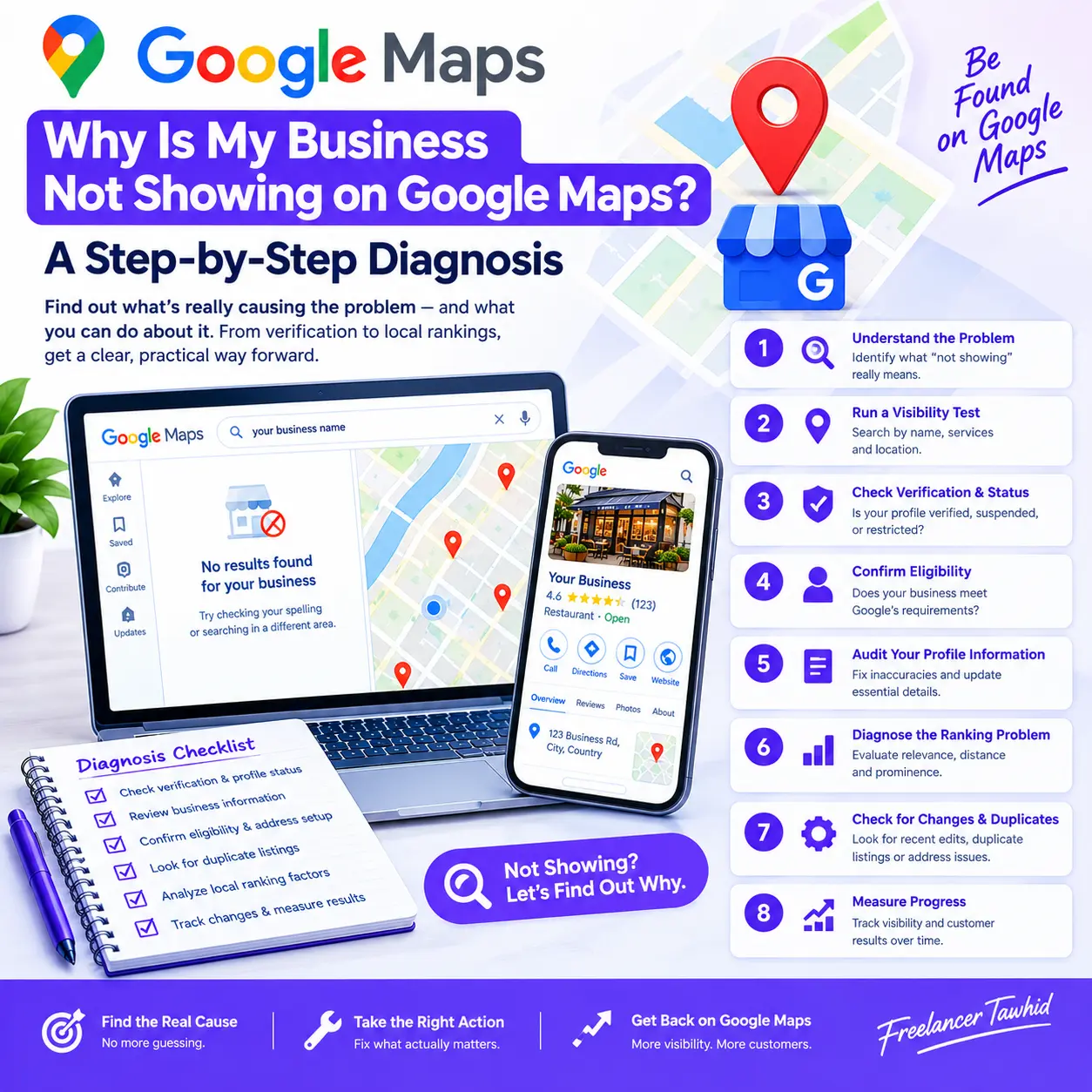
If your business is not showing on Google Maps, the cause could be an incomplete verification, a suspended or ineligible Google Business Profile, duplicate listings, incorrect business information, or weak local rankings. The right solution depends on whether your profile is genuinely missing or simply not appearing for particular searches. Follow this step-by-step diagnosis to identify the problem before making changes.
For many business owners, the problem is confusing. Their business is operating normally, their profile may appear in the management account, and yet potential customers cannot find them on Google Maps.
The important thing is not to assume that every visibility problem requires more reviews, additional keywords, or profile optimization. Those changes will not resolve every underlying issue.
In this guide, you will learn how to diagnose the most common causes, verify your profile’s status, understand local ranking factors, and determine the appropriate next step.
1. First, Identify What “Not Showing on Google Maps” Actually Means
Before troubleshooting, establish exactly what is happening. Different visibility problems can look similar, but they require different solutions.
What you notice | Possible explanation | What to check first |
Your business is missing even when you search its exact name | Verification, eligibility, restrictions, duplicates, or another profile-status issue | Check the profile’s status and public visibility |
You can see your profile, but customers cannot | Incomplete verification, processing, restrictions, or differences between the management view and public results | Check verification and current status |
Your business appears by name but not for service-related searches | Local ranking or query relevance problem | Investigate relevance, distance, and prominence |
Your service-area business has no public street address | The address may be correctly hidden | Review address and service-area settings |
Your business disappeared after an edit | A pending change, verification requirement, restriction, or another issue may be involved | Review recent changes and official notices |
These situations should not be treated as interchangeable.
For example, a business that is absent because its profile is suspended needs a different response from a verified business that appears when searched by name but ranks poorly for a competitive service.
Google’s official guide to improving local rankings explains the major factors that influence local visibility. Start by identifying your actual symptom, then investigate the corresponding cause.
2. Run a Basic Google Maps Visibility Test
Your first task is to establish a reliable baseline. Avoid editing your profile until you understand what the searches actually show.
Step 1: Search for your exact business name
Open Google Maps and search for your business using its real-world name. If the name is common, include the relevant location to distinguish it from similarly named businesses.
Next, check Google Search separately. A result appearing in one place does not necessarily mean that every Google search or Maps query will produce the same result.
Try the search while signed out or in a private browsing window. This can help compare the public-facing results with what you see when managing your profile.
However, remember that location, query wording, and other contextual factors can affect results. A private window does not eliminate all differences between searches.
Step 2: Test branded and service-related searches
Run a small, consistent set of searches.
For example, imagine a hypothetical business called Northside Plumbing.
- Branded search: Northside Plumbing
- Service search: emergency plumber
- Service-and-location search: emergency plumber in the business’s service market
The results can help you identify the general problem.
If the business appears by name but not for the other searches, the profile may be live but have limited visibility for those services or search locations.
If it remains absent even under its exact name, investigate profile status, eligibility, verification, and duplicates before concentrating on ranking improvements.
This is an illustrative example, not a real client result.
Step 3: Record your findings
Before changing anything, record:
- The exact search query.
- Whether you searched in Google Maps or Google Search.
- The approximate search location.
- Whether the profile appeared.
- The profile’s current verification or restriction status.
- Any recent changes to the business information.
This baseline will help you determine whether a later correction actually improves the situation.
Important: Do not change the business name, address, categories, and other information simultaneously simply to see whether something works. Make corrections based on evidence and applicable Google guidelines.
3. Check Your Google Business Profile Verification and Status
If your business is missing from Google Maps, verification and profile status should be among your first checks.
A Google Business Profile helps Google represent an eligible business on Search and Maps. Verification helps establish that the person managing the profile is authorized to represent the business.
Google explains its current process in the official Google Business Profile verification guide.
Is your Google Business Profile verified?
Sign in to the Google Account associated with your business. Find the relevant profile and review its current verification status.
Check whether verification is complete, still pending, required again, or encountering an error.
If verification is incomplete, follow the method Google provides for your profile. Available methods can vary, so do not assume you can always select a particular option.
Google states that verification reviews can take up to five business days after the verification steps are completed. Some cases may take longer.
Verification also does not guarantee that your business will appear prominently for every search query.
For detailed instructions, read How to Verify a Google Business Profile.
Is your profile suspended, disabled, or restricted?
A suspended or disabled profile presents a different problem from a profile that simply ranks poorly.
Check your management account for the current status and any notification explaining the restriction. Review the relevant Business Profile policies and identify what must be corrected before requesting a review.
If you believe Google restricted the profile incorrectly, follow its official instructions for fixing suspended or disabled profiles.
Prepare relevant evidence when required, such as business registration or other documents that establish the business’s legitimacy. Ensure that the information in supporting documents corresponds with the business represented by the profile.
Do not create another profile for the same business to work around a suspension. Google specifically warns against creating a replacement profile while an appeal is under review.
For a more detailed explanation of the process, see Google Business Profile Suspended? Common Causes and How to Prepare a Reinstatement Appeal.
Is Google processing verification or a recent profile change?
A pending change does not automatically mean that your profile has been suspended.
Google may need to review verification information or changes to business details. Check the status of the specific action and follow any instructions provided.
For example, verification reviews and appeal reviews have their own published guidance and timelines. Do not apply the verification timeframe to every profile edit or assume that all visibility problems will resolve within the same period.
If the relevant published timeframe has passed and your profile remains unavailable, review the official help documentation or contact Google Business Profile support where appropriate.
Could another person own or manage the profile?
Your business may already have a verified profile created by a former employee, agency, or previous owner.
Search for the existing listing and investigate its ownership before creating another one. If someone else controls the profile, use Google’s process for requesting ownership or management access.
Resolving an ownership issue can be more appropriate than starting over with a new listing.
4. Confirm That Your Business Is Eligible to Appear on Google Maps
Not every organization or business model qualifies for a Google Business Profile.
According to Google’s business eligibility and ownership guidelines, an eligible business generally must make in-person contact with customers during its stated hours.
This makes eligibility an essential part of the diagnosis.
Does your business qualify?
Consider the difference between these business models:
Storefront business: Customers visit a genuine business location during its stated hours. The business meets the applicable requirements for a customer-facing location.
Service-area business: The business travels to customers or delivers to them rather than serving customers at its own business address.
Hybrid business: The business serves customers at its location and also travels to customers or delivers to them.
Online-only business: The organization operates online without qualifying in-person customer contact. An online-only business generally does not qualify for a Google Business Profile.
Being registered as a company does not automatically make every business eligible.
If your business model does not meet Google’s requirements, profile optimization will not make it eligible. Establish eligibility before investing more time in visibility improvements.
Is your business address configured correctly?
The address on a Business Profile can be public, so it is important to understand what that address represents.
If customers visit the business at its eligible location, the public address should accurately represent that location.
If customers do not visit the business address and the business operates as a service-area business, Google instructs businesses to remove the address from public display and specify the areas served instead.
Do not use a virtual office, false address, or residential address represented as a customer-facing storefront when it does not meet Google’s requirements.
Is your service-area configuration accurate?
A service-area business should list the areas it genuinely serves rather than adding unrelated locations simply to influence rankings.
Google currently allows up to 20 service areas, which can be specified using eligible area formats such as cities and postal codes. It also advises that the overall service area should generally remain within approximately two hours of driving time from the business’s base.
These settings describe where the business provides services. They do not guarantee visibility throughout every listed area.
Read Google’s official service-area guidance and the more detailed Google Business Profile guide for service-area businesses.
Could your business have a duplicate profile?
Google’s duplicate-profile guidance states that multiple profiles representing the same business can violate its policies. A profile identified as a duplicate may not appear on Google Search or Maps.
Duplicates can occur when a business is added more than once, changes ownership, or creates another profile instead of resolving an existing listing.
Search for your actual business name, phone number, and address to identify possible duplicates.
If you find one, establish which profile legitimately represents the business and follow Google’s applicable resolution process. Do not delete, merge, or recreate profiles without first confirming the correct action.
5. Audit Your Google Business Profile Information
After checking eligibility and status, review the accuracy and completeness of the profile.
Google recommends maintaining complete and accurate business information because it helps the platform understand the business and match it to relevant local searches.
Check your business name, address, phone number, and website
Confirm that the information reflects how the business actually operates.
The business name should be its real-world name, not a list of services or location keywords added for SEO.
The address should represent the correct location when it is appropriate to display it. The phone number and website should connect customers with the actual business.
Incorrect information is a reason to investigate further, but one discrepancy does not automatically prove that the profile has been suspended or excluded from results.
Correct inaccurate information according to Google’s guidelines, and avoid making unsupported changes to fields that are already accurate.
Review your primary business category
Your primary category helps Google understand what your business does.
For example, a business that primarily provides plumbing services should select the most appropriate category for that actual activity rather than choosing an unrelated category because it appears popular.
Additional categories should also represent genuine services or activities offered by the business.
Categories can affect relevance, but changing them repeatedly without a clear reason is not a reliable diagnostic method.
For detailed guidance, see How to Choose the Right Google Business Profile Categories.
Check your services, hours, and other essential details
Confirm that your available services, opening hours, website, and other relevant information are accurate and current.
Where appropriate, provide useful information that helps customers understand what the business offers.
A well-maintained profile improves the quality of information available to customers and may support relevance for suitable queries. However, completing every available field does not guarantee a particular ranking.
Investigate inconsistent information across the web
If your business information differs across important directories or established business listings, investigate the discrepancies.
Pay particular attention to the business name, address, phone number, website, and whether outdated information still represents a former location.
Prioritize accurate, relevant listings rather than submitting the business to large numbers of low-quality directories.
Explore Local Citation Building if the diagnosis identifies widespread listing inconsistencies.
6. If Your Profile Is Live, Diagnose the Ranking Problem
Suppose your business appears on Google Maps when you search its name, but it is missing from searches for the products or services you provide.
In that situation, you should investigate local ranking rather than automatically treating the profile as unavailable.
Google identifies three primary considerations for local rankings: relevance, distance, and prominence. These factors help Google determine which businesses best match a search. See Google’s official local ranking guidance.
Check relevance: Does your profile match the search?
Relevance describes how closely a Business Profile matches what someone is looking for.
A business that offers several services may not appear equally prominently for every related search. The selected category, business information, and actual services all help explain what the business does.
Review whether:
- The primary category accurately represents the main business activity.
- The profile information describes the actual services offered.
- The website clearly explains the relevant products or services.
- The search being tested corresponds to something the business genuinely provides.
Do not add unrelated services or misleading information simply to match more keywords. Relevance should reflect the actual business.
Check distance: Where is the search coming from?
Distance is a significant reason a business may appear in one search but not another.
Google considers how far a business is from the searcher or the location implied by the query. The same business may therefore appear prominently for a relevant search near its location but less prominently farther away.
For example, a hypothetical plumbing company might appear for “emergency plumber” in one part of its service market but not in another.
That difference does not necessarily mean the profile is broken.
If your business needs a clearer geographic ranking diagnosis, test the same queries from several relevant points in its actual service market. Keep the query wording and measurement method consistent.
A location grid or local rank-tracking tool can help visualize these differences, but its results are estimates from specific test conditions, not a complete representation of what every customer sees.
Check prominence: How established is the business online?
Prominence relates to how well-known a business is.
Google notes that prominence can be influenced by information about a business across the web, including links and reviews. Its local ranking guidance also explains that more reviews and positive ratings can help local ranking.
Useful areas to investigate include:
- Genuine customer reviews and appropriate responses.
- Relevant links from trustworthy websites.
- Accurate business information on established platforms.
- A website that clearly represents the business and its services.
- Meaningful evidence of the business’s presence and reputation.
Focus on genuine authority and useful information. Avoid buying reviews, fabricating customer feedback, or pursuing low-quality links under the assumption that more is always better.
There is no published formula that guarantees a specific Maps position from a given number of reviews or links.
Check whether your website supports the relevant services
Your website can help customers and search engines understand the business’s offerings.
Review whether the linked website works correctly and presents useful, accurate information about the business. If the profile represents a particular service, the relevant website page should clearly explain that service.
For example, a business that provides several distinct services may benefit from clear, well-organized service pages rather than forcing every service into one generic page.
When investigating website-related issues, check:
- Whether the relevant page loads properly.
- Whether the service is described accurately.
- Whether important page content is accessible to search engines.
- Whether the content is relevant to the actual business and customers.
- Whether the page includes clear, consistent business information.
These checks are part of a wider diagnosis, not proof that a website alone determines Maps ranking.
Explore Local On-Page SEO for more information about improving the relevance and structure of local business website content.
Understand why one search may show your business while another does not
Consider three hypothetical searches for a local repair business:
Search type | What it helps you investigate |
Exact business name | Whether the profile can be located by its identity |
Main service | Whether the business appears for a relevant service query |
Service plus a location | How the results vary when the query expresses geographic intent |
If the business appears for its name but not for a service query, investigate relevance, competition, and other ranking factors.
If results vary by search location, examine the role of distance.
If the business remains missing across searches, revisit the earlier checks to ensure that a status, eligibility, or duplicate-profile problem has not been overlooked.
The goal is to identify the category of problem before deciding which improvements are justified.
7. Investigate Recent Changes, Duplicates, and Address Problems
Sometimes the initial checks do not reveal an obvious explanation. In that case, look for recent events or configuration issues that may help narrow the diagnosis.
Did the problem begin after a profile edit?
Review any recent changes to the business name, address, category, ownership, or other important information.
If visibility changed shortly after an edit, inspect the status of that edit and any new verification requirement or policy notification.
The timing can help guide the investigation, but it does not prove that the edit caused the problem.
Avoid repeatedly changing the same information to force a result. Establish what is actually wrong, make the necessary correction, and monitor the outcome.
Is another profile representing the same business?
Search for previous listings that may have been created by another manager or agency.
A business may have an old listing under a former name, a duplicate at the same address, or another profile that already represents the same operation.
Review Google’s instructions for resolving duplicate profiles and ownership issues before deciding what to do.
Is the missing map pin actually a problem?
A missing public address does not necessarily mean that a business has disappeared from Maps.
For a service-area business that does not serve customers at its business address, hiding that address is appropriate under Google’s guidance. The profile may show the service area rather than a publicly displayed street address.
For a genuine storefront, investigate whether the address and map pin accurately identify the customer-facing location.
Use Google’s business address instructions to review the appropriate configuration.
A quick diagnostic checklist
Use the following checklist before making additional changes.
Symptom | What to investigate | Next step |
Missing from branded and service searches | Verification, profile status, eligibility, duplicates | Resolve the confirmed status or eligibility issue |
Visible to the owner but not publicly | Public visibility, processing, restrictions | Check the current status and official instructions |
Visible by name but absent from service queries | Relevance, distance, prominence | Investigate local ranking |
No public street address | Business type and address configuration | Confirm whether the address should be hidden |
Visibility changed after an edit | Edit status, verification requirements, policy notices | Resolve the specific issue before making further changes |
8. Measure Visibility and Confirm Whether the Fix Worked
Correcting a profile is only part of the process. You should also determine whether the problem has been resolved and whether customer interactions improve.
Keep a record of what changed
Record the original symptom, the confirmed cause, the correction made, and the subsequent observations.
Where practical, address one confirmed issue at a time. This makes it easier to understand which action was relevant and reduces the temptation to make unnecessary changes.
Use the same queries and comparable search locations when repeating manual or tool-assisted visibility checks. Keep in mind that local search results can vary, so an individual observation is not conclusive evidence of a sustained ranking change.
Use Google Business Profile Performance appropriately
Google Business Profile’s Performance reporting provides information about how people discover and interact with a profile on Google Search and Maps.
Depending on the profile and the metrics available, you may be able to review:
- Search terms used to find the business.
- Profile views.
- Calls initiated from the profile.
- Website clicks.
- Requests for directions.
- Other available customer interactions.
See Google’s official Business Profile Performance documentation.
These metrics can help you evaluate customer discovery and engagement. They do not provide a complete ranking report for every query, searcher, or geographic location.
For practical measurement instructions, read How to Measure Google Business Profile Performance.
Use Google Search Console for the website, not as a complete Maps ranking report
Google Search Console can help you analyze your website’s organic Search impressions, clicks, queries, and indexing information.
However, website search performance and Business Profile performance are different data sets. Search Console should not be treated as a complete report of all Google Maps rankings.
Use the data source that corresponds to the problem you are investigating.
Set realistic expectations
The appropriate timeframe depends on the type of issue.
Verification, profile edits, policy appeals, and ranking improvements are different processes. Some require action from Google, while others involve correcting information or strengthening the business’s relevance and authority.
Follow the published instructions relevant to the issue, check the available status information, and avoid assuming that any particular ranking or recovery date is guaranteed.
9. What Not to Do When Your Business Is Missing from Google Maps
Some attempted fixes can create additional problems instead of resolving the original one.
Do not create another profile immediately
An existing profile may be unverified, controlled by another account, or incorrectly identified as a duplicate.
Investigate the original listing and its ownership first. Creating an additional profile for the same business may complicate the situation.
Do not add keywords to your business name
Use the real-world business name in accordance with Google’s guidelines.
Adding service terms or location names solely to influence ranking is not a substitute for accurate profile information.
Do not use a false address
Your profile should reflect the business’s actual operating model and meet Google’s eligibility requirements.
Do not create a fictitious storefront or misrepresent an address to obtain Maps visibility.
Do not make multiple unexplained changes
Changing several fields simultaneously makes it harder to isolate the cause of the problem and can introduce unnecessary complications.
Investigate the evidence, correct the confirmed issue, and monitor what happens.
Do not trust guaranteed Google Maps rankings
Google states that there is no way to request or pay Google for a better local ranking.
Be cautious of anyone promising a guaranteed position, a guaranteed reinstatement, or a guaranteed recovery timeframe without knowing the actual problem.
Professional Local SEO can improve the quality of a business’s profile, website, and broader local search strategy, but no one can guarantee a specific organic ranking.
10. When Should You Get Professional Google Maps SEO Help?
A business owner can resolve some problems independently, particularly when the cause is clearly identified and Google provides a straightforward corrective process.
Professional help becomes more useful when the diagnosis is unclear, several issues interact, or the profile remains poorly visible despite appropriate corrections.
When a self-diagnosis may be enough
You may be able to resolve the issue yourself if you discover that:
- Verification has not been completed.
- The profile contains a straightforward information error.
- The public address is configured incorrectly for the business model.
- You have identified the relevant official instructions and can follow them.
Start with Google’s official guidance and avoid paying for services that offer no meaningful additional help.
When a Local SEO audit makes sense
A broader audit may be appropriate when the profile appears eligible and operational but the underlying issue remains unclear.
For example, several factors may need to be examined together: profile setup, duplicate listings, website relevance, business information, local authority, and geographic ranking patterns.
A structured audit can prioritize the issues that deserve attention instead of relying on repeated edits or generic optimization recommendations.
Learn more about Local SEO Audit services.
How Google Maps SEO and profile optimization help
Different services address different stages of the problem.
Google Maps SEO is relevant when the focus is understanding and improving a business’s local visibility and rankings.
Explore Google Maps SEO services for help with the broader visibility problem.
Google Business Profile Optimization is appropriate when the profile’s information, categories, or configuration need attention. Learn more about Google Business Profile Optimization.
Local SEO Audit is a sensible starting point when you cannot confidently identify the cause or when multiple aspects of local search performance may need to be investigated.
The appropriate service should follow the diagnosis, not replace it.
Frequently Asked Questions
1. How can I tell whether my business is missing from Google Maps or just ranking poorly?
Search Google Maps and Google Search using the exact business name and relevant location, then test a few service-related queries. If the profile appears by name but not for services, investigate local ranking. If it remains absent, check verification, public status, eligibility, and duplicate profiles before focusing on optimization.
2. Why can I see my Google Business Profile but customers cannot?
The management interface and public search results may not show the same information. Check the profile’s verification status, any processing messages, restriction notices, and actual public visibility. Compare the results while signed out, then follow the official instructions for the specific status rather than assuming the profile is suspended.
3. How long does it take for a new business to appear on Google Maps?
Google states that verification reviews can take up to five business days after the verification steps are completed, although some cases take longer. Verification does not guarantee a particular ranking or visibility for every query. Check your profile’s status and distinguish an incomplete verification process from a local ranking problem.
4. Can a service-area business appear on Google Maps without showing its street address?
Yes. An eligible service-area business that does not serve customers at its business address should remove that address from public display and specify the areas it serves. Its address may therefore be hidden even when its profile is available. Confirm the business’s eligibility and configuration using Google’s official service-area guidance.
5. Why did my business disappear from Google Maps after I edited its profile?
A recent edit may coincide with a pending review, a verification requirement, a rejected change, or a policy issue. However, timing alone does not establish the cause. Check the profile’s current status and official notices, then follow the relevant correction or appeal process before making further changes.
Conclusion: Diagnose the Problem Before Changing Your Profile
When your business is not showing on Google Maps, the most important first step is identifying the type of visibility problem.
A missing profile, an eligibility issue, a suspension, an incorrectly configured address, and weak local rankings require different responses. Treating them as the same problem can waste time and introduce unnecessary changes.
Start by testing your business’s public visibility. Check verification and eligibility, review the accuracy of your profile information, and investigate relevance, distance, and prominence if the profile is live but not ranking for relevant searches.
Record what you find, make corrections based on evidence, and use Google’s official guidance when a verification or policy issue requires its involvement.
If you have completed these checks but still cannot determine why your business is missing or underperforming on Google Maps, explore my Google Maps SEO services or Local SEO Audit services.
As an SEO Expert & Consultant, my focus is helping businesses identify the issues affecting local search visibility and understand which improvements deserve priority. The appropriate next step should be based on your actual situation—not a generic list of optimization tasks.