
Service Pages vs. Location Pages: How to Build Local Landing Pages Without Doorway Content

Freelancer Tawhid
SEO Expert and Consultant
- October 14, 2026
- No Comments
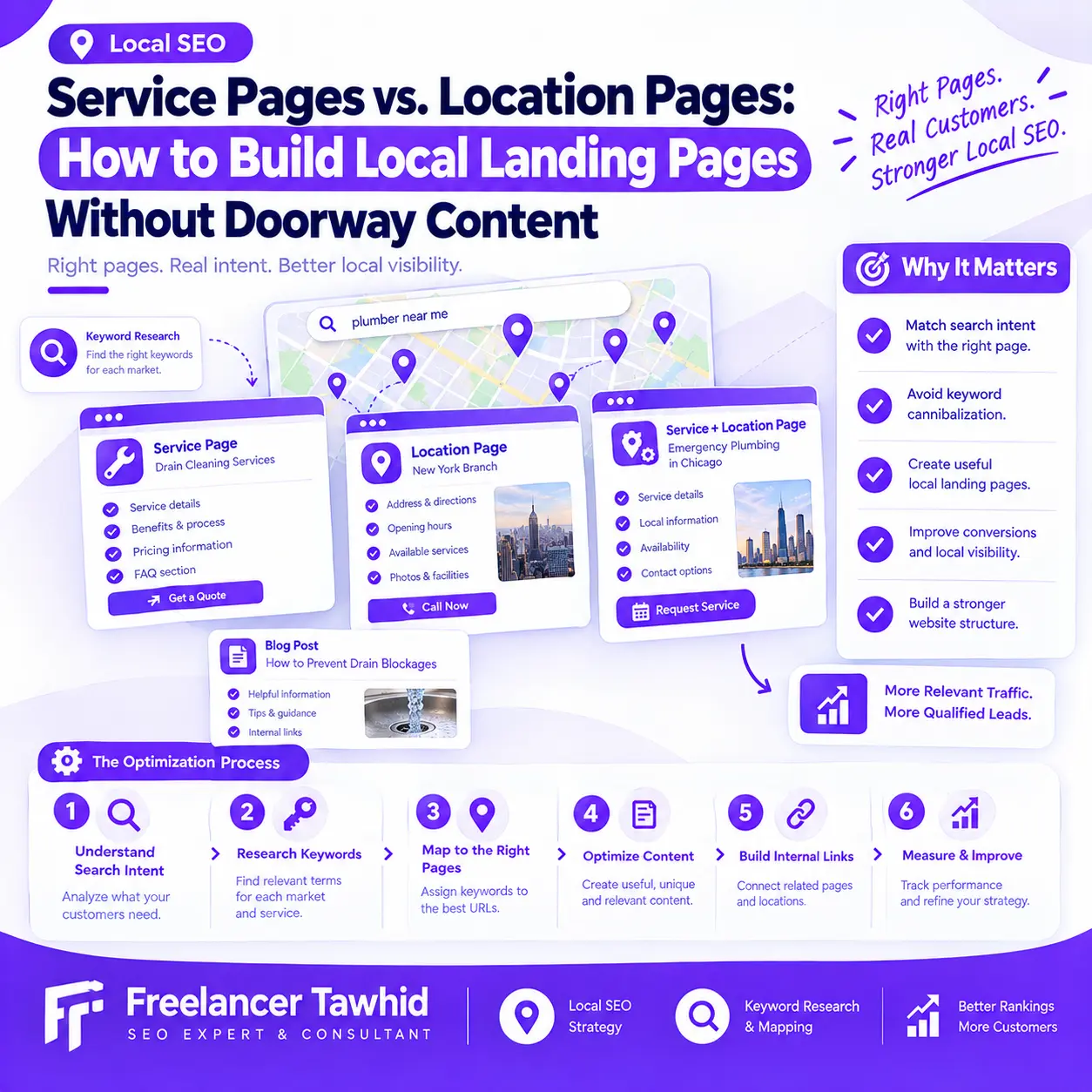
Service pages explain what a business offers, while location pages help people understand where a business operates or which areas it serves. A service-and-location page can target a more specific need when it provides genuine value. The key is to create pages for real customer needs, not simply to rank for every service and location keyword combination.
For businesses investing in Local SEO, this distinction matters. Publishing more landing pages does not automatically improve search visibility. When multiple URLs serve essentially the same purpose, lack useful information, or direct visitors to the same generic destination, they can create a poor user experience and raise doorway-abuse concerns.
The solution is to build a website structure around your services, real business locations, service areas, and the needs of potential customers.
In this guide, you will learn how service pages differ from location pages, when a separate local landing page makes sense, how to recognize doorway-style content, and how to plan, optimize, and audit local landing pages without unnecessary duplication.
Service Pages vs. Location Pages vs. Local Landing Pages
Before deciding which pages to create, it helps to understand what each page type is intended to accomplish.
What Is a Service Page?
A service page explains a particular service offered by a business. Its primary purpose is to help visitors understand what the business does, whether the service meets their needs, and how they can take the next step.
A useful service page typically explains:
- What the service includes and which problems it addresses.
- Who the service is intended for.
- How the process works and what customers can expect.
- Relevant benefits, limitations, requirements, or considerations.
- Evidence of expertise, where available.
- How to request a quote, schedule a service, or contact the business.
For example, a roofing company might have a dedicated roof repair page explaining common repair needs, inspection procedures, available solutions, and how customers can request assistance.
That page may satisfy several related searches without requiring a separate URL for every variation of the service keyword.
A service page should primarily be organized around the offering and the customer’s decision-making needs.
What Is a Location Page?
A location page represents a genuine physical business location or branch. It helps customers understand where the business operates and what they can access at that particular location.
Depending on the business, useful information may include:
- The correct business name, address, and contact details.
- Opening hours and directions.
- Services or products available at that branch.
- Branch-specific facilities, staff, or accessibility information.
- Authentic photographs and relevant customer evidence.
- Instructions for visiting, booking, or contacting the location.
A company with several physical branches may reasonably need a separate page for each branch, provided the pages accurately represent those locations and help customers find relevant information.
The pages can share a consistent design. Their purpose and factual content must reflect the actual business.
What Is a Service-Area Page?
A service-area page explains where a business genuinely provides its services, particularly when employees travel to customers instead of serving them from a storefront in every area.
This type of page can be useful for plumbers, electricians, cleaning companies, contractors, and other businesses that operate across multiple service areas.
For example, a plumbing company might explain the services it provides across its actual coverage area, how customers arrange appointments, and whether any travel or scheduling limitations apply.
A service-area page does not require the business to maintain a physical storefront in every area it serves.
However, the page must represent the business accurately. A company should not claim to have a branch, local team, or physical office where none exists.
Google’s Business Profile guidelines explain the distinction between storefront and service-area businesses and set requirements for representing locations accurately.
What Is a Service-Plus-Location Landing Page?
A service-plus-location landing page combines a specific service with a particular location or service area.
For example, a roofing company might have a general roof repair service page and a separate page explaining how that service is provided in a particular area.
The combined page is useful when the service-and-location combination creates a distinct customer need and the page can address it meaningfully.
It might explain actual coverage, relevant service availability, scheduling considerations, local operating requirements, or documented work relevant to that area.
The important distinction is that combining a service keyword with a location keyword does not automatically justify a new page.
A separate URL should serve a clear purpose and provide useful information beyond changing the place name in an existing page.
Comparison: Which Local Landing Page Should You Create?
Page type | Main purpose | When it makes sense |
Service page | Explain a particular offering | A business provides a distinct service that deserves dedicated information |
Physical location page | Help customers find and understand a genuine branch | A business operates multiple actual locations or needs a dedicated page for its principal location |
Service-area page | Explain genuine geographic service availability | A business travels to customers within defined areas |
Service-plus-location page | Address a distinct service need in a particular area | The combined intent warrants a separate, useful page |
Location hub | Help customers navigate several branches or service areas | The business has enough genuine locations or coverage areas to benefit from a directory or hub |
These page types are options, not a mandatory checklist. A small business may need only one main service page and clear contact information, while a multi-location company may need a more developed architecture.
Which Pages Should Your Business Create?
The right structure depends on how the business operates, what customers need to know, and whether an existing page already serves the intended search.
Single-Location Businesses
A business operating from one physical location often needs a clear homepage, relevant service pages, and accessible location and contact information.
A separate location page may be helpful when it serves a distinct purpose, but it is not automatically necessary.
For example, if the homepage already explains where the business is located, how customers can visit, and what the business offers, another page repeating that information may add little value.
Before creating a new URL, ask whether customers would benefit from having the information presented separately.
Service-Area Businesses
Businesses that travel to customers need to communicate their actual service coverage without implying that they have physical branches in every area.
A practical structure might include:
- A main service page explaining what the business offers.
- A clear explanation of the areas served.
- Dedicated service-area pages when different areas have meaningful information or customer needs.
- Additional service-plus-location pages when the specific combination justifies separate treatment.
A company serving several areas does not automatically need a unique page for every place. Sometimes, a well-organized service page with clear coverage information is enough.
Businesses With Multiple Physical Locations
Businesses operating genuine branches often benefit from dedicated location pages.
Each page can explain the branch’s address, hours, available services, facilities, contact information, and other details that help customers choose the right location.
For example, a retailer may use the same page template for every branch while showing each branch’s actual opening hours, available services, directions, and facilities.
This structure can be both scalable and useful because the individual URLs represent real business locations.
Businesses Serving Several Areas With Different Requirements
Some businesses genuinely need more detailed service-area content because the service itself differs across areas.
Possible reasons include different appointment availability, operating conditions, delivery arrangements, applicable regulations, or services offered.
A separate page may be appropriate when those differences materially affect the customer’s decision.
Geographic distance alone, however, is not enough to justify a new page.
When One Page Is Better Than Several
Sometimes the most effective solution is to keep one well-developed service page and explain the business’s coverage clearly.
Consider a contractor who offers the same service, follows the same process, and provides the same customer experience throughout several nearby areas. If separate pages would repeat the same information with only minor wording changes, one stronger page may be more useful.
A sensible Local SEO strategy prioritizes the right pages rather than the greatest number of pages.
If you need help deciding how services, locations, and supporting content should fit together, explore Freelancer Tawhid’s Local SEO services.
What Makes a Local Landing Page a Doorway Page?
Google’s Search spam policies define doorway abuse as creating pages to rank for specific, similar queries when those pages lead users toward intermediate destinations that are less useful than the final destination.
The policy includes examples involving multiple pages targeting cities or regions, substantially similar pages closer to search results than a clear site hierarchy, and pages that funnel visitors toward the same destination.
This does not mean that every city page, service-area page, or page using a template is a doorway page. The concern is the purpose and usefulness of the pages.
Warning Signs of Doorway-Style Content
- Many pages differ only by location names.
A website may have dozens of pages with nearly identical headings, paragraphs, service descriptions, and calls to action. Only the city or region changes.
If those pages do not address distinct customer needs or contain meaningful differences, their usefulness deserves scrutiny.
- Pages target similar queries but offer no independent value.
Creating multiple URLs for nearly identical search intents can leave visitors with several entry points to essentially the same information.
The problem is not simply keyword overlap. It is the absence of a defensible reason for separate pages.
- Visitors are pushed toward the same generic destination.
A collection of geographic pages may serve primarily as a way to capture search traffic before sending everyone to the same generic contact or service page.
If a visitor cannot obtain useful, relevant information from the landing page, the structure may be working against the user’s needs.
- Local claims are not supported by the business’s actual operations.
A business should not suggest that it has an office, staff, customers, projects, or facilities in an area unless those claims are accurate.
Local relevance must not depend on invented details.
- The website has no clear hierarchy.
A large collection of city pages may be poorly connected to the main services, relevant locations, or useful navigation.
This can make the site more difficult for people to use and make the relationships between pages less clear.
What Does Not Automatically Make a Page a Doorway Page?
Some common assumptions deserve clarification.
- Using a template is not inherently wrong. A business with multiple branches can use a consistent layout.
- Similar services can share information. When the same service is genuinely offered at different branches, some content repetition is natural.
- A page does not need an entirely different design. What matters is whether its purpose, factual details, and useful information fit the location or service it represents.
- Longer content is not automatically better. Adding paragraphs to increase word count does not resolve a page that lacks a meaningful reason to exist.
- Changing wording is not enough. Rewriting sentences without improving the information available to customers does not necessarily create additional value.
Google’s people-first content guidance recommends creating content to benefit people rather than primarily to manipulate search rankings.
The practical lesson is to assess the entire page strategy, not just the wording of individual pages.
A Practical Doorway-Risk Checklist
Before publishing a local landing page, ask:
- Does this page represent a genuine service, physical location, or service area?
- Does it serve a distinct customer need or search intent?
- Does it provide accurate information that is useful on its own?
- Are its local claims supported by verifiable business information?
- Is it connected to a clear, useful website hierarchy?
- Would combining it with an existing page make the experience better without losing important information?
These questions are a practical review framework, not an official Google scoring system. Several warning signs should prompt closer evaluation, but no single answer automatically determines whether a page violates Google’s policies.
What Should a Useful Location or Service-Area Page Contain?
Once you have established that a page deserves its own URL, focus on what visitors actually need.
Accurate Business and Location Information
Include information relevant to the page’s real purpose.
For a physical branch, this may include its address, opening hours, directions, contact details, and available services.
For a service-area page, explain the relevant coverage and how customers can arrange the service. State genuine limitations when they affect availability.
Do not present a service area as a staffed physical location, and do not publish inaccurate contact details to make a page appear more local.
Service Information Relevant to the Area
A location page should help customers understand what they can obtain at that location or within that service area.
Depending on the business, useful details may include:
- Which services are available.
- How customers can arrange appointments.
- Whether any scheduling or availability restrictions apply.
- What customers should know before requesting the service.
- How this location’s offering differs from other branches, where relevant.
Do not manufacture differences when the same service and process genuinely apply everywhere.
Genuine Local Evidence
Evidence can make a page more informative and trustworthy when it is relevant and accurate.
Examples include authentic photographs of a branch, verified staff information, documented projects, genuine customer testimonials, and relevant local partnerships.
Use these elements only when they exist and can be represented honestly. Do not invent customer experiences, display unrelated reviews as location-specific evidence, or imply that work was completed in an area when it was not.
If local evidence is unavailable, focus on verifiable business information and clearly explain the services and coverage the business can substantiate.
Useful FAQs and Customer Information
FAQ sections can address genuine questions that influence a customer’s decision.
For example:
- Is this service available in the area?
- What services are available at this branch?
- How are appointments arranged?
- Are there any service or scheduling limitations?
- What information should customers provide before requesting a quote?
Base the questions on actual enquiries, customer-service records, or relevant search data where available.
Avoid publishing the same set of questions across dozens of pages with only the location name changed.
What Can Be Shared Across Templates?
A practical template can standardize branding, navigation, general company policies, common service explanations, and calls to action.
The parts that require individual review include location details, service availability, local claims, proof, contact information, and any differences that matter to customers.
The goal is not to make every page artificially unique. It is to ensure that shared content is accurate and that every page has a genuine reason to exist.
How to Build Local Landing Pages Without Creating Doorway Content
Follow this workflow before adding new pages to a website.
Step 1: Audit Existing Pages
Begin by reviewing the pages you already have.
Include service pages, physical location pages, service-area pages, combined service-and-location pages, location hubs, and relevant supporting content.
For each URL, record:
- Its intended purpose and search intent.
- The service or location it represents.
- The queries it receives, where data is available.
- Its existing content and internal links.
- Its organic traffic and relevant conversions, where measured.
- Any overlap with other pages.
Google Search Console can help identify the queries, clicks, impressions, and pages appearing in organic search. Analytics or CRM data can provide additional context about enquiries and business outcomes.
Do not automatically remove a page just because it receives little organic traffic. It may still serve an important customer or operational purpose.
Step 2: Map Search Intent to the Correct Page
Group search queries according to what people are trying to accomplish.
A general service query, a branch-location query, and a service-plus-location query may require different information. However, closely related keyword variations can often be served by the same page.
Use a mapping framework like this:
Search need | Likely page destination |
Understand or enquire about a service | Main service page |
Find a particular branch | Relevant physical location page |
Check whether a business serves an area | Service-area page or existing service page |
Find a specific service available in an area | Combined page, when a separate page is justified |
Learn how to evaluate a service | Relevant informational content |
These are starting points, not fixed rules. Review the actual intent and the existing page inventory before assigning new URLs.
For deeper keyword discovery and mapping, explore Local Keyword Research.
Step 3: Decide Whether the Page Deserves Its Own URL
Evaluate each proposed page against three essential tests.
Business reality: Does the company genuinely operate at the location or serve the area?
Search intent: Is there a distinct customer need that warrants a separate destination?
Independent usefulness: Can the proposed page offer meaningful information that would be lost or harder to find if it were combined with an existing page?
A city keyword appearing in a keyword-research report is not sufficient evidence that a new page is needed.
If the business information, intent, and useful content are substantially the same as an existing URL, reconsider whether a separate page is worthwhile.
Step 4: Create a Content Brief for Each Approved Page
Before writing, document the page’s:
- Primary purpose and intended search intent.
- Main service or genuine location represented.
- Customer questions that need to be answered.
- Verified business information and relevant evidence.
- Relationship with existing service and location pages.
- Appropriate conversion action.
This prevents page production from becoming a process of generating the same copy repeatedly with new place names.
A consistent structure is fine. The content must reflect the real page purpose.
Step 5: Build a Clear Internal-Linking Structure
Connect each landing page to the pages that help visitors understand the business and move toward their next step.
For example, a service page can link to relevant branches or service areas. A location page can link to the services actually available there. A location hub can help visitors choose among genuine branches when the business has enough locations to justify one.
Use descriptive anchor text that explains the destination.
Avoid enormous city-link footers, irrelevant cross-links, and long chains of nearly identical landing pages created mainly to multiply keyword targets.
Step 6: Check Technical Readiness
Before publishing, review the page’s technical setup.
Canonical URL: Make sure the page has an appropriate canonical and consistent internal links.
Indexability: Check that the page is not accidentally blocked from crawling or indexing and can be discovered through relevant internal links.
Metadata: Use an accurate, descriptive title and a clear main heading that reflect the page’s purpose.
Content accessibility: Ensure that important information is available to users and can be understood by search engines.
Mobile usability: Check the layout, contact options, forms, and booking actions on smaller screens.
Structured data: Where applicable, use appropriate structured data that accurately reflects visible page content and the real business.
Structured data does not make low-value content useful, and technical readiness does not guarantee that a page will be indexed or rank.
Step 7: Measure, Learn, and Refine
After publishing, monitor whether the page is attracting the intended searches and helping the business achieve its goals.
Look at query-to-page alignment, organic engagement, qualified enquiries, and technical health where data is available.
If a page repeatedly overlaps with another URL, investigate whether the pages serve genuinely distinct needs. If the page is inaccurate, improve it. If it has no defensible purpose, consider consolidation or removal.
There is no universal ranking timeline or guaranteed result. Measurement should guide decisions rather than justify producing more pages automatically.
How to Structure Service, Location, and Service-Area URLs
Your URL structure should reflect the website’s organization and the relationships between the business’s services and locations. There is no single URL pattern that every business must follow.
Use a Logical Hierarchy
For illustration, a company might use a structure like this:
- /services/roof-repair/ — a core service page.
- /locations/branch-name/ — a genuine physical branch.
- /service-areas/area-name/ — a justified service-area page.
- /services/roof-repair/area-name/ — a combined page when its separate purpose is warranted.
These are hypothetical examples, not required URL formats or proposed URLs for every business.
Choose a structure that is understandable, scalable, and consistent with your business model.
When Should You Create a Location Hub?
A location hub can be useful when a company has multiple genuine branches or service areas and customers need an easy way to choose the relevant destination.
A hub might list branches, summarize their services, and provide links to the corresponding pages.
However, an additional regional or city directory is not necessary simply because it creates another URL. Add hierarchy levels when they improve navigation or provide meaningful information.
When Should You Consolidate URLs?
If several pages serve substantially the same purpose, consider combining them into the strongest suitable destination.
The appropriate implementation may involve updating internal links, redirecting retired URLs to relevant destinations, or using canonical tags when appropriate for duplicate or substantially similar URLs.
Canonical tags are not a substitute for evaluating whether a large collection of weak location pages should exist in the first place.
Avoid redirecting every removed page to the homepage when that destination does not satisfy the original visitor’s need.
How Service Pages and Location Pages Should Link to Each Other
Internal linking should help visitors understand the website, navigate between related information, and find a relevant next step.
Link Service Pages to Relevant Locations
A service page can link to the branches or service areas where the offering is genuinely available.
For a multi-location business, this may help visitors identify the most suitable branch. For a service-area business, it can help them understand coverage.
Do not link every service to every location when that relationship is irrelevant.
Link Location Pages to Relevant Services
A branch page should connect to the services actually available there. A service-area page can link to the relevant service descriptions and explain any genuine limitations.
These connections also clarify the relationship between the website’s service and location content.
Keep Navigation Useful and Descriptive
Use clear menus, relevant location hubs where appropriate, and descriptive anchor text.
Every important page should be reachable through a sensible navigation or internal-linking path. Avoid using internal links merely to repeat exact-match keywords or create artificial connections between otherwise unrelated pages.
For more help with page-level optimization and architecture, explore Local On-Page SEO.
Practical Examples: Useful Pages vs. Doorway-Style Expansion
The following examples are hypothetical. They illustrate how to apply the decision framework rather than represent actual client projects.
Example 1: A Business With Three Physical Branches
Imagine a retailer operating three staffed branches with different opening hours, facilities, and available services.
Each location page identifies its real address, opening hours, directions, services, and relevant branch information.
Although the pages share a template and some standard content, each helps customers find and evaluate a specific branch. Separate pages have a clear purpose.
Example 2: A Contractor Serving Several Areas
Imagine a contractor who provides the same core service across several areas.
The contractor maintains a main service page explaining the work, its process, and how customers can request assistance. The company also publishes a service-area page where it can provide useful information about actual coverage and relevant arrangements.
A combined service-and-location page is added only when it addresses a distinct customer need and can support that purpose with accurate information.
There is no need to claim that the contractor operates a physical office in every area.
Example 3: Twenty-Five Pages With Almost Identical Copy
Imagine a website that publishes one page for each of twenty-five cities.
Every page contains the same service descriptions, benefits, headings, generic claims, and contact form. Only the city name and a few phrases change. The pages provide no substantial information about actual service availability or meaningful differences between areas.
This structure deserves a review against Google’s doorway-abuse policy.
The correct response is not necessarily to rewrite every page with more synonyms. First determine whether the pages serve separate needs. Then improve the worthwhile pages, consolidate overlapping content, and remove pages that have no defensible purpose.
The Core Lesson
A useful local landing page helps visitors understand something important about the service, the business, the location, or the availability of the offering.
If the page cannot do that better than an existing URL, reconsider whether it needs to exist.
How to Audit Existing Local Pages: Keep, Improve, Consolidate, or Remove
A website with an established set of location pages needs a structured review rather than a decision based solely on page count or rankings.
Keep Pages With a Clear Purpose
Retain pages that accurately represent the business, meet a meaningful customer need, offer useful information, and belong in the website’s structure.
A page may remain useful even when it receives limited organic traffic, particularly when it serves existing customers or supports navigation.
Improve Pages With a Legitimate Purpose but Weak Content
Some pages deserve to exist but need better information.
Possible improvements include correcting location details, clarifying service availability, adding relevant customer information, improving internal links, and making the next step easier to understand.
Prioritize missing or inaccurate information rather than adding text merely to make a page longer.
Consolidate Pages That Serve the Same Need
When two or more pages substantially overlap, determine whether a stronger combined page would serve users better.
Before merging, examine their intended purposes, search queries, existing links, content, and conversions. Preserve genuinely useful information that would otherwise be lost.
If a URL is retired, select a redirect destination that closely matches the original page’s purpose where an appropriate destination exists.
Query overlap by itself does not prove that pages must be merged. The decision should consider actual user needs and available performance data.
Remove Pages With No Defensible Purpose
If a page is unnecessary or misleading and cannot reasonably be improved, removing it may be appropriate.
The implementation should reflect the situation: a relevant replacement may warrant a redirect, while a page with no suitable replacement may need to return an appropriate unavailable-page status.
Avoid sending visitors to unrelated destinations merely to preserve a URL.
If your site has a large number of overlapping landing pages, a structured Local SEO audit can help identify which pages deserve further work and which need a different approach.
How to Measure Whether Your Local Landing-Page Strategy Is Working
The aim is not to maximize the number of indexed pages. It is to make sure your pages serve the right queries and help users accomplish their goals.
Review Search Visibility and Query Alignment
Use Google Search Console to evaluate which queries generate impressions and clicks for each important URL.
Check whether the intended page appears for the expected type of search. If different pages appear for similar queries, investigate whether the overlap reflects genuine differences in intent or unnecessary duplication.
Do not treat every instance of two URLs appearing for related queries as harmful keyword cannibalization.
Measure Qualified Traffic and Conversions
Where analytics and conversion tracking are available, review the outcomes that matter to the business.
These might include qualified enquiries, calls, bookings, quote requests, or other meaningful actions.
A page that attracts relevant visitors and helps them take the next step may contribute value that raw traffic figures alone do not reveal.
Monitor Technical Health
Review indexability, canonicalization, redirects, internal links, and whether important pages remain accessible.
Pay attention to unintended technical problems when consolidating or restructuring a large collection of landing pages.
Maintain a Page-Review Record
For each significant URL, record its purpose, intended search need, key evidence, performance, and next action.
Revisit the page portfolio when the business changes its services or coverage, when new branches open, or when performance data indicates a meaningful opportunity.
This creates a repeatable process for improving the website instead of continuously adding pages without reviewing the existing ones.
Frequently Asked Questions
Does a service-area page need a physical office in that city?
No. A service-area page can explain that a business travels to customers in an area without claiming to have a physical office there. The page should accurately describe the services available and the actual coverage area. Google Business Profile eligibility and address-display rules are separate considerations from whether a website page is useful.
Can I reuse the same template for multiple location pages?
Yes. A consistent template can make a multi-location website easier to navigate and maintain. The important question is whether each page accurately represents its location and provides the information its visitors need. Changing city names alone is not a substitute for meaningful local details, accurate services, and useful customer information.
Should I create a Google Business Profile for every city I serve?
Not automatically. Google generally allows a service-area business without a customer-facing storefront one profile for its central business location, with a designated service area. Businesses with separate, eligible operating locations may qualify for individual profiles. Do not create profiles for cities simply because the website has a landing page there. Follow Google’s current Business Profile eligibility guidelines.
Can I keep an indexed location page that gets no organic traffic?
Yes, when it still serves a meaningful customer or business purpose. An indexed page with no organic traffic is not automatically a doorway page or a candidate for deletion. Review its accuracy, usefulness, internal links, query opportunity, and conversion role before deciding whether to improve, consolidate, or remove it.
How can I tell whether two local pages are competing with each other?
Use Google Search Console to compare the queries and landing-page URLs associated with the pages. Investigate whether they target the same underlying intent, whether Google alternates between them for important queries, and whether they serve different customer needs. Query overlap alone does not prove harmful cannibalization; the decision should also consider page purpose and performance.
Conclusion: Build Pages for Real Customer Needs, Not Every Location Keyword
Service pages, location pages, service-area pages, and service-plus-location landing pages can all play a useful role in Local SEO. The important decision is whether each page accurately represents the business and serves a distinct customer need.
Before creating another URL, review your existing pages, understand the search intent, confirm the business information, and determine whether the proposed page adds value that an existing page cannot adequately provide.
Use consistent templates where they make sense, but do not rely on city-name substitutions, unsupported local claims, or repetitive content to expand your website.
When several pages serve the same purpose, improve the strongest destination or consolidate the overlap where appropriate. When a page genuinely helps customers find the right service or location, make it easy to discover and navigate.
For guidance on planning your page structure, improving location targeting, and prioritizing the right Local SEO work, explore Freelancer Tawhid’s Local SEO services.
I’m Tawhid, an SEO Expert & Consultant at Freelancer Tawhid. My Local SEO work combines research, website structure, on-page optimization, location-based content, and performance monitoring according to the needs of each project. You can contact me to discuss your website and Local SEO goals.