
Local SEO Internal Linking: How to Connect Service Pages, Location Pages, and Supporting Content

Freelancer Tawhid
SEO Expert and Consultant
- October 14, 2026
- No Comments
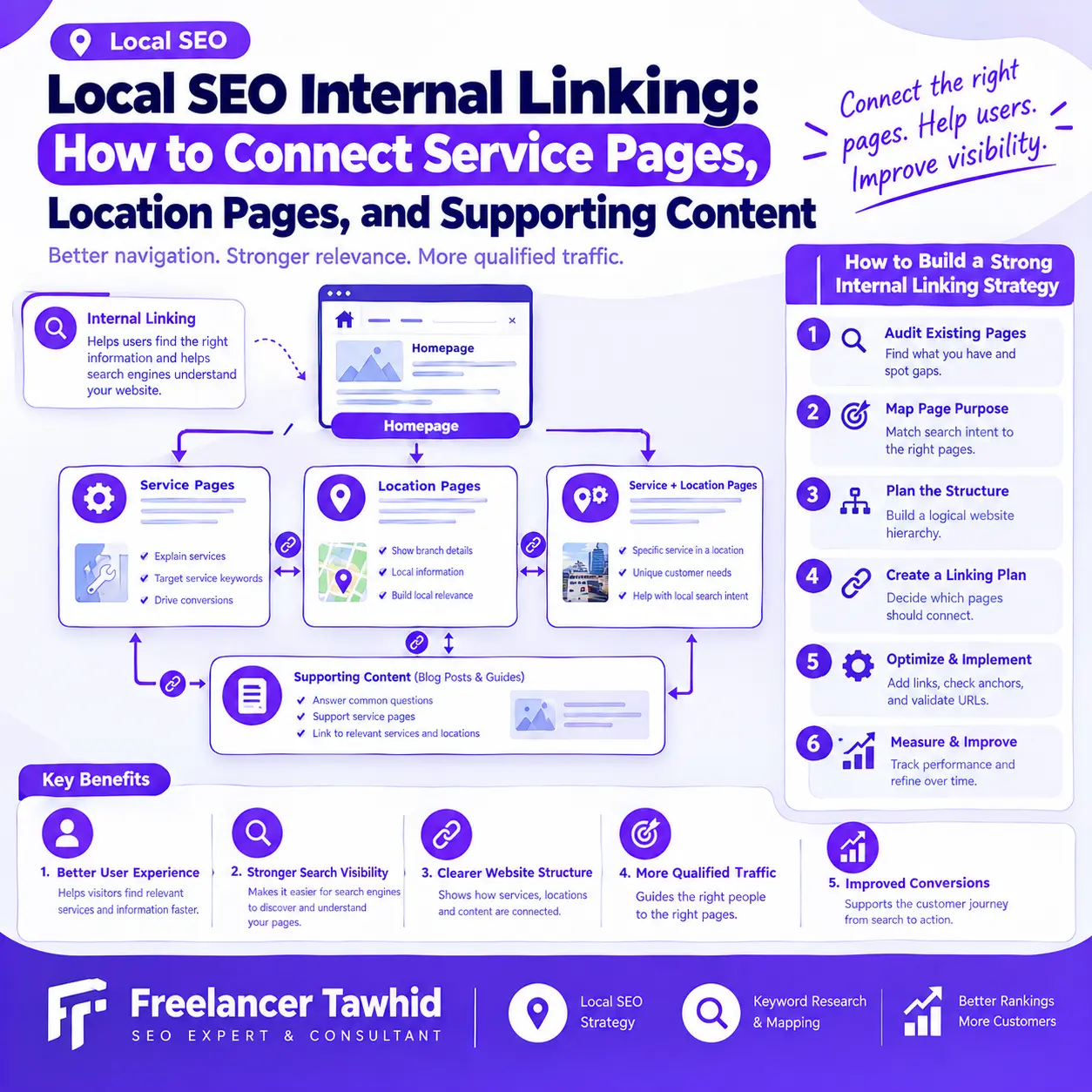
Local SEO internal linking connects relevant service pages, location pages, and supporting content so visitors can navigate a website more easily and search engines can discover and understand its pages. An effective strategy connects pages according to their purpose, uses descriptive anchor text, and helps users find the most relevant information without creating unnecessary links or duplicate landing pages.
For local businesses, the challenge is not simply adding more links. It is deciding which pages should connect, why those connections matter, and how the website can support the services and locations that are genuinely relevant to the business.
A well-planned structure can make important pages easier to discover, clarify relationships between services and locations, and guide potential customers toward useful information or an appropriate next step.
This guide explains how to build a practical internal linking strategy for Local SEO, from mapping page relationships to auditing technical issues and measuring the results.
What Is Internal Linking in Local SEO?
Internal linking in Local SEO is the practice of connecting related pages within the same website to help visitors navigate the site’s services, locations, and resources while helping search engines discover and understand its content.
For example, a home-service business might link its main service page to relevant service-area pages. An informational article about a common plumbing problem might link to the service page that explains how the business addresses that problem.
These connections should reflect the actual purpose of each page rather than follow a rigid formula.
Why internal links matter for local businesses
Internal links serve several purposes.
- They help visitors find relevant services.
Someone reading a guide about a specific problem may need to understand the available service, its process, or whether it is offered in their area. A contextual link provides a useful route to that information.
- They help search engines discover pages.
Google explains in its link best practices documentation that crawlable links help it discover pages and understand their relationships. Important pages should have relevant incoming links from other pages on the website.
- They clarify website architecture.
Links between a main service page, related services, location pages, and supporting articles help communicate how those resources fit together.
- They support useful customer journeys.
A visitor might move from an educational article to a service explanation, compare relevant options, and then contact the business. Thoughtful internal linking makes that journey easier without forcing a sales message into every page.
Internal linking does not guarantee higher rankings. Its value comes from supporting discoverability, relevance, navigation, and a well-organized website.
Internal links, backlinks, and XML sitemaps: What is the difference?
These concepts serve different purposes.
- Internal links connect pages on the same website.
- Backlinks are links from other websites pointing to your website.
- External links point from your website to another domain.
- XML sitemaps provide search engines with information about URLs that you want them to discover or consider for crawling.
A sitemap can complement internal linking, but it should not replace useful links between related pages. Similarly, adding internal links cannot compensate for missing content, technical indexation problems, or pages that do not satisfy their intended search needs.
Which Pages Should Link to Each Other on a Local Business Website?
The right internal linking structure depends on the business model, number of genuine locations, available services, and purpose of each page.
Before adding links, identify the important page types and establish which relationships help visitors.
1. Homepage to main service pages
The homepage should provide useful routes to the business’s primary services and other important sections.
A business offering plumbing, heating, and drainage services might link to the corresponding service pages from a service overview section. This helps visitors understand the available options without searching through unrelated content.
The homepage does not need to link directly to every URL on the website. Prioritize the destinations that matter most to visitors and the site’s organization.
2. Main service pages to individual service pages
A service hub can connect visitors to more specific services.
For example, a general plumbing service page might link to distinct pages explaining drain cleaning, pipe repairs, or installation services, provided those pages offer meaningful and separate information.
The goal is to make the service structure understandable, not to create a large collection of pages for every possible keyword variation.
3. Service pages to location pages
A service page can link to location or service-area pages when those destinations help users understand where the business operates or how the service is available in a particular area.
For example, a business with genuine service coverage across several areas may link to its relevant area pages from a section explaining service availability.
The link should have a clear purpose. Adding every possible area name to every service page does not automatically create a better internal linking strategy.
4. Location pages to relevant service pages
Location pages should help visitors understand what a business offers in the area described.
If a business provides heating and plumbing services in a particular area, its location page might link to the corresponding heating and plumbing service pages.
A visitor who wants detailed service information can then move from the area page to the appropriate service description.
These reverse links can be useful, but they are not mandatory in every situation. Their value depends on the page’s content and the user’s likely next step.
5. Supporting blog posts to relevant service pages
Supporting articles often answer questions that arise before someone decides whether to hire a service provider.
An article explaining how to recognize a plumbing problem may link to the relevant service page if that page helps readers understand their options.
The link should fit naturally within the explanation. It should not interrupt the article with unrelated promotional links.
6. Related articles to other helpful resources
One article can link to another when the second resource provides information that the reader may need next.
For example, a broad guide to local landing pages might link to a more detailed guide about mapping search intent to the correct page.
Avoid linking articles solely because they belong to the same category. The destination should add something useful that the source page does not fully explain.
A practical internal linking matrix
Use the following table as a starting point when planning links across a local business website.
Source page | Potential destination | Main purpose |
Homepage | Main service pages | Help visitors find key services |
Service hub | Individual service pages | Organize related services |
Service page | Relevant location page | Explain service availability |
Location page | Relevant service pages | Clarify the services offered in that area |
Supporting article | Relevant service page | Connect information to a useful next step |
Supporting article | Related educational guide | Provide additional explanation |
Case study | Relevant service page | Connect project context with the service involved |
This is a flexible framework, not a requirement to create every possible connection. Each link should make sense for the source page, destination page, and visitor.
How to Build a Local SEO Internal Linking Strategy Step by Step
An effective internal linking strategy begins with understanding the pages you already have. Adding links before reviewing the site’s architecture can reinforce existing problems instead of solving them.
Step 1: Inventory your existing website pages
Start by collecting the URLs that make up the website.
Group them into categories such as:
- Homepage and primary navigation pages
- Main service pages
- Individual service pages
- Location and service-area pages
- Location-specific service pages
- Supporting blog posts and guides
- Case studies and other relevant resources
- Contact and conversion pages
For each URL, record its primary purpose, intended audience, target search intent, current indexability, and important internal links.
A simple spreadsheet is sufficient to begin planning. For larger websites, a crawler can make the inventory process more efficient.
Do not assume that every existing URL deserves to remain. Some pages may be redundant, outdated, or too similar to another page to serve a useful independent purpose.
Review those issues before deciding which links to add.
Step 2: Map search intent to the appropriate page
Each important page should have a clear purpose.
Consider a hypothetical business that provides plumbing and heating services across several genuine service areas.
Its website might contain:
- A general plumbing service page
- A general heating service page
- A location page describing its service coverage in Area A
- A location page describing its service coverage in Area B
- A supporting article explaining how to recognize a common plumbing problem
Each page addresses a different need.
The plumbing page explains the service. The heating page covers a different service. The location pages explain relevant geographic availability. The article answers an informational question.
The links connect these pages where their purposes overlap usefully.
This process begins with page mapping, not anchor text. If several pages target essentially the same search intent, adding links between them will not automatically resolve the overlap.
Depending on the circumstances, the appropriate solution may be to improve the page purposes, consolidate overlapping URLs, or remove unnecessary pages.
For broader guidance on the research that informs these decisions, explore Local Keyword Research.
Step 3: Establish a logical website hierarchy
A local website may use a structure such as:
Homepage → Main service hub → Individual service pages → Relevant service-area pages → Supporting resources
However, this is a conceptual model rather than a universal URL structure.
Some websites work better with a separate location hub. Others need only a small number of service and location pages. The appropriate architecture depends on the actual business and its information needs.
Focus on these principles:
- Important pages should have sensible routes through the website.
- Related services should be easy to discover.
- Location pages should connect to the services they genuinely represent.
- Supporting articles should have relevant links to deeper information.
- Breadcrumbs and navigation should make the site’s organization easier to understand.
URL nesting and website hierarchy are not the same thing. A URL does not become well organized simply because it contains multiple folders.
Google’s link best practices and its general guidance on helpful content provide a sound foundation for planning a clear structure.
Step 4: Create a page-to-page linking plan
Once page purposes and relationships are clear, document the intended links.
A practical internal link inventory can use these fields:
Field | What to record |
Source URL | The page containing the link |
Destination URL | The page being linked to |
Link purpose | Why the destination is useful |
Anchor text | The visible text used for the link |
Placement | The section or paragraph containing it |
Existing status | Whether the link already exists |
Action required | Add, retain, update, or remove |
Validation status | Whether the final link has been checked |
For example, a supporting article about a service-related problem might link to the relevant service page from the paragraph explaining when professional assistance could be appropriate.
A location page could link to that same service page where visitors need more detailed information about the work offered.
The matrix should identify useful relationships rather than impose a minimum number of links on every page.
Step 5: Add contextual internal links
Contextual links appear naturally within a page’s content.
They are useful when the surrounding explanation gives the reader a reason to visit another resource.
Compare these examples:
Less descriptive:
“Read more here.”
More descriptive:
“Explore our relevant service to understand how the wider optimization process works.”
The second example gives readers a clearer expectation of what they will find. In actual implementation, choose an anchor that accurately reflects the destination page and the surrounding discussion.
Google recommends using descriptive, reasonably concise anchor text that is relevant to both the source and destination pages. Avoid inserting long strings of keywords or locations merely to influence search engines.
Context matters just as much as the anchor itself. A service-related link belongs in an explanation where that service is relevant, not in an unrelated paragraph added to create another internal link.
Step 6: Review navigation and breadcrumbs
Contextual links are only one part of the website’s architecture.
Navigation menus help visitors reach important sections. Breadcrumbs can show the relationship between a page and its parent sections. Links within the main content connect related information.
Review all three where appropriate.
Ask:
- Can visitors find the important service pages without difficulty?
- Are the parent and child relationships understandable?
- Does the breadcrumb trail reflect the actual site structure?
- Are important pages accessible through normal HTML links?
- Are navigation elements clear rather than overloaded with unnecessary destinations?
Not every website needs the same navigation design. The aim is to make the structure understandable and usable.
Step 7: Validate every important link
After implementation, check the destination and technical behavior of the links.
Confirm that:
- The destination URL loads the intended page.
- Internal links do not contain unnecessary redirect steps.
- There are no broken internal links.
- Anchor text describes the destination accurately.
- Important pages are indexable where appropriate.
- Links use crawlable HTML, ordinarily an <a> element with an href attribute.
- The destination genuinely helps the reader.
A link that looks correct in the editor may still point to an outdated URL or an incorrect destination.
For technical reference, consult Google’s documentation on crawlable links.
How to Optimize Internal-Link Anchor Text for Local SEO
Anchor text is the visible text users click to open another page. Its purpose is to make the destination understandable before the visitor clicks.
It should be descriptive, natural, and accurate.
Use anchor text that reflects the destination
For a service page, appropriate anchor variations might include:
- Our plumbing service
- Plumbing installation and repair
- Learn about our heating services
Use wording that makes sense within the sentence and matches the actual destination.
Avoid vague anchors when a more descriptive phrase would help. At the same time, do not force an exact keyword into every link.
When should you include a location name in anchor text?
Include a geographic modifier when it helps explain a genuinely location-specific destination.
For example, linking to a service-area page using its area name may help readers understand where the destination applies.
A general service page does not need a location name in every incoming link. Similarly, a location page should not receive repetitive city-name anchors from unrelated pages simply because the business wants to reinforce that term.
The destination and context should determine the wording.
How to avoid over-optimized anchor text
Watch for these common mistakes:
- Repeating the same exact-match phrase mechanically across every page.
- Combining multiple service and location keywords into a long anchor.
- Adding links to the same destination repeatedly without a useful reason.
- Using anchor text that promises information the target page does not contain.
- Placing several unrelated links next to each other.
There is no universal anchor-text ratio that must be followed. The goal is to describe the destination naturally while helping visitors navigate the website.
How to Connect Supporting Content Without Overlinking
Supporting content can help users explore a topic before choosing a service. Its internal links should reflect the reader’s information needs rather than a requirement to promote a service on every page.
Connect educational articles to relevant services
Suppose a website publishes an article about how to recognize and evaluate a particular home-service problem.
The article could link to the corresponding service page when readers need more information about professional solutions.
For Local SEO websites, the equivalent might be an article about local landing-page optimization linking to a relevant Local On-Page SEO service.
The relationship is appropriate because the service offers a logical next step for the reader.
However, links should not replace the informational content. Readers should still receive a complete and helpful explanation of the question they came to answer.
Link related articles when they add useful information
Related articles can complement each other.
A broad guide may link to a more detailed resource covering a particular technical check, decision, or implementation step.
Before adding the link, ask whether the destination provides additional value. If both pages simply repeat the same explanation, the website may benefit more from improving the content distinction than from adding another link.
Avoid turning every article into a service-page doorway
Supporting articles should serve their own informational purpose.
A useful article can include a relevant service link and still provide enough information for readers who are not ready to hire someone.
Avoid adding repetitive calls to action to every section or inserting service links where they do not make sense. A clear answer followed by a relevant next step is often more useful than a page filled with promotional links.
Google’s helpful content guidance emphasizes content that serves people rather than content created primarily to manipulate search results.
How Location Pages Fit Into a Local SEO Internal Linking Structure
Location pages require particular care because their value depends on more than their links.
A business should first establish why each page needs to exist. Internal linking can then connect useful pages within an appropriate website structure.
Understand location pages, service-area pages, and location-specific service pages
These page types can serve different purposes.
Location pages describe a genuine business location or relevant services associated with an area, depending on the business model.
Service-area pages provide useful information about the geographic areas a business serves.
Location-specific service pages address a particular service in a particular area when that combination has a distinct purpose and useful information to offer.
These distinctions are not a requirement to create three separate types of pages. Many businesses need only a simpler structure.
Decide whether a location page deserves to exist
Before creating or retaining a location page, evaluate the following:
- Does the page serve a distinct user need or search intent?
- Does the business genuinely operate in or provide services to the area described?
- Does the content offer useful information beyond a change of place name?
- Does the page help visitors understand the business’s services or availability?
- Does it have a meaningful role in the website’s navigation and content architecture?
- Does another existing URL already serve the same purpose effectively?
If several pages are nearly identical and exist mainly to target different city queries, adding more links between them is not the right first response.
Review the pages’ purpose, value, and relationship to the business before deciding what to change.
Google’s spam policies discuss doorway abuse, including substantially similar pages targeting different regions or cities that lead users toward the same destination. The issue is not the mere presence of geographic pages; it is whether those pages provide genuine value and fit a useful website structure.
Connect location pages to the right services
A useful location page should help visitors understand what is available in the area.
If the business provides several services there, contextual links can help visitors reach the corresponding service pages. If a service is not available in a particular area, do not link to a page in a way that implies otherwise.
Similarly, cross-linking between locations can help when visitors have a genuine reason to navigate between them. It is not necessary to link every location page to every other one.
Keep the links focused on legitimate business relationships and the information visitors need.
What if several location pages target the same search intent?
Review the pages individually before changing the links.
Possible actions include:
- Improving pages that have legitimate, distinct purposes but need more useful information.
- Differentiating pages where they meet genuinely different user needs.
- Consolidating pages that substantially overlap and are better served by one URL.
- Redirecting retired pages to appropriate replacements when a suitable destination exists.
- Removing unnecessary pages when they no longer serve a useful purpose.
A link alone will not resolve a content or intent problem. Fix the underlying architecture first, then update internal links to reflect the revised structure.
Common Local SEO Internal Linking Mistakes and How to Fix Them
Use this table to diagnose issues during an internal-link audit.
Problem | What to investigate | What to do |
Important page has few incoming links | Whether relevant pages naturally reference it | Add useful contextual links from suitable source pages |
Page is orphaned | Whether it has meaningful incoming links from crawlable pages | Add appropriate links or reconsider whether the page should exist |
Every service page links to every location | Whether each relationship is genuinely relevant | Remove unnecessary cross-links and retain useful connections |
Several pages target the same intent | Search intent, page purpose, and content overlap | Differentiate, consolidate, or redirect as appropriate |
Internal links point to redirected URLs | Outdated URLs and their final destinations | Update links to the correct final URLs |
Anchor text is repetitive or stuffed | Context and destination relevance | Rewrite anchors naturally |
Supporting articles have no useful next steps | Whether another service or resource would genuinely help | Add relevant contextual links where needed |
A page has many links but still performs poorly | Content quality, search intent, indexability, and competition | Diagnose the underlying issue rather than adding links indiscriminately |
Prioritize the issues that matter most
Not every internal-link issue deserves the same urgency.
Start with problems that prevent visitors from reaching important pages, send people to incorrect destinations, or make key content difficult for search engines to discover.
Then address structural issues such as overlapping pages, confusing navigation and links that do not reflect the intended hierarchy.
Use business importance, relevance, severity and implementation effort to decide what to fix first.
Understand what internal linking cannot fix
Internal linking is one component of a wider SEO strategy.
It cannot independently solve weak content, technical indexation problems, an incorrect search-intent target, insufficient business relevance, or every competitive disadvantage.
It should not be treated as a direct or guaranteed way to improve Google Maps rankings either. Google identifies relevance, distance and prominence as the main considerations for local results in its local ranking guidance.
If a website has broader performance problems, a Local SEO audit can help determine whether internal linking is the primary issue or just one element of a wider diagnosis.
How to Audit and Measure Local SEO Internal Links
An internal-link audit should identify structural problems, establish a baseline, and help you prioritize changes. It should not treat every crawler warning or link-count difference as a problem that must be fixed.
Audit internal-link coverage and technical issues
A website crawler can help identify:
- Important pages with few or no incoming internal links.
- Broken internal links.
- Links pointing to redirecting URLs.
- Pages that are difficult to reach through the site’s ordinary structure.
- Unexpected differences between intended and actual page hierarchy.
- Pages with indexability or canonicalization issues that require further investigation.
- Links with vague or misleading anchor text.
- Multiple URLs that may be serving the same search intent.
Combine crawler data with a review of the actual page content. A page with few incoming links is not automatically important, and a page with many incoming links is not automatically valuable.
The correct action depends on the purpose of the page and the nature of the problem.
Which tools can help?
Different tools answer different questions.
Tool | Best use |
Screaming Frog or Sitebulb | Crawl the website and investigate internal links, redirecting URLs, response codes, and page relationships |
Google Search Console | Review indexing information, impressions, clicks, and relevant search queries |
URL Inspection in Search Console | Investigate the indexability and indexing status of individual important URLs |
Google Analytics 4 | Review relevant landing-page behavior and configured conversions |
Spreadsheet | Record intended links, audit findings, priorities, and completed changes |
A crawler helps identify potential technical issues, but its reports need interpretation. Google Search Console and analytics data provide additional context about visibility and user behavior.
Measure changes without assuming causation
Before making significant changes, record the current situation.
Depending on the website, useful observations may include:
- Whether important pages receive appropriate internal links.
- How many identified orphan pages have been resolved.
- How many broken internal links or links to redirects remain.
- Whether important pages are discoverable and indexable as intended.
- Organic impressions, clicks and relevant query patterns for affected pages.
- Relevant landing-page traffic and configured lead or conversion events.
After implementation, review the same indicators over an appropriate period.
Changes in search performance can be influenced by many factors, including content updates, competition, technical improvements and search demand. Do not assume an increase in organic traffic was caused solely by internal linking when several things changed at once.
The purpose of measurement is to establish what changed, identify what still needs attention, and make better decisions about the next steps.
Make internal-link maintenance part of the SEO process
Review links after:
- Publishing important new service or location pages.
- Updating or retiring existing URLs.
- Consolidating overlapping content.
- Redesigning navigation or changing the website structure.
- Publishing supporting articles that should connect to existing service pages.
A repeatable process reduces the chance that the site’s structure will become confusing as more content is added.
A Practical Example of Local SEO Internal Linking
Consider a hypothetical home-service company with two services and two genuine service areas.
Its website contains a homepage, a page for each service, a page for each service area, and several useful educational articles.
The appropriate linking strategy depends on how those pages relate to one another.
Example website structure
Source page | Useful link | Why it helps |
Homepage | Main service pages | Helps visitors find core services |
Service A page | Relevant location pages | Explains where Service A is available |
Service-area page | Services offered in that area | Helps visitors investigate specific services |
Educational article | The service page addressing the topic | Provides a relevant next step |
Related guide | Another guide answering a follow-up question | Helps readers explore the topic further |
This structure does not require every page to link to every other page. Service and location relationships should reflect the actual business, while supporting content should connect readers to relevant explanations.
Three practical improvements
Improvement 1: Add a missing contextual link.
An educational article explains a problem that a particular service addresses but contains no link to that service page. Adding a relevant link in the explanation can help interested readers find the next resource.
Improvement 2: Improve a location page’s service connections.
A location page describes multiple services but does not clearly connect to their individual explanations. Add relevant links where they help visitors understand availability and service details.
Improvement 3: Correct an outdated destination.
A contextual link points to an old URL that redirects to the current page. Update it to the intended final destination where appropriate, then verify that the link works.
Each improvement should have a clear purpose and a validation step. None requires an arbitrary increase in the total number of links.
For a real-world example of broader Local SEO implementation, my Local SEO case study describes work involving location targeting, website structure, on-page optimization, content, internal linking and other activities. Because several areas of SEO were involved, its reported results should not be attributed to internal linking alone.
Frequently Asked Questions About Local SEO Internal Linking
How many internal links should a local SEO page have?
There is no universal ideal number of internal links for a local SEO page. Include the links that help visitors navigate to relevant services, location information and supporting resources. Evaluate each link’s usefulness, placement and contribution to the page experience rather than targeting a fixed number.
Should every service page link to every location page?
No. A service page should link to location pages when those destinations genuinely help visitors understand where a service is available or explore relevant local information. Linking every service to every location regardless of relevance can create clutter. Base the structure on actual service availability and useful page relationships.
Can internal linking improve Google Maps rankings?
Internal linking can help search engines discover and understand website pages, but it does not guarantee better Google Maps rankings. Google’s local results are based mainly on relevance, distance and prominence. A sound website structure is one part of a broader Local SEO strategy, not a replacement for other ranking considerations.
Should a local business create a separate page for every city it serves?
Not necessarily. Create a separate location page when it serves a distinct purpose and offers useful information about the business’s services in that area. Replacing a city name in otherwise identical content is not a sufficient reason. Review page quality, user needs and search intent before expanding the website.
How can I find orphan pages on a local business website?
Use a website crawler to review internal incoming links and compare discovered URLs with your important page inventory. Investigate pages that have no meaningful incoming internal links or are difficult to reach through normal navigation. Check their purpose and indexability before adding links; unnecessary pages may need consolidation instead.
Conclusion: Build an Internal Linking Structure Around Real User Needs
A good Local SEO internal linking strategy begins with clear page purposes and relevant relationships. Service pages, location pages, and supporting articles should connect where those links help visitors find the right information and help search engines discover and understand the website.
Start by auditing the current structure, mapping each page to its intended purpose, and creating a practical link inventory. Use descriptive anchor text, check destination URLs, and review location pages for genuine usefulness before creating more of them.
Then measure the changes, address any remaining technical problems, and maintain the structure as the website grows.
The objective is not to create the largest possible internal-link network. It is to build a coherent website that supports the business’s actual services, locations and customer needs.
If your website has orphan pages, overlapping location landing pages or unclear relationships between services and supporting content, explore my Local On-Page SEO service. I can help assess the website structure and identify relevant optimization priorities based on your existing pages and business goals.
For broader website and local search challenges, you can also explore my Local SEO services or contact Freelancer Tawhid to discuss your requirements.