
Local Keyword Research Tools: Free and Paid Options Compared

Freelancer Tawhid
SEO Expert and Consultant
- October 13, 2026
- No Comments
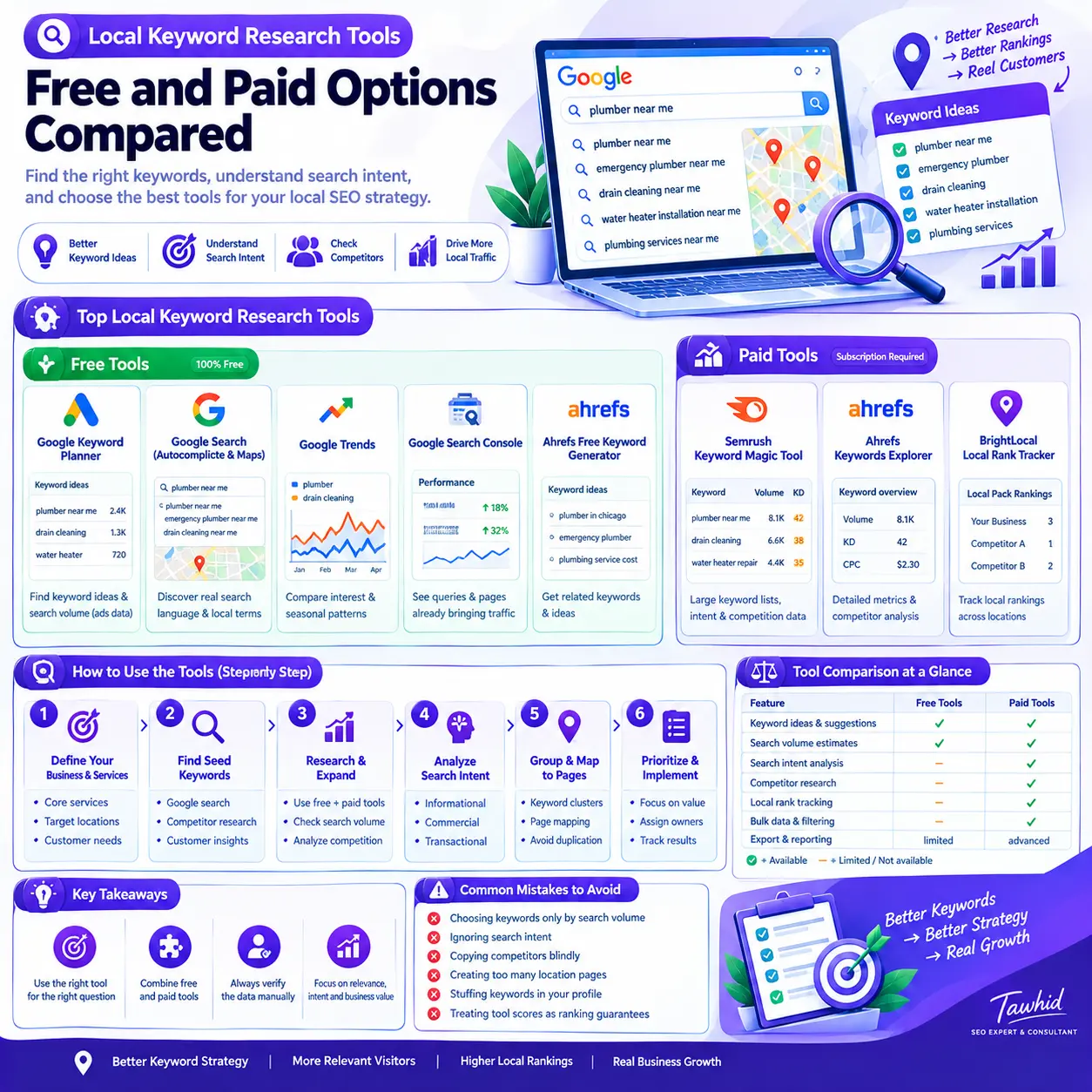
Local keyword research tools help you discover what potential customers search for, evaluate keyword opportunities, analyze competitors, and plan content around relevant services and locations. Free tools such as Google Keyword Planner, Google Trends, and Google Search Console can cover many basic needs, while paid platforms such as Semrush and Ahrefs provide additional research and analysis capabilities.
The best choice depends on your business, target market, research requirements, and budget. You do not necessarily need an expensive subscription to build a useful local keyword strategy. What matters is choosing the right tools, interpreting their data correctly, and turning your findings into pages that satisfy search intent.
In this guide, you’ll learn which free and paid local keyword research tools are worth considering, how their capabilities differ, and how to combine them into a practical workflow.
Best Local Keyword Research Tools at a Glance
The following comparison highlights tools for different stages of local keyword research, from discovering search queries to measuring actual search performance.
Tool | Cost category | Best use | Main limitation |
Google Keyword Planner | Free access through Google Ads | Discovering keyword ideas and estimating demand by geographic market | Advertising-oriented metrics require careful SEO interpretation |
Google Search autocomplete and Maps | Free | Discovering natural service terminology and local search variations | Suggestions do not provide a complete keyword database or reliable volume estimates |
Google Trends | Free | Comparing relative search interest and seasonal patterns | Does not provide absolute monthly search volumes |
Google Search Console | Free | Discovering queries that already generate impressions and clicks for your website | Primarily measures your own site’s search performance |
Ahrefs Free Keyword Generator | Free tool | Finding related keywords and additional ideas | Its capabilities differ from the full paid research platform |
Semrush Keyword Magic Tool | Paid research platform; check current access options | Large keyword lists, filters, related terms, and intent analysis | Advanced data and usage limits depend on the available plan |
Ahrefs Keywords Explorer | Paid research platform | Detailed keyword metrics, competitor research, and topic analysis | Subscription value depends on your research requirements |
BrightLocal Local Rank Tracker | Paid local SEO tool | Monitoring localized organic, Maps, and Local Pack rankings in supported markets | Geographic availability is limited compared with worldwide keyword research |
These tools are not interchangeable. Google Trends helps compare search interest, Search Console reveals how your own site performs, and a local rank tracker measures selected rankings. A complete research process may benefit from several complementary tools rather than relying on a single platform.
Check the vendors’ official websites for current features, access requirements, geographic coverage, and subscription terms before purchasing. These can change over time.
What Should a Local Keyword Research Tool Help You Do?
Local keyword research tools help identify and evaluate the search queries relevant to a business’s products or services and the markets it serves.
However, effective local keyword research involves more than generating a list of phrases that contain a city name or the words “near me.” A useful tool should help you understand the opportunities behind those searches and decide what action to take.
1. Discover relevant keywords
The first task is finding the different ways people describe a service, product, problem, or desired outcome.
For example, someone looking for plumbing assistance might search for variations related to emergency repairs, leak detection, pipe replacement, or other specific services.
These phrases represent different needs. Some may deserve dedicated service pages, while others may be better handled within an existing page.
Useful discovery tools include Google Keyword Planner, Google autocomplete, keyword suggestion platforms, and competitor research tools.
2. Estimate search demand
Keyword tools may provide average monthly search volume, historical trends, or other demand estimates.
These metrics help compare opportunities, but they should not be treated as exact counts of future visitors. Different vendors can report different figures because their data sources, databases, geographic settings, and calculation methods differ.
A keyword with modest estimated volume may still be valuable when it closely matches a service that the business offers.
3. Understand search intent and competition
Search intent describes what a person is trying to accomplish with a query.
A search such as “how to repair a leaking pipe” suggests an informational need. A query such as “emergency plumber” may indicate that someone wants to hire a provider.
The distinction influences which page should target the keyword.
SERP analysis and competitor research tools help you examine the pages already appearing for a query, the type of content they provide, and potential gaps in your own website.
4. Organize keywords into useful groups
A research tool can help you identify related terms, but you still need to decide how they fit into your website.
Closely related queries with the same search intent can often be addressed by one strong page. Genuinely different services or customer needs may require separate pages.
This is where keyword clustering and keyword mapping become important.
For a more detailed explanation of the process, see my Local Keyword Research service.
Best Free Local Keyword Research Tools
Free tools can be sufficient for many small-business websites, especially when the research scope is limited. They can help you discover terms, validate ideas, understand search behavior, and identify existing performance opportunities.
Here are the tools worth starting with.
1. Google Keyword Planner
Best for: Discovering keyword ideas and estimating search demand for selected geographic markets.
Google Keyword Planner is an advertising research tool available through Google Ads. It can also support organic SEO research when its metrics are interpreted appropriately.
You can use it to:
- Discover keyword ideas from service terms or relevant website inputs.
- Explore variations that relate to a specific product or service.
- Refine research using location and language settings.
- Review average monthly searches and historical trends.
- Compare advertising competition and top-of-page bid estimates.
- Export or organize findings where supported by your current access.
One useful capability is geographic targeting. Google documents options for choosing countries, regions, cities, and other supported areas when refining keyword research.
Official documentation: Refine your keywords in Google Keyword Planner.
How to use Keyword Planner for local SEO
Start with a small set of seed keywords that describe the business’s actual services.
For a hypothetical roofing company, seed terms might include:
- Roof repair
- Roof replacement
- Roof inspection
- Emergency roofing service
Choose the appropriate geographic and language settings for the market you want to investigate. Review the suggested terms, then organize relevant variations by service and search intent.
Do not select keywords solely because they have the highest search volume. A query may be popular but irrelevant to the business’s services or unsuitable for the landing page you intend to create.
Important limitation: Google Keyword Planner primarily supports Google Ads planning. Some basic features require completing account setup, including entering billing information. Check the current requirements before beginning.
Its advertising competition metric measures competition in the advertising environment; it is not a direct measurement of organic SEO difficulty.
2. Google Search Autocomplete and Google Maps
Best for: Discovering natural-language queries, service variations, and geographically relevant search ideas.
Google autocomplete is useful because it reveals predictions generated as users begin typing queries. Google explains that these predictions reflect several signals, including previous searches, language, location, and trending interest.
Read the official explanation: How Google autocomplete predictions work.
To use autocomplete for keyword research:
- Enter a core service term into Google Search.
- Examine relevant suggested phrases.
- Try different service modifiers, such as pricing, problems, repairs, reviews, and alternatives.
- Review related searches and relevant question suggestions when available.
- Inspect Google Maps results for queries with local intent.
- Record promising phrases for further validation.
For example, someone researching a cleaning service might discover variations concerning deep cleaning, move-out cleaning, recurring cleaning, or specialized cleaning requirements.
These variations can help you understand the market’s terminology and identify distinctions between services.
Google Maps is particularly useful for examining the type of businesses and results Google displays for local-intent queries. It can help you understand how search intent varies between general research and searches intended to find nearby providers.
Important limitation: Autocomplete suggestions are discovery signals, not proof of search volume or ranking potential. Their absence does not mean a keyword receives no searches, and their appearance does not establish that a separate page is necessary.
3. Google Trends
Best for: Comparing relative search interest, identifying seasonal patterns, and exploring changes in search behavior.
Google Trends helps you compare search terms over a selected period and geographic area. It can be particularly useful when two similar service terms appear equally relevant but you need additional context about how interest changes over time.
You can use it to:
- Compare alternative ways of describing a service.
- Explore seasonal changes in search interest.
- Investigate whether a topic is gaining or losing attention.
- Compare relative interest across selected geographic markets.
- Identify periods when a service may attract greater attention.
For example, a business offering seasonal maintenance services may use Trends to understand when different service-related terms tend to attract more interest.
Official documentation: FAQ about Google Trends data.
Does Google Trends show actual keyword search volume?
No. Google Trends normalizes search data and scales relative interest on a range from 0 to 100 for the selected context.
A value of 100 represents the peak relative interest in that comparison, not 100 searches. Two regions displaying the same interest score do not necessarily have the same number of searches.
Use Trends to understand relative interest and possible seasonality. Use another suitable source when you need search-volume estimates.
4. Google Search Console
Best for: Discovering the search queries that already bring people to your website.
Google Search Console is especially useful once a website is indexed and has begun appearing in Google Search.
Its Performance report can show queries and pages alongside metrics such as clicks, impressions, click-through rate, and average position.
Official documentation: Search Console Performance report.
You can use this information to:
- Find local-intent queries already generating impressions.
- Identify pages receiving impressions for relevant but unexpected terms.
- Discover related queries that might improve existing content.
- Review pages with impressions but relatively few clicks.
- Compare performance across queries and landing pages.
- Identify opportunities to improve how closely a page matches a searcher’s intent.
Suppose an existing service page receives impressions for several variations of a service name. You can inspect the corresponding results and determine whether the page sufficiently addresses those needs.
This is often more actionable than generating a long list of entirely new keywords.
Important limitation: Search Console reports performance for your property, not a complete database of competitor keywords or all possible market opportunities. Some queries are omitted from reports, including for privacy reasons.
5. Ahrefs Free Keyword Generator
Best for: Finding additional keyword ideas without immediately committing to a full paid research subscription.
Ahrefs provides a free keyword research tool that can help you discover related terms and investigate potential opportunities.
Visit the Ahrefs Free Keyword Generator.
It can complement Google’s tools when you want to:
- Expand a short seed list into more keyword variations.
- Explore related search terms.
- Discover potential question-based queries.
- Compare ideas before conducting more detailed research.
- Identify phrases that deserve further SERP analysis.
For example, a seed keyword describing a professional service might produce related terms involving costs, comparisons, service problems, or specific customer requirements.
You can then assess which suggestions reflect a meaningful customer need and whether the website has an appropriate page to address it.
Important limitation: The free tool and the full paid Keywords Explorer product do not provide identical functionality. Check the current tool interface and access limits before relying on a particular feature.
Can free tools be enough for local keyword research?
Yes. Free tools can be enough when you research a small business, a limited number of services, or an initial set of opportunities.
A practical free setup might include:
- Google Keyword Planner for ideas and search-demand estimates.
- Google autocomplete and Maps for natural-language discovery.
- Google Trends for relative interest and seasonality.
- Google Search Console for existing website performance.
The limitations become more noticeable when you need extensive competitor analysis, bulk keyword processing, detailed filtering, repeated reporting, or research across many projects.
At that point, a paid tool may save time or provide data that is difficult to obtain efficiently through a manual workflow.
Best Paid Local Keyword Research Tools
Paid keyword research platforms can make larger research projects more manageable. They often combine keyword discovery, filtering, competitor analysis, metrics, and organization in one interface.
The right choice depends on the tasks you need to complete rather than the size of the platform’s advertised database.
1. Semrush Keyword Magic Tool
Best for: Broad keyword expansion, filtering, related-term discovery, and search-intent analysis.
The Semrush Keyword Magic Tool generates related keyword ideas and provides a range of analysis and filtering capabilities.
According to its documentation, the tool supports keyword grouping, subgroup exploration, search-volume metrics, keyword difficulty estimates, intent information, and SERP-feature data.
You can use it to:
- Generate related keyword ideas from a seed term.
- Organize terms into related topic groups.
- Filter results by selected metrics or query characteristics.
- Identify question-based keyword opportunities.
- Investigate commercial and informational intent.
- Build organized keyword lists for different projects.
This is useful when research produces hundreds or thousands of potential terms and you need to narrow them into a manageable set.
For example, a researcher working across several service categories could investigate each seed term, group related variations, and identify which query families deserve separate analysis.
Limitations to consider:
Keyword difficulty and search volume are estimates, not direct predictions of your website’s performance. Data coverage can vary by market, and the features available to you depend on the current subscription and access terms.
Semrush is most valuable when you regularly need its broader research functionality. For a single, small keyword list, the additional cost may not be justified.
2. Ahrefs Keywords Explorer
Best for: Detailed keyword evaluation, competitor research, and topic analysis.
Ahrefs Keywords Explorer is a research platform for generating keyword ideas and examining metrics associated with individual queries and broader topics.
Visit the Ahrefs Keywords Explorer page.
Its documented functionality includes search-volume analysis, keyword difficulty, parent topics, traffic-potential estimates, and SERP analysis.
These capabilities help you investigate whether a term is worth targeting and how it relates to broader topics.
You can use Ahrefs to:
- Expand keyword lists beyond the initial seed terms.
- Explore related queries and topic opportunities.
- Review estimated search demand and ranking difficulty.
- Examine current ranking pages and their competitive characteristics.
- Investigate the relationship between a specific query and a broader parent topic.
- Organize keywords into groups for further analysis.
What is the difference between search volume and traffic potential?
Search volume estimates how often a particular keyword is searched during a specified period and market.
Traffic potential estimates the organic traffic that a ranking page may receive from a broader set of queries associated with the topic, depending on the provider’s methodology.
These metrics answer different questions. A keyword with modest individual search volume may belong to a topic where ranking pages receive traffic from many related queries.
Ahrefs explains this distinction in its documentation: Traffic potential vs. search volume.
Limitations to consider:
Ahrefs’ keyword difficulty score is based primarily on referring-domain data for the current top-ranking pages. It does not fully account for every factor that influences ranking, such as search intent, page quality, content relevance, or the strength of your own website.
Use the score as one indicator rather than as a definitive verdict on ranking feasibility.
For a smaller project, the free tools may be sufficient. Keywords Explorer becomes more useful when you need deeper analysis and use that information regularly.
3. BrightLocal Local Rank Tracker
Best for: Monitoring selected keyword rankings in localized organic and map search results.
BrightLocal’s Local Rank Tracker complements keyword research by showing how a business website and Google Business Profile perform for selected search terms in supported markets.
Its documented reporting includes organic rankings, Local Pack and Google Maps visibility, and selected third-party search results.
Official documentation: What is BrightLocal Local Rank Tracker?.
A rank tracker can help answer questions such as:
- Where does the business appear for a selected service keyword?
- Does visibility differ between organic results and the local pack?
- How does visibility change across the tracked locations?
- Are selected keywords improving or declining over time?
- Which terms require additional investigation?
Is a local rank tracker the same as a keyword research tool?
No. The distinction matters.
Keyword research tools help you discover and evaluate what people search for.
Local rank trackers measure where selected websites or business listings appear for specified keywords and search locations.
Both can contribute to a local SEO strategy, but they perform different jobs.
Worldwide coverage warning: BrightLocal currently documents Local Rank Tracker support for the United States, United Kingdom, Canada, Australia, New Zealand, and Ireland. Confirm its latest country-availability information before purchasing. Do not assume that a specialized local SEO tool supports every country in which you operate.
For businesses targeting markets outside a tool’s supported coverage, another platform or measurement approach may be necessary.
Free vs. Paid Local Keyword Research Tools: What Is the Difference?
Free and paid tools can both contribute useful information. The primary difference is often the depth of analysis, workflow integration, data access, and the amount of repetitive work a platform can reduce.
Factor | Free tools | Paid platforms |
Initial keyword discovery | Often sufficient for a focused project | Useful for larger keyword sets and broader discovery |
Search-demand analysis | Basic estimates and trend comparisons | Often provides additional keyword metrics and analysis |
Competitor research | More manual and limited | Typically offers more extensive competitive insights |
Keyword filtering | May require several tools or spreadsheets | Often provides integrated filters and grouping |
Bulk research | Can be time-consuming | Generally more practical for larger projects |
Local rank tracking | May require manual checks or another tool | Specialist tools can monitor selected local results |
Cost | Lower direct software cost | Subscription cost must be justified by the work performed |
These are general patterns, not guarantees. A paid product may still lack the exact geographic data or functionality you require, while a free tool may be perfectly adequate for a particular task.
Best tool setup for a single-location business
For a business with a limited service range, start with Google Keyword Planner, autocomplete, and manual SERP inspection. Add Google Search Console once your website has useful performance data.
Use a spreadsheet to organize the findings and map relevant keywords to existing pages.
Consider a paid subscription only when you need a meaningful increase in research depth, data volume, or workflow efficiency.
Best tool setup for a multi-location business
Businesses serving multiple locations need a more structured process.
Focus on:
- Differentiating genuine services and geographic markets.
- Researching location-specific search demand where data is available.
- Identifying overlapping keyword intent across existing pages.
- Mapping query groups to appropriate service and location pages.
- Monitoring relevant local visibility across supported markets.
Do not assume that country-level search-volume estimates will accurately represent demand in an individual city or smaller service area.
Best tool setup for an agency or SEO consultant
A consultant or agency may benefit more from paid tools because keyword research is repeated across clients, websites, services, and geographic markets.
Bulk exports, project organization, competitor analysis, and reusable reporting can reduce manual effort.
However, buying several overlapping tools is not automatically efficient. Choose a platform based on the tasks it helps you complete and the quality of the decisions it supports.
How to Choose the Right Local Keyword Research Tool
Before subscribing to a platform, identify the problem you need it to solve.
1. Identify your primary research task
Start by deciding whether you need to:
- Generate new keyword ideas.
- Estimate search demand.
- Explore competitor keywords.
- Analyze search intent.
- Group keywords into topics.
- Map keywords to website pages.
- Track local rankings.
You may need a different tool for each task, but you do not necessarily need a separate subscription for every function.
2. Check geographic and language coverage
Location settings matter when the research concerns a specific market.
Confirm whether the tool supports the countries, languages, geographic granularity, and search surfaces relevant to your project.
A platform that provides extensive keyword information for one market may have limited data for another. This matters particularly for worldwide SEO work, multilingual research, and specialized local rank tracking.
3. Compare features and usage limits
Check the current subscription details before making a decision.
Pay attention to:
- Keyword and query limits.
- Search database coverage.
- Project and website limits.
- Report exports.
- User seats.
- Historical data.
- Local rank tracking.
- Additional charges or add-ons.
- Monthly versus annual billing requirements.
Use official vendor pricing pages rather than relying on an old comparison article. Pricing and plan structures change, so avoid making a purchasing decision based on a price quoted without a checking date.
4. Evaluate whether the additional data changes your decisions
A paid tool is valuable when its insights help you make better decisions or complete necessary work more efficiently.
For example, it may help when you need to investigate multiple competitors, identify keyword gaps at scale, or compare hundreds of related terms.
If you only need to research a small number of service keywords, the additional data may not meaningfully improve your strategy.
5. Validate the tool with a small research task
Before committing to a platform, test it using a real research question.
Check whether it discovers useful terms, provides the geographic information you need, allows practical filtering, and helps you make a clear decision.
This is more useful than choosing a platform based solely on its marketing claims or the size of its advertised database.
A Practical Workflow for Local Keyword Research
Choosing tools is only the first step. The goal is to transform the information they provide into a practical keyword strategy.
The following workflow combines free discovery methods, optional paid research, and actual search-performance data.
Step 1: Build a list of services and seed keywords
Start by listing the business’s core services, supporting services, products, customer problems, and important commercial offerings.
For each subject, identify the main terminology customers might use.
For example, a hypothetical plumbing business might investigate:
- Plumbing services.
- Emergency plumbing.
- Leak detection.
- Pipe repair.
- Water heater repair.
These are starting points, not final keyword targets.
Include only services the business genuinely offers and consider the geographic markets it actually serves.
Step 2: Expand the list using free tools
Use Google autocomplete, related searches, Maps results where relevant, and Keyword Planner to discover additional variations.
Record promising terms in a spreadsheet.
Useful columns include:
Column | Purpose |
Keyword | The search phrase being evaluated |
Source | Where the idea was discovered |
Search intent | Informational, commercial, or transactional |
Location or market | The geographic context relevant to the research |
Estimated volume | A provider’s estimate, where available |
Target page | The existing or proposed destination |
Priority | The relative importance of the opportunity |
Notes | Relevant observations from SERP research |
Do not treat every suggestion as a separate target. The next steps help determine which terms deserve attention.
Step 3: Enrich and evaluate the keywords
Use a specialist platform if you need more detailed data.
Examine search volume, keyword difficulty estimates, related terms, competitors, and potential commercial relevance.
When tools disagree, check whether they use the same market, language, and date range. Different values do not necessarily mean one platform is defective; the tools may be estimating demand differently.
Treat every metric as evidence to interpret, not an automatic instruction.
Step 4: Inspect search results and identify intent
Search for important candidate keywords in the relevant market.
Examine the pages and result types that appear. Are they service pages, informational articles, directories, business listings, or other resources?
This helps you understand what kind of page may satisfy the search.
A keyword tool might indicate that a phrase has attractive metrics, but the actual search results may reveal that your proposed landing page does not match the dominant intent.
SERP inspection helps prevent that mismatch.
Step 5: Group closely related keywords
Keyword clustering organizes related queries according to their topic and intended outcome.
Consider these illustrative searches:
- Roof repair service.
- Repairing a damaged roof.
- Professional roof repair.
Depending on the actual search results, these phrases may be appropriate for one service page rather than three separate pages.
In contrast, roof inspection and roof replacement may require distinct content if they serve substantially different customer needs.
Use keyword tools to assist with grouping, then review the results yourself.
Step 6: Map each keyword group to the correct page
Assign each cluster to a relevant destination on the website.
A practical keyword map might include:
Keyword group | Possible destination |
Core service searches | Main service page |
Distinct supporting service | Dedicated service page, if justified |
Genuine location-specific service intent | Relevant location page, where useful and appropriate |
How-to questions and informational topics | Supporting blog post |
Existing performance opportunities | Relevant current page that can be improved |
The right page depends on search intent, business structure, and the content needed to satisfy the query.
Do not create a new page merely because you found another keyword variation. Google identifies doorway abuse as a spam practice when substantially similar pages target similar queries or locations primarily to funnel visitors toward the same destination.
See Google’s Search spam policies.
Step 7: Prioritize the opportunities
After organizing the research, evaluate each keyword group according to:
- Relevance to the services offered.
- Commercial or informational intent.
- Estimated search demand.
- Competitive context.
- Existing page quality and coverage.
- Business value.
- The resources required to address the opportunity.
Do not apply a rigid scoring formula simply because a tool or template recommends one.
The objective is to identify useful, achievable opportunities that match the business’s needs—not to maximize a spreadsheet score.
Step 8: Measure performance after implementation
Once the relevant pages have been improved or published, review the available performance data.
Google Search Console can show how pages and queries perform in Google Search through metrics such as clicks, impressions, click-through rate, and average position.
For selected local keywords, a rank tracker can provide additional insight into visibility across supported locations and search result types.
Use the findings to identify which pages need further investigation. Do not assume that a change in rankings was caused by a single modification without considering other relevant factors.
Common Mistakes When Using Local Keyword Research Tools
Even a capable platform can produce poor results when the information is interpreted incorrectly.
Choosing keywords only by search volume
High-volume keywords can be attractive, but the most popular phrase is not automatically the best target.
A smaller, highly relevant query may be more useful than a broad phrase that attracts people looking for something the business does not offer.
Evaluate intent, relevance, competitiveness, and business value together.
Treating keyword difficulty as a ranking prediction
Keyword difficulty is a provider-defined estimate. Different platforms use different methods, and their scores are not directly interchangeable.
A low score does not guarantee that your website will rank. A higher score does not automatically make a keyword impossible.
Inspect the competing pages, understand the search intent, and evaluate whether your content can meet the need more effectively.
Confusing advertising competition with organic difficulty
Advertising competition and organic SEO difficulty measure different things.
A keyword may have strong commercial value in paid search without presenting the same level of competition in organic results. Conversely, a broad informational query may have substantial organic competition even if its advertising metrics are modest.
Use the appropriate metric for the question you are trying to answer.
Assuming autocomplete proves keyword demand
Autocomplete is useful for discovering search language, but it is not a complete keyword database.
Validate promising suggestions through search results, other research tools, or actual performance data where available.
Creating too many location pages
Adding a location modifier to a keyword does not automatically justify a separate page.
Create location pages when they serve a genuine user need and can provide meaningfully distinct, useful information. Avoid producing near-identical pages solely to target slightly different geographic queries.
Stuffing keywords into Google Business Profile fields
Keyword research can help you understand services and customer terminology, but it should not be used to manipulate business information.
Use accurate categories and descriptions that reflect the actual business. Do not insert extra keywords into the business name or other fields where they do not belong.
Relevant keyword research can support an appropriate Google Maps SEO strategy, but it cannot replace accurate business information or guarantee local rankings.
Buying tools without checking market coverage
A tool may be useful in one country and unsuitable for another.
Confirm the target market, language, data availability, and geographic precision before paying. This is especially important when comparing specialist local rank trackers with general-purpose keyword research platforms.
What Should You Do After Completing Local Keyword Research?
Research becomes valuable when it informs decisions about website pages and SEO priorities.
Turn your findings into a keyword map
Your final keyword map should identify the primary query group for each page, supporting variations, search intent, relevant market, priority, and implementation status.
The purpose is not to target every keyword separately. It is to establish a clear relationship between customer searches and the pages that best address them.
Improve the relevant service pages
Use the findings to improve content where there is a meaningful gap between what people search for and what the existing page provides.
Depending on the research, this might involve clarifying service descriptions, improving headings, adding genuinely useful supporting information, or improving internal links.
My Local On-Page SEO service covers the page-level side of local SEO. For issues involving a wider website or local search presence, a Local SEO Audit may be a more appropriate starting point.
Review opportunities as your business changes
Keyword research is not a one-time task that must be repeated on an arbitrary schedule.
Revisit it when your services change, the target market evolves, search behavior shifts, new competitors emerge, or actual performance reveals an important opportunity.
Use evidence to decide when further research is necessary instead of repeatedly generating keyword lists without implementing the findings.
Conclusion: Choose the Right Tools for Better Local SEO Decisions
The best local keyword research tools are the ones that help you understand customer searches and make sound decisions about your website.
Google Keyword Planner, autocomplete, Google Trends, and Search Console provide a useful foundation for many research tasks. Paid platforms such as Semrush and Ahrefs can add value when you need deeper keyword analysis, competitive research, and more efficient workflows. Specialized tools such as BrightLocal Local Rank Tracker can complement the process when you need localized ranking measurements in a supported market.
You do not need to purchase every tool. Start with the research task, assess what the available data can tell you, verify promising keywords against actual search results, and organize the findings into a practical page-level strategy.
Above all, remember that keyword research is a means to better SEO decisions, not an end in itself. Its value depends on selecting relevant opportunities and implementing them in ways that genuinely help users.
If you need help identifying keyword opportunities, analyzing competitors, grouping search terms, or mapping them to the right pages, explore my Local Keyword Research Service. As an SEO Expert & Consultant, I approach research in the context of the business, its target market, existing website, and wider SEO objectives rather than treating a keyword list as the final deliverable.
Frequently Asked Questions
1. What is the best free tool for local keyword research?
The best free starting tool depends on the task. Google Keyword Planner helps generate keyword ideas and estimate demand, autocomplete and Google Maps reveal useful terminology, Google Trends compares relative search interest, and Search Console shows queries already reaching your website. Combining these sources often provides more context than relying on only one tool.
2. Do I need to run Google Ads to use Google Keyword Planner for local SEO?
Google Keyword Planner is available through Google Ads and can support keyword research for organic SEO as well as advertising planning. Google currently requires account setup, including billing information, for basic features such as discovering new keyword ideas. Check the latest Google Ads Help documentation before starting.
3. How accurate is the search volume reported by local keyword research tools?
Search volume is an estimate, not a precise count of future website visits. Different platforms may use different data sources, geographic databases, and calculation methods. Compare equivalent settings, inspect actual search results, and consider Search Console data for your website before making major decisions based on a single metric.
4. What is the difference between a local keyword research tool and a local rank tracker?
A keyword research tool helps discover and evaluate phrases that a business may want to target. A local rank tracker measures how selected pages or business listings appear for specified terms in particular search locations. Both are useful, but they answer different questions: what should you target, and where do you currently appear?
5. How many local keywords should I target on one page?
There is no universal number of keywords that every page should target. Organize closely related phrases around a coherent search intent and a page that genuinely satisfies that need. Create another page only when a distinct service, location, or user objective warrants one, rather than making pages for every minor keyword variation.
About the author: Tawhid is an SEO Expert & Consultant at Freelancer Tawhid. He began working in SEO through Local SEO in 2020 and developed his knowledge through research and practical implementation on real projects. His work focuses on understanding the business, search intent, competitive environment, and relevant SEO opportunities before determining what should be prioritized.