LocalBusiness Schema for Local SEO: What to Mark Up and How to Validate It

Freelancer Tawhid
SEO Expert and Consultant
- October 14, 2026
- No Comments
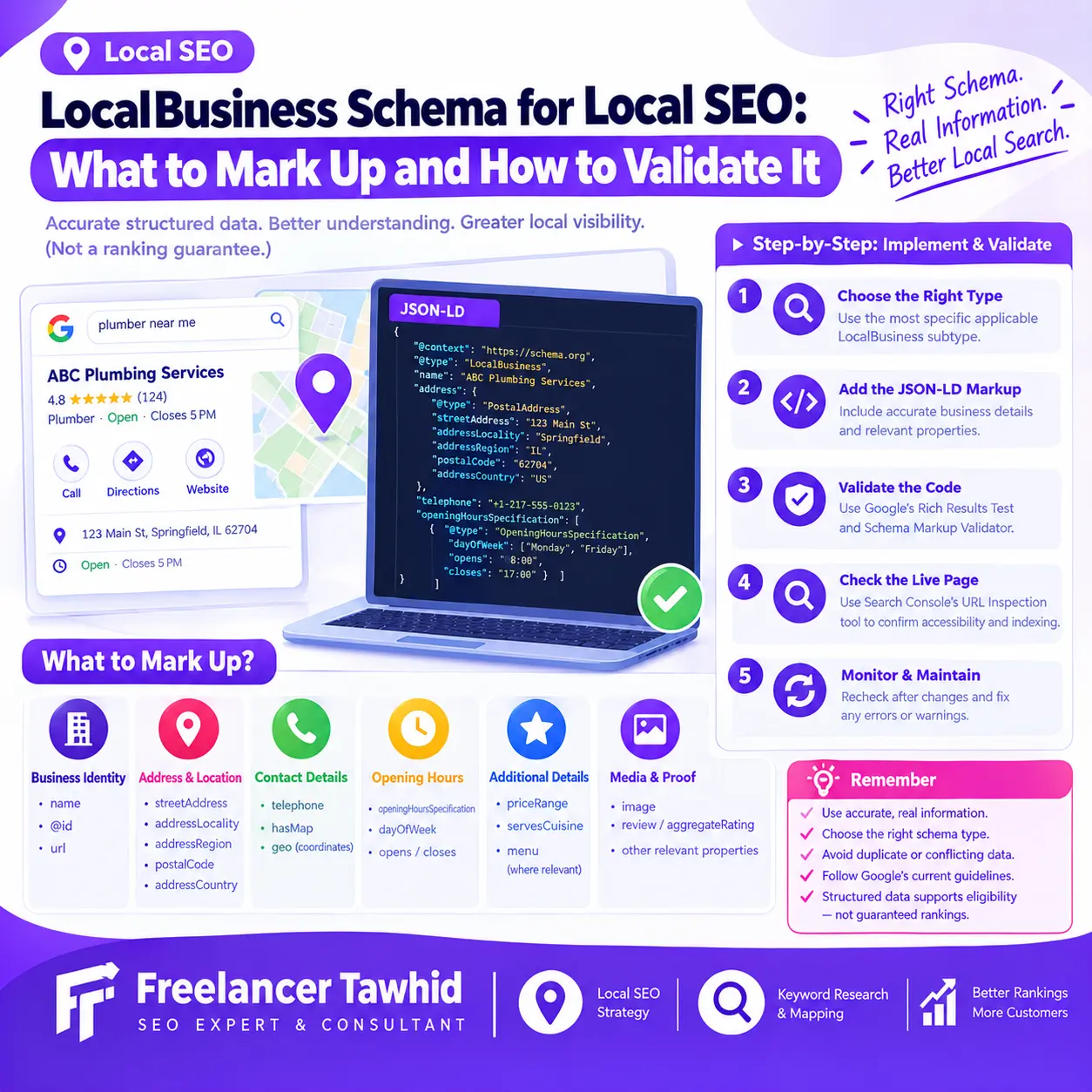
LocalBusiness schema is structured data that helps search engines understand information about a real-world business or branch, including its name, address, contact details, and opening hours. To implement it correctly, choose an appropriate business type, mark up accurate information, validate the code, and check the published page using Google’s testing tools. Correct markup supports eligibility for applicable search features but does not guarantee higher rankings.
In this guide, you’ll learn which LocalBusiness schema properties to use, how to implement JSON-LD, how to validate structured data, and how to diagnose common errors. You’ll also learn how schema relates to Google Business Profile and the wider Local SEO process.
What Is LocalBusiness Schema, and Why Does It Matter for Local SEO?
LocalBusiness schema is a type of structured data from Schema.org that describes a particular physical business or branch of an organization. It provides information in a standardized, machine-readable format so search engines can better interpret the business represented by a webpage.
For example, a restaurant website might use LocalBusiness structured data to describe its name, address, telephone number, opening hours, and menu URL.
Schema markup does not replace the visible content of a website. Instead, it provides a structured representation of information that should accurately reflect the business and the page.
How LocalBusiness schema supports local search understanding
Search engines need to interpret webpages, entities, and their relationships to understand what a business offers and which information belongs to it.
LocalBusiness schema can help describe:
- The identity of a business or branch.
- Its physical location and address.
- Its contact information and operating hours.
- Relevant business-specific details.
- The relationship between a business entity and its website.
Google can use eligible structured data to understand page content and determine whether a page qualifies for supported search features. However, valid markup does not guarantee that Google will display a rich result, Knowledge Panel, or other enhanced search appearance.
Structured data should therefore be treated as one component of a broader technical SEO strategy, not as a standalone ranking solution.
LocalBusiness schema vs. Google Business Profile
LocalBusiness schema and Google Business Profile serve different purposes. Although both can communicate business information, they are not interchangeable.
Aspect | LocalBusiness schema | Google Business Profile |
Where it exists | On your website | Google’s business listing platform |
Primary purpose | Describe business information in structured form | Manage a business’s presence on Google |
Typical information | Name, address, opening hours, telephone, and other applicable properties | Business details, hours, photos, reviews, and customer interactions |
How it is managed | Through website code, a CMS, a plugin, or custom implementation | Through Google Business Profile management tools |
Does it guarantee higher local rankings? | No | No |
For an eligible local business, both should contain accurate information. Nevertheless, adding schema to a website does not create a Google Business Profile, verify a business, or automatically improve its Google Maps position.
For help with the profile side of this process, see Google Business Profile Optimization.
Which Businesses Should Use LocalBusiness Schema?
LocalBusiness schema is most appropriate when a webpage describes a genuine physical business or branch. The exact implementation depends on the business model, the information available, and Google’s requirements for the intended search feature.
Physical storefronts and customer-facing businesses
Examples include:
- Retail stores
- Restaurants and cafés
- Dental and medical practices
- Gyms and fitness centers
- Salons and spas
- Other qualifying businesses operating at physical premises
These businesses may use an appropriate LocalBusiness subtype to describe their locations and relevant details.
For a business with several branches, each genuine location should be represented accurately rather than treating all branches as one physical entity.
Service-area businesses
Some businesses travel to customers rather than receiving customers at a public storefront. Examples include plumbers, mobile repair services, and certain home-service providers.
These businesses require careful treatment because the address they use internally may not be appropriate to publish publicly.
Do not invent a storefront, publish a misleading address, or assume that hiding an address in Google Business Profile automatically determines how website structured data should be implemented.
Google’s LocalBusiness rich-result documentation specifies a physical business location through its address requirements. If a service-area business does not have an appropriate public location to represent, verify Google’s current requirements before implementing markup intended for that feature.
You can still evaluate other appropriate structured-data types for describing the business and its services, provided the markup accurately represents the entity and follows the relevant guidelines.
Businesses with multiple locations
A business operating in multiple locations may need separate location entities and location-specific pages.
For example, a restaurant chain might have individual pages for its branches, each describing the relevant address, telephone number, opening hours, and other location-specific details.
The important considerations are:
- Each entity represents a genuine location.
- Each location’s information is accurate.
- Each location page describes the appropriate branch.
- Identifiers distinguish the relevant entities.
- The markup does not associate one branch with another branch’s details.
Avoid copying one location’s complete schema across every branch without updating the location-specific information.
When a different schema type is more appropriate
LocalBusiness is a broad type, but it is not the correct default for every website.
A business with no qualifying physical location may be better represented using Organization or another appropriate type, depending on the entity and page.
A local business should also use the most specific applicable LocalBusiness subtype supported by the vocabulary. For example, a restaurant can use Restaurant rather than the generic LocalBusiness type.
Schema.org defines LocalBusiness as a particular physical business or branch and places it within both the Organization and Place hierarchies. See the official Schema.org LocalBusiness definition.
Which LocalBusiness Schema Properties Should You Mark Up?
The properties you choose should describe the actual business and satisfy the requirements of the relevant structured-data feature.
Not every Schema.org property is required by Google. Some properties are recommended for the Local Business rich-result feature, while others simply provide additional semantic information.
Core business identity properties
The following properties are useful starting points.
Property | Purpose | Implementation guidance |
@context | Identifies the vocabulary used | Use https://schema.org |
@type | Defines the entity type | Select the most specific applicable type |
@id | Provides a stable identifier for the entity | Use a consistent, unique identifier where appropriate |
name | Identifies the business | Use the genuine business name |
url | Identifies the business’s website or specific location page | Use the appropriate canonical URL |
address | Describes a physical business location | Use a nested PostalAddress object |
For Google’s Local Business rich-result feature, name and address are documented as required properties. The address must represent a genuine physical business location and should include as many applicable details as possible.
A typical address object may contain:
- streetAddress
- addressLocality
- addressRegion
- postalCode
- addressCountry
Which fields apply depends on the location and its postal-address conventions.
Do not invent missing address components merely to fill every field. Ensure that the address accurately identifies the business location being described.
Contact and geographic properties
Additional properties can provide useful information when they apply.
telephone
Use an appropriate primary business contact number. Including the country and area codes helps represent the number consistently.
geo
This property can describe the business’s geographic coordinates using GeoCoordinates, including latitude and longitude.
Only use coordinates that accurately represent the relevant location. Incorrect coordinates can misrepresent the business.
image
Use relevant, accessible images that represent the business or location. Do not add unrelated images simply to increase the number of properties.
hasMap
This property can identify an appropriate map URL where relevant. Confirm that the destination actually represents the business location.
These properties are not universally required for every implementation. Check the current Google documentation to determine which ones are supported and recommended for your intended use.
Business hours and operational details
The openingHoursSpecification property can describe the hours during which a business location operates.
It uses the OpeningHoursSpecification type to represent details such as the days of the week, opening times, and closing times.
For example, a business might be open from 09:00 to 17:00 on weekdays but operate different hours on weekends. The markup should reflect those actual hours.
Other applicable properties may include:
- priceRange for a meaningful indication of the business’s relative price range.
- servesCuisine for an appropriate food establishment.
- menu for a restaurant’s menu URL.
- department for a qualifying department within a larger business.
Do not copy restaurant-specific properties into a schema implementation for a dental practice or repair service. Choose properties based on the business type and the information that can be verified.
Reviews, ratings, and conditional properties
Review-related markup requires particular care.
Properties such as review and aggregateRating have specific requirements, and their suitability depends on the business, the source of the reviews, and the applicable Google feature.
Google’s LocalBusiness documentation limits its recommendations for certain review properties to sites that capture reviews about other local businesses. Its review snippet policies also restrict self-serving review markup for an Organization or LocalBusiness when the business controls the reviews about itself.
Adding a rating to the JSON-LD does not make it eligible for a review rich result.
Before including reviews or ratings, consult Google’s review snippet guidelines and the current Local Business structured-data documentation.
Required vs. recommended properties
It is important to distinguish three categories:
- Google-required properties: Fields needed to qualify for the specific Google rich-result feature.
- Google-recommended properties: Additional fields Google documents as useful for that feature.
- Other Schema.org properties: Valid vocabulary that can describe an entity but does not necessarily enable a Google rich result.
A property may be valid in Schema.org without being required or supported by a particular Google search feature. Always consult both the vocabulary and the relevant Google documentation.
How to Choose the Correct LocalBusiness Schema Type
Choosing the correct type helps avoid inaccurate or overly generic entity descriptions.
Start with the actual business category
Select the type that describes the real business rather than the service keyword you want to rank for.
For example:
- A qualifying restaurant can use Restaurant.
- A qualifying spa can use DaySpa.
- A qualifying health club can use HealthClub.
Check the current Schema.org definitions before using a subtype. A familiar business category does not automatically mean that every similarly named type is valid or appropriate for your implementation.
Use the most specific applicable subtype
Google recommends using the most specific applicable LocalBusiness subtype.
This does not mean selecting the narrowest imaginable type regardless of accuracy. The type must accurately represent the business and be supported by the relevant vocabulary.
A type’s existence in Schema.org also does not guarantee that Google provides a dedicated rich-result feature for it.
Represent multiple locations clearly
For a multi-location organization, distinguish the overall organization from its individual branches.
A useful implementation may include:
- An organization entity describing the overall business.
- Separate location entities for genuine branches.
- Appropriate relationships between the organization and its locations.
- Stable @id values.
- Relevant location-specific URLs.
The exact graph depends on the website’s structure. Do not add unnecessary complexity when a straightforward entity description is sufficient.
How to Add LocalBusiness Schema Using JSON-LD
JSON-LD is generally the most convenient format for implementing structured data because it keeps the markup separate from the visible HTML content. Google recommends JSON-LD when a website’s setup supports it.
Follow these steps to create and implement the markup.
Step 1: Audit the existing structured data
Before adding a new schema block, determine what the website already outputs.
Check:
- Your CMS or website platform.
- Your SEO plugin’s schema settings.
- Your theme’s structured-data output.
- Any custom JSON-LD added by a developer.
- Other plugins that may generate Organization or LocalBusiness entities.
This is particularly important when using a CMS with built-in structured data. Adding another block without checking the existing implementation can create duplicate or conflicting entities.
The objective is not to maximize the number of schema blocks. It is to provide an accurate, coherent representation of the relevant entities.
Step 2: Map verified business information to properties
Prepare a source of truth before writing the code.
Confirm the business’s genuine name, appropriate physical address, canonical website URL, contact number, opening hours, business category, and any additional properties you intend to include.
For a business with several branches, maintain separate verified information for each location.
Do not copy information from a competitor’s schema, guess coordinates, or insert invented business details to make the markup look complete.
Step 3: Create the JSON-LD markup
The following example illustrates a fictional restaurant. Replace every example value with verified information before using similar markup on a real website.
<script type=”application/ld+json”>
{
“@context”: “https://schema.org”,
“@type”: “Restaurant”,
“@id”: “https://example.com/locations/sample-restaurant/#business”,
“name”: “Sample Restaurant”,
“url”: “https://example.com/locations/sample-restaurant/”,
“telephone”: “+12125550123”,
“image”: “https://example.com/images/sample-restaurant.jpg”,
“address”: {
“@type”: “PostalAddress”,
“streetAddress”: “123 Example Street”,
“addressLocality”: “Example City”,
“addressRegion”: “Example Region”,
“postalCode”: “10001”,
“addressCountry”: “US”
},
“openingHoursSpecification”: [
{
“@type”: “OpeningHoursSpecification”,
“dayOfWeek”: [
“Monday”,
“Tuesday”,
“Wednesday”,
“Thursday”,
“Friday”
],
“opens”: “09:00”,
“closes”: “17:00”
}
],
“servesCuisine”: “Italian”
}
</script>
Important: This is an illustrative example, not a tested implementation for a real business. The example values, including the telephone number, address, image URL, and hours, must not be copied into a live website as if they were genuine.
The example demonstrates several useful principles:
- @context identifies the Schema.org vocabulary.
- @type identifies the business as a restaurant.
- @id gives the entity a stable identifier.
- name identifies the business.
- url points to its specific location page.
- address describes the location using PostalAddress.
- openingHoursSpecification describes the example’s weekday opening hours.
- servesCuisine describes an applicable business-specific attribute.
The example uses a specific subtype because it represents a restaurant. For another business, select the appropriate type and remove properties that do not apply.
The @id value should be stable and consistent wherever the same entity is referenced. Use the canonical URL of the real location page rather than the example URL.
Also ensure that the visible page content agrees with the markup. Structured data must not describe information that is false, misleading, or inconsistent with the page.
Step 4: Add the markup to the appropriate page
JSON-LD can generally be placed in the HTML head or body. The implementation must be accessible to Google and correctly rendered.
Common approaches include:
Using a CMS or SEO plugin
Configure the existing schema settings where possible. Confirm which properties the plugin generates and whether the resulting markup accurately describes the relevant business.
Using custom code
A developer can implement JSON-LD in the site’s template or page output. This may be useful when the site needs location-specific data or more control over entity relationships.
Using JavaScript-generated markup
Google can process certain dynamically injected structured data, but the rendered output must be accessible and correctly implemented. Verify the deployed page rather than relying solely on what the CMS editor displays.
Avoid inserting multiple independent implementations unless their roles and entity relationships are intentional.
Step 5: Connect the markup to the correct entity
Use identifiers and URLs consistently when describing the same business across multiple pages.
For example, a location page should not accidentally reference the identifier of another branch. Similarly, an organization entity should not be confused with a particular physical location.
Keep the implementation as simple as the website’s actual entity structure allows.
How to Validate LocalBusiness Schema Before Publishing
Validation should take place both before deployment and after the markup is live. Each tool answers a slightly different question, so one successful test is not sufficient for every purpose.
Step 1: Test the markup with Google’s Rich Results Test
Open the Google Rich Results Test.
You can test a public URL or enter a code snippet. For a deployed website, testing the URL is particularly useful because it allows you to examine the page Google can access.
Review:
- Which supported structured-data items Google detects.
- Whether required properties are missing.
- Whether the tool reports errors or warnings.
- Whether the detected markup qualifies for the supported rich-result feature.
Correct critical errors and review relevant warnings.
A successful result means that the tested markup meets the tool’s checks for the supported feature. It does not prove that every Schema.org property is valid, that the page is indexed, or that Google will display a rich result.
Step 2: Use the Schema Markup Validator
Open the Schema Markup Validator.
This tool is useful for inspecting broader Schema.org vocabulary and structural issues, including types and properties that are not necessarily associated with a Google rich-result feature.
Use it to check whether the markup follows the vocabulary and whether its properties are structured appropriately.
The distinction matters:
- The Rich Results Test checks eligibility for supported Google rich-result features.
- The Schema Markup Validator checks Schema.org markup more broadly.
A page can use valid Schema.org vocabulary without qualifying for a particular Google rich result. Conversely, passing one tool should not be treated as proof that the complete implementation is accurate or policy-compliant.
Step 3: Inspect the rendered page
After reviewing the test results, inspect the deployed HTML and rendered output.
Confirm that:
- The JSON-LD is present.
- The markup is syntactically valid.
- The intended business type is detected.
- Nested objects, such as PostalAddress, are structured correctly.
- The correct business name, address, and URL are included.
- No stale or conflicting schema block is overriding the intended information.
- The markup agrees with the visible page and represents the correct entity.
If a plugin is responsible for the markup, inspect the output it generates rather than assuming its settings are correct.
Step 4: Inspect the live URL in Google Search Console
Use Google Search Console to inspect the published URL.
The URL Inspection tool can help you understand whether Google can access the page and what information is available about its crawling and indexing status.
Check for issues such as:
- A URL that Google cannot fetch.
- A page blocked by robots.txt.
- A noindex directive.
- A canonical URL that differs from the intended page.
- Structured data that is absent from the rendered page.
- An indexed version that does not reflect recent changes.
Available structured-data enhancement reports depend on the type of markup and the features Google recognizes for the site.
Search Console does not replace the Schema Markup Validator or the Rich Results Test. It adds a post-deployment perspective on Google’s access to the page.
Step 5: Request recrawling and monitor changes
After correcting and deploying the markup, use URL Inspection to test the live page. If appropriate, request indexing and make sure the page is included in a valid sitemap.
Google needs time to recrawl and reprocess the page. A successful validation test or indexing request does not guarantee immediate processing or a search appearance.
Recheck the page after deployment and monitor relevant Search Console reports when available.
Common LocalBusiness Schema Errors and How to Fix Them
Structured-data problems can originate from syntax, incorrect properties, conflicting implementations, inaccurate business details, or issues unrelated to the markup itself.
Use the following diagnostic table to identify the next step.
Problem | Possible cause | Recommended action |
Missing required property | The required business name or address is absent or incorrectly structured | Check Google’s current property requirements and correct the JSON-LD |
Invalid JSON | Missing commas, quotation marks, or closing brackets | Validate the syntax and test the corrected code |
Incorrect property type | A field contains a value of the wrong type | Check the Schema.org definition and use the expected data structure |
Wrong business type | The selected type does not represent the business | Choose the most specific applicable type |
Duplicate business entities | Multiple plugins or templates generate overlapping schema | Inspect all schema blocks and establish a consistent implementation |
Incorrect business information | Address, hours, telephone, or other details are outdated | Verify the source information and update the markup |
Schema not detected | Markup is missing, blocked, or not rendered as expected | Inspect the rendered page and test the live URL |
Valid markup but no rich result | The page is not indexed, the feature is not displayed, or another eligibility condition is unmet | Check Search Console and the relevant Google guidelines |
Missing or incorrectly formatted required properties
Start by identifying whether the problem is a missing property, a syntax error, or an invalid data structure.
For example, the address property should generally contain a PostalAddress object rather than an arbitrary text string when implementing Google’s Local Business rich-result markup.
Correct the underlying problem rather than adding unrelated fields to eliminate warnings.
Markup does not match visible business information
A technically valid schema block can still be misleading if it describes incorrect information.
Examples include an outdated address, inaccurate opening hours, a telephone number that no longer belongs to the business, or a business name that does not match the real entity.
Verify the information and ensure the structured data accurately reflects the page.
Duplicate schema generated by plugins
Two plugins may generate separate business entities with different identifiers, names, or URLs.
Do not immediately remove all schema. First determine which block is authoritative, whether both blocks describe the same entity, and whether their coexistence is intentional.
Then consolidate or correct the implementation so the page describes the business consistently.
Using the wrong schema type or property
A property may be valid in Schema.org but unsuitable for the selected entity or unsupported for a particular Google feature.
Check both the type definition and the Google documentation. Remove irrelevant properties and use a more appropriate type when necessary.
Validation succeeds, but the expected rich result does not appear
This does not automatically mean the markup is broken.
A successful test is only one part of the process. Google also considers eligibility policies, crawling, indexing, and whether a particular search appearance is appropriate.
Check the page’s indexing status, the current feature requirements, and any relevant Search Console reports. Avoid repeatedly adding more properties in the hope of forcing a display.
How to Handle LocalBusiness Schema for Multiple Locations
Multi-location websites require a clear distinction between the overall business and its individual branches.
Give each genuine location a clear identity
When each branch has its own relevant webpage, describe the specific location on that page.
Use the correct name, address, telephone number, hours, and other applicable properties for that branch. Keep the entity identifier and URL consistent with the location being represented.
Avoid reusing one address or identifier for unrelated branches
A common template error occurs when one branch’s schema is copied to another page without changing the address or identifier.
This can create conflicting entity information and make it difficult to understand which location the markup describes.
Use a consistent template for shared properties, but populate location-specific values from verified information.
Align location pages, structured data, and public business information
Check that each page describes the correct branch and that its business details are accurate.
Where applicable, compare the information with the business’s legitimate public listings and Google Business Profile.
The objective is consistency and accurate entity representation—not creating additional schema entities simply to increase the amount of markup on the website.
Does LocalBusiness Schema Improve Google Rankings?
LocalBusiness schema can help search engines interpret business information and may support eligibility for applicable search features. However, implementing it does not guarantee higher organic rankings, better Google Maps placement, or a particular rich result.
Structured data is not a ranking shortcut
Google’s documentation explains that structured data enables eligibility for certain search features but does not guarantee that those features will appear.
LocalBusiness markup should therefore be implemented for accuracy, clarity, and compliance with the relevant technical requirements—not because adding more properties is assumed to produce a ranking improvement.
Rich-result eligibility is not ranking success
Three separate outcomes need to be distinguished:
- Valid markup: The structured data is syntactically and structurally correct.
- Eligibility: The page meets the requirements for a supported search feature.
- Display and performance: Google decides whether to show a feature, and the page receives whatever search visibility and engagement result from that decision.
These outcomes are related, but they are not interchangeable.
Combine structured data with a broader Local SEO strategy
Schema is only one part of website optimization.
Depending on the business and its goals, a broader strategy may include:
- Useful, accurate location and service pages.
- Appropriate technical SEO and crawlability.
- Relevant internal linking.
- Accurate Google Business Profile information where eligible.
- Meaningful business information and customer experience.
- Ongoing monitoring of search visibility and website performance.
For a broader approach, explore Freelancer Tawhid’s Local SEO service. If the website has technical problems or unclear optimization priorities, a Local SEO audit can help identify which issues need attention.
How to Maintain and Revalidate LocalBusiness Schema
Structured data should be reviewed whenever relevant changes affect the business or website.
Recheck schema after business or website changes
Review the implementation after changes to:
- Business names or location details.
- Telephone numbers and opening hours.
- Canonical URLs or website structure.
- CMS themes, SEO plugins, or schema settings.
- Location-page templates.
- The business’s category or operating model.
A change to a website template can affect many location pages at once, so check representative pages after significant releases.
Monitor errors and eligible search features
Use the Rich Results Test for validation and Search Console to review the deployed page and relevant reports where available.
If an issue appears after a website update, determine whether the cause is the markup itself, a change in rendered HTML, an accessibility issue, or a difference between the live and indexed versions.
Prioritize fixes by accuracy and impact
A practical order is:
- Correct false or misleading business information.
- Fix syntax errors and missing required properties.
- Resolve incorrect types and conflicting entities.
- Address relevant warnings and optional improvements.
- Recheck the deployed page and monitor subsequent processing.
There is no universal revalidation interval that suits every website. Reviewing markup after meaningful changes is more useful than repeatedly testing an unchanged implementation without a reason.
LocalBusiness Schema Validation Checklist
Use this checklist when implementing or auditing LocalBusiness structured data.
- The selected schema type accurately describes the business.
- The business name and applicable physical address are correct.
- Optional properties are accurate and relevant.
- The JSON-LD syntax and nested properties are valid.
- Existing plugins and themes do not generate conflicting entities.
- The markup reflects the actual page content.
- Google’s Rich Results Test has been run for the intended supported feature.
- The Schema Markup Validator has been used when broader vocabulary validation is needed.
- The published page is accessible to Google and the markup is present in the rendered output.
- Search Console has been checked after Google has had time to process the page.
- The implementation will be reviewed after relevant business or website changes.
Completing this checklist improves implementation quality, but it cannot guarantee indexing, higher rankings, or a particular search appearance.
Frequently Asked Questions About LocalBusiness Schema
1. What is LocalBusiness schema in SEO?
LocalBusiness schema is structured data that describes a real-world business or branch, including its name, address, and other relevant details. It helps search engines interpret business information and may support eligibility for applicable search features. It does not guarantee higher rankings, better Google Maps visibility, or a particular rich result.
2. Which properties are required for Google LocalBusiness schema?
For Google’s Local Business rich-result feature, the documented required properties include name and address. Other properties, such as telephone, opening hours, and geographic coordinates, may provide useful details where applicable. Always check Google’s current documentation because requirements differ from the broader Schema.org vocabulary.
3. How do I test LocalBusiness schema?
Use Google’s Rich Results Test to check eligibility for supported Google rich results. Use the Schema Markup Validator to inspect broader Schema.org vocabulary and structure. After deployment, use Google Search Console’s URL Inspection tool to examine how Google accesses the live page. Passing one test does not guarantee a search appearance.
4. Can I use LocalBusiness schema for a service-area business without displaying my address publicly?
A service-area business should not invent a storefront or misrepresent its location. Google’s structured-data requirements and its rules for hiding a Business Profile address are separate considerations. Check the current requirements before implementing LocalBusiness markup, particularly if the business does not have an appropriate public physical location to describe.
5. Does LocalBusiness schema improve Google Maps rankings?
LocalBusiness schema can help describe business information on a website, but it does not guarantee higher Google Maps rankings or a better position in local results. Google considers multiple factors, including relevance, distance, and prominence. Schema should complement accurate business information and a broader Local SEO strategy rather than replace it.
Conclusion: Implement Accurate LocalBusiness Schema, Then Validate It
LocalBusiness schema helps describe a real-world business in a structured, machine-readable format. To implement it correctly, select the most specific applicable type, use accurate business information, choose relevant properties, and validate the JSON-LD before and after deployment.
Use Google’s Rich Results Test to evaluate supported search-feature eligibility, the Schema Markup Validator to check broader Schema.org vocabulary, and Search Console to inspect the published page. Remember that valid markup does not guarantee indexing, rankings, or a rich result.
Most importantly, treat structured data as one part of a complete website optimization process. Accurate business details, useful pages, sound technical implementation, and a consistent Local SEO strategy all contribute to a stronger foundation.
If you need help identifying technical issues, prioritizing fixes, or improving your broader local search strategy, explore Freelancer Tawhid’s Local SEO services or the Local SEO Audit service. These are relevant next steps if you need professional support beyond implementing schema alone.