
Local SEO Title Tags, H1s, and Meta Descriptions: How to Optimize Each Page

Freelancer Tawhid
SEO Expert and Consultant
- October 14, 2026
- No Comments
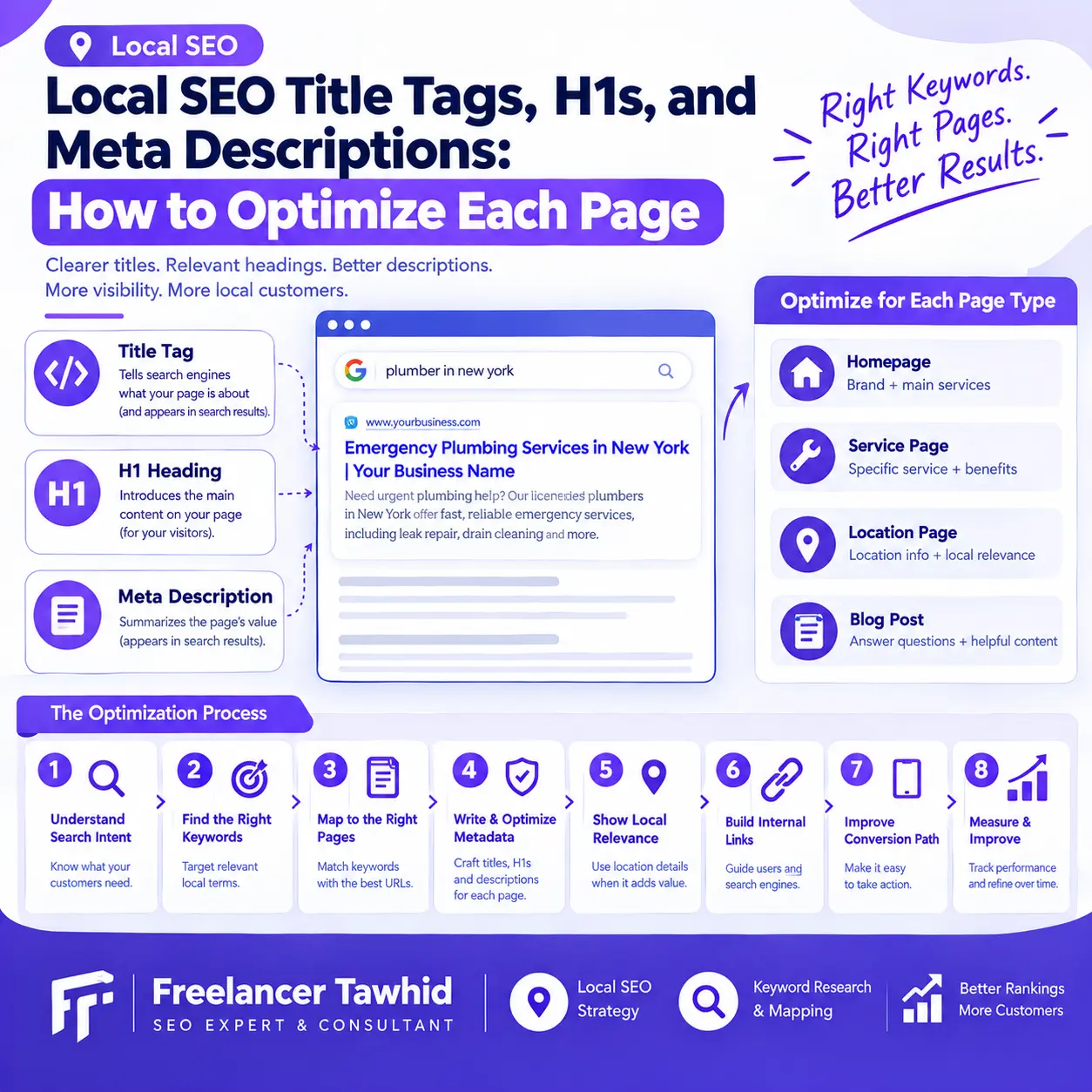
Optimizing title tags, H1 headings, and meta descriptions for local SEO starts with understanding the purpose of each page. Every important URL should have a clear topic, a descriptive title tag, a relevant main heading, and an accurate search-result summary. Use location modifiers where they genuinely match the page’s purpose, not simply to repeat keywords.
These elements help search engines interpret your content and help potential customers understand what a page offers. However, they do not guarantee higher rankings or determine exactly how Google displays your pages in search results.
In this guide, you’ll learn how to optimize each element, choose the right wording for different page types, avoid common local SEO mistakes, and build a repeatable page-by-page optimization process.
What Are Title Tags, H1s, and Meta Descriptions?
Title tags, H1 headings, and meta descriptions serve different purposes. Understanding how they work together makes it easier to optimize local business websites without repeating keywords unnecessarily.
What Is an SEO Title Tag?
An SEO title tag is the HTML <title> element that specifies a page’s title. It appears in the browser tab and can help Google determine the title link displayed in search results.
For local SEO, a title tag should communicate the page’s main topic, service, and relevant geographic context when appropriate.
For example, a plumbing business might use:
Emergency Plumbing Services in [City] | [Business Name]
This title identifies the service, establishes its geographic relevance, and includes the business name.
A different page about bathroom plumbing installations should not automatically use the same title. Its wording should reflect the specific service and intent of that page.
Google recommends descriptive, concise titles and advises against keyword stuffing and repetitive boilerplate titles. There is no fixed character limit for the HTML title itself; Google may truncate the displayed title link to fit the available space. Read Google’s title link documentation.
What Is an H1 Heading?
An H1 is the main visible heading that introduces a page’s content.
It helps visitors understand the page’s purpose and provides a clear structure for the information that follows.
For example:
Title tag: Emergency Plumbing Services in [City] | [Business Name]
H1: Emergency Plumbing Services
The title tag provides additional context for search results, while the H1 introduces the service to visitors.
For a local business website, the H1 should accurately describe the content of the specific URL. A service page should introduce that service, while a genuine location page should clearly identify the relevant branch or location.
A clear, prominent H1 is a useful editorial practice, but using multiple H1 elements does not automatically mean a page violates Google’s guidelines. The priority is a logical, understandable heading hierarchy.
What Is a Meta Description?
A meta description is an HTML element that summarizes a page:
<meta name=”description” content=”Describe the page accurately here.”>
Unlike the H1, the meta description is not normally visible in the main page content. It can, however, appear as the descriptive text beneath a title link in Google Search.
For example:
Need emergency plumbing assistance? Explore our plumbing services, understand the available solutions, and learn how to request help in [City].
The description should accurately represent the page, communicate relevant information, and help searchers determine whether the result meets their needs.
Google primarily generates snippets from page content, although it may use the meta description when that provides a more useful summary. The description you write is therefore a suggestion, not a guarantee of what Google will display. Learn more about Google snippets.
Title Tag vs. H1 vs. Meta Description
Element | Main purpose | Primary optimization goal |
Title tag | Defines the page title | Communicate the topic and relevance clearly |
H1 heading | Introduces the main page content | Set the right expectation for visitors |
Meta description | Summarizes the page for searchers | Explain the page’s value accurately |
All three elements should describe the same underlying subject. Their wording can differ because each has a different purpose.
Before Optimizing Metadata, Understand Each Page’s Search Intent
The most effective local SEO metadata begins with the page itself—not with a keyword inserted into a title template.
Before changing anything, identify what the page offers, who it serves, and which search intent it should satisfy.
Identify the Purpose of Each URL
Different page types require different optimization approaches.
Homepage: Represents the business and its primary offering.
Service page: Explains a particular service, its benefits, and how customers can obtain it.
Location page: Provides useful information about a genuine branch or a distinct local service offering.
Blog post: Answers an informational question, explains a process, or helps readers solve a problem.
For example, the homepage of a plumbing business may describe its overall plumbing services, while a dedicated drain-cleaning page should focus on drain cleaning rather than repeating the homepage’s generic wording.
The same principle applies to informational articles. A guide explaining how to fix a leaking faucet should target the reader’s informational need, rather than being written as though it were a commercial service landing page.
Select the Primary Query and Supporting Concepts
Use keyword research, the page’s existing content, and relevant search results to identify the query the page should serve.
Consider:
- What is the searcher trying to accomplish?
- Does the query indicate a need for information, a specific service, or a particular location?
- What information do relevant competing pages provide?
- Does the existing URL satisfy that intent?
- Which related concepts are necessary to explain the topic accurately?
For example, someone searching for emergency plumbing services is expressing a different need from someone researching how to prevent a clogged drain.
The title, H1, and description should reflect those differences.
For additional guidance, explore Local Keyword Research to understand how keyword groups can be mapped to the appropriate pages.
Decide Whether a Geographic Modifier Belongs on the Page
Location names can help clarify the relevance of a page to local searches. However, they should not be added indiscriminately.
A business might reasonably use a city name in a service-page title when that service is genuinely provided to customers in that market.
An informational article about writing SEO titles usually does not need a city name simply because its author offers Local SEO services.
Similarly, a business with multiple branches may benefit from distinct pages that provide meaningful information about each location. It does not automatically need a separate page for every city or neighborhood it hopes to rank for.
Google identifies the creation of substantially similar pages targeting specific cities or regions as a potential form of doorway abuse when those pages provide little distinct value and funnel users toward the same destination. Review Google’s spam policies.
The guiding principle is straightforward: create and optimize pages for genuine user needs, not merely for additional keyword variations.
How to Optimize Local SEO Title Tags
Title tags should identify a page’s primary subject clearly and help searchers understand why it is relevant to their query.
Use the following process for each important URL.
1. Start With the Main Service or Topic
Identify the most important concept the page addresses.
For a service page, this is usually the principal service. For an informational article, it is the question or topic the content explains.
Illustrative examples include:
- Emergency Plumbing Services | [Business Name]
- Roof Repair Services | [Business Name]
- How to Prevent Drain Blockages | [Business Name]
Each title communicates a distinct purpose instead of combining several loosely related keywords.
2. Add Location Information When It Helps
If geographic context is central to the page’s purpose, consider including it naturally.
For example:
Roof Repair in [City] | [Business Name]
This can be appropriate when the page describes roof repair services genuinely offered in that location.
However, adding the same city name to every blog post, unrelated service page, and general website resource is unnecessary.
A location modifier should improve the title’s meaning, not function as a keyword inserted by default.
3. Keep the Title Descriptive and Concise
A good title communicates the page’s subject without unnecessary repetition.
Consider these examples:
Weak:
Plumber, Plumbing, Plumbing Services, Best Plumbing Company
Stronger:
Plumbing Services for Homes and Businesses | [Business Name]
The stronger title tells searchers what the business offers without turning the title into a list of search terms.
There is no universal character limit imposed on title elements by Google. As a practical editorial starting point, many writers aim for a concise title that displays its key information early, then review how it appears in a search-result preview.
Do not treat a 50–60-character target as a ranking requirement.
4. Make Important Pages Distinct
Pages with different purposes should not share identical titles simply because they belong to the same business.
Consider a website with three services:
| Page | Illustrative title tag | |—|—| | Main services page | Plumbing Services | [Business Name] | | Drain-cleaning page | Drain Cleaning Services | [Business Name] | | Water-heater page | Water Heater Repair | [Business Name] |
The titles share a brand but distinguish the main purpose of each URL.
For multiple branches, use accurate location information where it helps users distinguish the pages. Make sure the content also provides useful, location-specific information.
Google recommends descriptive page titles and cautions against repeated or boilerplate titles that make different URLs difficult to distinguish.
- Avoid Common Title-Tag Mistakes
Watch for these problems:
- Repeating the same keyword several times.
- Using a title that describes a service the page does not offer.
- Adding irrelevant city names or service-area claims.
- Reusing a generic title across substantially different pages.
- Including outdated dates, offers, or business information.
- Making every title unnecessarily long by repeating the full brand name and a long list of services.
A title should reflect the content visitors will find after clicking. A compelling phrase is not useful if the page fails to deliver what it promises.
How to Write a Clear H1 for Each Local Page
The H1 should establish the page’s central subject as soon as visitors reach the content.
It should not merely repeat a keyword mechanically. Instead, it should summarize the page’s actual purpose in natural language.
Make the Main Heading Specific
Consider a service page targeting water-heater repair.
Too vague: Our Services
More descriptive: Water Heater Repair Services
The second heading immediately clarifies what the page covers.
If the page serves a particular local market, the geographic reference can be included when it improves clarity. Whether the city belongs in the H1 depends on the page’s purpose and the business’s actual operations.
Keep the H1 Consistent With the Title Tag
The title tag and H1 do not need to match word for word. They should, however, describe the same underlying subject.
For example:
Element | Example |
Title tag | Water Heater Repair in [City] \| [Business Name] |
H1 | Water Heater Repair Services |
Meta description | Learn about our water-heater repair services, the problems we address, and how to request assistance in [City]. |
The title identifies the service and its geographic relevance, while the heading introduces the content. The description summarizes the page for potential visitors.
Together, these elements communicate a consistent purpose without excessive repetition.
Organize Supporting Headings Around Real User Needs
Once the H1 identifies the topic, use H2s and H3s to organize the information visitors need.
A service page might include:
- Services provided and problems addressed.
- How the service works.
- Relevant qualifications or process details that can be verified.
- Pricing information, if available and accurate.
- Frequently asked questions.
- How to request the service.
Do not create headings for every keyword variation. Organize the content around useful information and meaningful subtopics.
Google’s title-link guidance explains that prominent headings and other page text can help its systems determine a suitable title link. A clear main heading and consistent page content help reduce ambiguity.
How to Write Effective Meta Descriptions for Local Pages
A meta description should summarize what the page offers and help the searcher decide whether to visit it.
It should be unique where practical, accurate, and specific to the page’s purpose.
1. Summarize the Actual Page
Begin by identifying the main subject and the most useful information a searcher can expect.
For a service page, describe the service and relevant details. For a blog post, summarize the question the article answers.
Weak example:
Plumber plumbing services, plumbers near me, emergency plumber, best plumber, plumbing company.
Improved example:
Explore our plumbing services, learn which problems we address, and find out how to request assistance for your property.
The improved version describes an actual offering in natural language rather than listing keywords.
2. Communicate a Relevant Benefit
A description can explain why a page is worth visiting.
For example, a drain-cleaning page might summarize the types of blockages the business handles and explain how customers can request an assessment.
Only include claims the business can substantiate. Do not invent emergency availability, certifications, discounts, customer ratings, or performance guarantees.
For an informational article, explain what the reader will learn rather than writing a sales pitch.
3. Write Unique Descriptions for Important Pages
Reusing the same description across unrelated pages gives searchers little information about how those pages differ.
For example, the description of a roof-repair page should focus on roof repair rather than repeat the general description of the company’s homepage.
For larger websites, descriptions can be generated programmatically when they remain readable and accurately reflect the individual pages. Google’s guidance explicitly recognizes that useful, diverse programmatic descriptions can be appropriate for large sites.
4. Understand Length and Google Snippet Selection
Google does not specify a strict character limit for meta descriptions. Search snippets may be shortened to fit the available display space, and the wording can vary according to the search query.
A description that is useful for one query may not be the text Google chooses to display for another.
Treat common character-count recommendations as editorial guidance rather than fixed rules. Put the most important information early enough that the description remains useful if it is shortened.
5. Avoid Misleading or Repetitive Descriptions
Avoid keyword lists, excessive city-name repetition, unsupported promotional claims, and generic summaries that could describe almost any page on the website.
For practical guidance, see Google’s documentation on writing effective meta descriptions.
Local SEO Title Tag, H1, and Meta Description Examples
The following examples are illustrative templates. Replace the placeholders with accurate business information and adapt the wording to the actual page. They do not represent measured client results or proven ranking improvements.
Page type | Title tag | H1 | Meta description direction |
Homepage | Plumbing Services in [City] \| [Business Name] | Plumbing Services for Homes and Businesses | Summarize the business, its main services, and its relevant service area. |
Service page | Emergency Plumbing in [City] \| [Business Name] | Emergency Plumbing Services | Explain the service offered and how customers can request assistance. |
Genuine branch page | [Business Name] — [Branch Name] \| [City] | [Business Name] — [Branch Name] | Describe verified branch details and the services available there. |
Informational article | How to Prevent Drain Blockages: A Practical Guide | How to Prevent Drain Blockages | Summarize the advice, preventive steps, and important considerations covered in the article. |
Before-and-After Example
Imagine a local plumbing service page with the following original metadata.
Before optimization
- Title: Plumber | Plumbing | Best Plumbing Services
- H1: Welcome to Our Website
- Meta description: We provide professional services. Contact us today.
The problem is not simply that these elements lack enough keywords. They fail to communicate the page’s specific purpose or distinguish the business’s offering.
After optimization
- Title: Drain Cleaning Services | [Business Name]
- H1: Drain Cleaning Services
- Meta description: Explore drain-cleaning services for common blockages and learn how to request an assessment for your property.
The revised set is more specific and consistent. The title identifies the service, the H1 introduces the page, and the description previews its content and next step.
This revision is an example of clearer communication, not a guarantee of improved rankings or CTR.
A Step-by-Step Workflow for Optimizing Existing Pages
A repeatable process helps prevent inconsistent metadata and makes it easier to review changes over time.
Step 1: Create a Page Inventory
List the important URLs on your website, prioritizing homepages, service pages, genuine location pages, and useful informational articles.
Record the following for each URL:
Field | What to record |
URL | The page being optimized |
Page type | Homepage, service, location, or article |
Primary purpose | The main job the page should accomplish |
Primary query | The principal search intent |
Current title | The existing HTML title |
Current H1 | The visible main heading |
Current description | The meta description, if present |
Indexability | Whether the page is eligible for indexing |
Proposed changes | The revised title, heading, and description |
This inventory makes duplicate wording and unclear page purposes easier to spot.
Step 2: Map Queries to the Correct Pages
Review keyword research, current search results, and existing content to determine which page should satisfy each main search intent.
If two URLs target substantially the same purpose, investigate whether both are necessary. However, similar keywords do not automatically mean two pages are competing incorrectly. Different services or user needs may justify separate pages.
For additional help, explore Local Keyword Research.
Step 3: Draft the Title, H1, and Description Together
Write all three elements as a set, rather than optimizing them independently.
Ask:
- Does the title accurately represent the page?
- Does the H1 clearly introduce the main subject?
- Does the description summarize the actual content?
- Are geographic references appropriate?
- Does each important page have a distinct purpose?
Reading the three elements together often reveals inconsistencies that are not obvious when reviewing them separately.
Step 4: Implement the Changes and Inspect the Page
Update the fields in your content management system or SEO plugin.
After publishing, check the rendered page and verify that the intended title tag, H1, and meta description have been implemented correctly.
Also review the visible content. A revised title cannot compensate for a page that lacks the information it promises.
Step 5: Complete a Quality-Control Review
Before finishing, verify that each priority page has:
- A descriptive, appropriate title tag.
- A clear main heading.
- An accurate meta description.
- Wording that matches the page’s actual purpose.
- Appropriate geographic information, where relevant.
- No unnecessary keyword repetition.
- No obvious template errors or stale claims.
If the website has many URLs, start with the pages that matter most to the business rather than trying to rewrite everything at once.
Step 6: Monitor Performance
Use Google Search Console to review available impressions, clicks, click-through rate (CTR), search queries, and landing pages.
Pay attention to pages that receive relevant impressions but appear to be attracting the wrong audience or providing a weak search-result preview.
Metadata changes should be assessed in context. Rankings, clicks, and CTR can also change because of search demand, competitors, query mix, seasonality, and other website updates. A change in performance after an edit does not, by itself, prove that the metadata caused the change.
Common Local SEO Metadata Problems and How to Fix Them
Duplicate Title Tags and Meta Descriptions
When distinct pages have identical titles or descriptions, users have less information to distinguish the results.
Start by checking whether the URLs represent different services, locations, or search intents.
If they do, rewrite the metadata to reflect each page’s purpose. If they do not, consider whether the site structure itself needs revision before making superficial wording changes.
Adding the Same City Name to Every Page
A city name should not be added merely because the website offers Local SEO services.
A location modifier can be appropriate for a page serving a relevant local search need. It may be unnecessary for a general blog post, a technical explanation, or a service page whose intended audience is broader.
Optimize for relevance rather than keyword frequency.
A Title Tag and H1 That Promise Different Things
If a title advertises one service but the visible heading introduces another, users may struggle to understand the page.
Align the title and H1 with the actual content. If the page covers several services, make its primary purpose clear and use supporting headings to organize secondary topics.
Google Displays a Different Title
Google generates title links automatically using sources that can include the HTML title, headings, prominent page text, and other information. It may change the displayed title when its systems determine another representation is more suitable.
If you notice an unexpected title:
- Check whether the HTML title is descriptive and accurate.
- Compare it with the H1 and prominent page content.
- Remove outdated or repetitive wording.
- Verify that the title does not promise something the page fails to deliver.
- Allow Google to recrawl the updated page and reassess the displayed result.
You can request recrawling through Search Console when appropriate, but this does not guarantee immediate processing or a particular title.
Google Uses Different Snippet Text
Google may use on-page text instead of the meta description when its systems consider that text more relevant to the search.
First, verify that your description accurately summarizes the page. Then inspect whether the page itself provides a clear, useful answer to the queries being investigated.
Do not assume that every difference between your description and Google’s snippet represents an error. Different search queries may lead Google to select different text.
Similar Location Pages Compete for the Same Intent
When businesses operate multiple branches, separate landing pages may help customers find relevant branch information. The pages should offer meaningful value beyond changing a city name.
Review whether each location page provides relevant details about the actual branch, its services, and the information customers need.
Where two pages serve essentially the same purpose and provide little distinct value, consider whether consolidation or a clearer information architecture would better serve users.
For a related discussion, read Google Maps SEO for Multi-Location Businesses.
How to Measure and Improve Metadata Over Time
Metadata optimization should be treated as an ongoing quality-control process, not a one-time task that guarantees a ranking increase.
Use Google Search Console to Identify Opportunities
Review performance by page and relevant query. Look for patterns such as:
- Important pages receiving impressions for relevant searches.
- Pages attracting impressions for queries that do not match their content.
- Search-result titles that appear outdated or unclear.
- Descriptions that fail to communicate the page’s actual subject.
- Several URLs appearing for overlapping queries where their purposes are not sufficiently distinct.
These observations help determine where to investigate first. They do not automatically establish that metadata is the underlying problem.
Separate Rankings, Impressions, and CTR
Each metric measures something different.
Impressions indicate that a result was shown in recorded search performance data.
Clicks measure visits generated through those search results.
CTR represents the proportion of impressions that resulted in clicks.
A page can receive more impressions without gaining clicks, while CTR can change because the mix of queries or ranking positions has changed.
Use these metrics to guide investigation rather than assuming that every change is evidence of a successful or unsuccessful title rewrite.
Prioritize Pages With a Clear Reason for Improvement
Start with important service pages, pages with inaccurate metadata, and pages where the current wording does not adequately describe the content.
Change elements for identifiable reasons and keep a record of meaningful updates. When possible, avoid changing many unrelated parts of the page at the same time if you need to evaluate what happened afterward.
Remember that title tags, H1s, and meta descriptions work alongside content quality, internal linking, technical accessibility, and overall search intent.
To review more comprehensive on-page issues, explore Freelancer Tawhid’s Local SEO Audit service.
Frequently Asked Questions
1. Do title tags and H1s need to match exactly?
No. A title tag and an H1 can use different wording as long as they accurately communicate the same page topic and intent. The title may include relevant context that helps distinguish the search result, while the H1 introduces the visible content. Avoid conflicting promises or using unrelated terms in either element.
2. Should every local SEO page include a city name in the title and H1?
No. Include a city or location name when it genuinely helps describe the page’s service, branch, or local relevance. General informational pages do not automatically need city names, and businesses serving multiple locations should not create near-identical pages merely to target additional geographic keywords. Each page should serve a meaningful user need.
3. What is the ideal length for a title tag and meta description?
Google does not specify a universal character limit for either element. Write descriptive titles and useful meta descriptions, placing the main information early in the text. Google may truncate title links and snippets to fit the display, so character counters are editorial aids rather than guarantees about what users will see.
4. Do meta descriptions directly improve Google rankings?
Meta descriptions should primarily be treated as a way to summarize the page and help searchers understand the result, not as a guaranteed ranking lever. Google primarily generates snippets from page content and may use the meta description when it provides a better summary. Write descriptions for accuracy and relevance rather than expecting a particular ranking outcome.
5. Why does Google show a different title or meta description from the one I wrote?
Google generates title links and snippets automatically. It can draw from HTML titles, headings, and other page text, and it may select snippet text that better matches the search query. Review your metadata for accuracy, clarity, and consistency with the visible content, then allow Google to recrawl the updated page.
Final Thoughts: Optimize Each Page for Its Own Purpose
Effective local SEO metadata starts with a clear understanding of what every important URL should accomplish.
Write a descriptive title tag, use an H1 that introduces the main subject, and create a meta description that accurately summarizes the page. Make geographic references relevant to the page’s actual purpose, and avoid repeating keywords or building unnecessary location pages.
Then check the implementation, review search performance, and improve the pages where you identify genuine problems.
These steps create a clearer website structure and a better experience for people evaluating your business in search results. They also make metadata optimization easier to maintain as the website grows.
Need Help Improving Your Local Website Pages?
If you need help identifying metadata issues, improving heading structure, or aligning service pages with search intent, explore Freelancer Tawhid’s Local On-Page SEO services.
For broader website issues involving content, keyword mapping, technical SEO, or competing pages, consider a Local SEO audit.
You can also contact Tawhid to discuss your website, SEO priorities, and whether professional implementation or consultation is appropriate for your needs.