
Local Keyword Mapping: How to Assign Keywords to the Right Pages Without Cannibalization

Freelancer Tawhid
SEO Expert and Consultant
- October 14, 2026
- No Comments
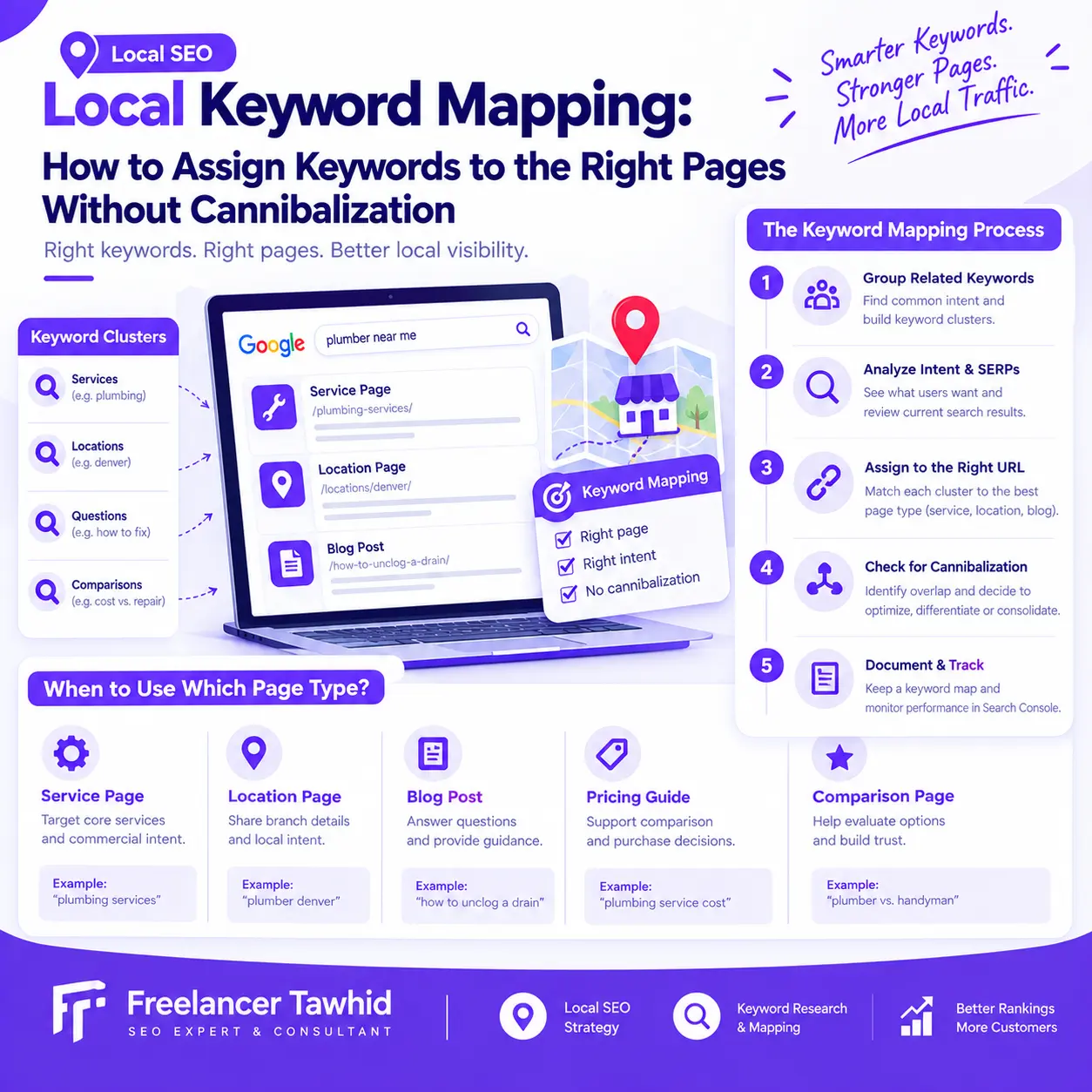
Local keyword mapping is the process of grouping related local search queries and assigning each group to the most appropriate website page. It helps businesses decide which keywords belong on service pages, location pages, and blog posts, identify unnecessary content overlap, and determine when to optimize, differentiate, or consolidate existing URLs.
Without a clear keyword map, a website can accumulate multiple pages targeting the same search intent while leaving other important topics inadequately covered. The solution is not to create a separate page for every keyword or eliminate every instance of overlap. It is to understand what searchers need and give each page a clear, useful purpose.
In this guide, you will learn how to map local keywords to URLs, choose between similar page types, identify potential keyword cannibalization, and make informed decisions using Google Search Console and a practical keyword mapping framework.
What Is Local Keyword Mapping, and Why Does It Matter?
Local keyword mapping connects groups of related search queries to the website pages best suited to answer them.
For example, a plumbing business might assign its main plumbing service queries to a core service page, drain-cleaning queries to a dedicated drain-cleaning page if justified, and educational questions about clogged drains to a helpful article.
Each page serves a defined purpose, and the overall website has a clearer structure.
How keyword mapping differs from keyword research and clustering
Although they work together, keyword research, keyword clustering, and keyword mapping are different activities.
Activity | Main purpose | Example |
Keyword research | Discover relevant search queries and evaluate their potential | Find searches related to plumbing services, drain cleaning, and emergency repairs |
Keyword clustering | Group related queries by topic and search intent | Group closely related drain-cleaning service queries |
Keyword mapping | Assign each cluster to an appropriate website URL | Assign the drain-cleaning cluster to the dedicated service page, if one is warranted |
Keyword research identifies opportunities. Clustering organizes them. Mapping turns that research into an actionable website and content plan.
If you need help with the research stage itself, my Local Keyword Research service covers keyword discovery, search intent analysis, competitor research, clustering, prioritization, and mapping opportunities to relevant pages.
This article focuses on the practical decisions involved in assigning keywords to URLs and managing potential cannibalization.
Why local keyword mapping matters for SEO
A keyword list alone does not tell you which pages your website needs.
You might discover several valuable searches related to one service, multiple offerings within the same industry, or queries combining a service with a geographic area. Without mapping, it is easy to target these opportunities inconsistently.
A well-maintained keyword map helps you:
- Establish a clear purpose for every important page.
- Target related keywords naturally within the same relevant page.
- Identify genuine content gaps before creating new URLs.
- Avoid unnecessary duplication between service pages, location pages, and blog posts.
- Improve internal linking by directing visitors to the most relevant destination.
- Prioritize existing pages that need optimization or clearer differentiation.
- Monitor whether search visibility is reaching the intended pages.
Keyword mapping does not guarantee rankings or prevent every instance of multiple URLs appearing in search results. Its purpose is to make the website more coherent and align content decisions with actual search needs.
Before Mapping Keywords, Audit Your Existing Pages
The first step is to understand what already exists.
Creating new pages before reviewing the current website can introduce unnecessary duplication, overlook useful existing content, and make the site more difficult to manage.
1. Build a complete URL inventory
Collect the important URLs from your website’s content management system, XML sitemap, site crawl, and Google Search Console.
For each relevant URL, record:
- The page URL.
- Its current title tag and H1.
- Its main topic and intended audience.
- Its page type, such as service page, location page, or blog post.
- Its indexability and canonical URL, where relevant.
- Its primary purpose and conversion goal.
- Its current search visibility, if data is available.
- Important internal links pointing to the page.
Include existing pages even when they perform poorly. A page receiving little organic traffic might still have a legitimate purpose, while another page attracting impressions might not be the best destination for the queries it receives.
Do not assume every URL in a sitemap deserves to remain indexed or that every published page requires its own keyword cluster.
2. Collect actual search queries and performance data
Google Search Console is a useful starting point for understanding how your existing pages appear in Google Search.
Open the Performance report and examine the Queries and Pages dimensions. Review clicks, impressions, click-through rate (CTR), and average position over a relevant period.
The official Search Console Performance report documentation explains how these metrics and dimensions can be used to understand search performance.
Look for patterns such as:
- A blog post receiving impressions for commercial service queries.
- Two similar service pages appearing for many of the same searches.
- A location page receiving visibility for queries that may be better served by another page.
- Important keyword groups with no suitable destination.
- Pages that receive impressions but few clicks, suggesting a need to investigate relevance, search-result presentation, or ranking position.
These patterns provide clues, not automatic diagnoses. Search Console does not label every instance of overlapping queries as keyword cannibalization.
3. Define the purpose of every important page
Before assigning keywords, summarize each page’s intended purpose in one sentence.
For example:
Page type | Intended purpose |
Main service page | Explain the core service and help suitable visitors inquire about it |
Dedicated service page | Address a distinct service offering and its specific customer needs |
Location page | Provide useful, accurate information about a genuine business location or service area |
Informational blog post | Answer a particular question or help readers solve a problem |
Comparison or pricing guide | Help readers evaluate options before making a decision |
This simple exercise often reveals overlap that a keyword spreadsheet alone cannot explain.
Two pages may use similar terminology while serving different audiences. Conversely, pages with different titles may answer essentially the same question.
The objective is to identify both the keyword and the purpose of the URL that should target it.
How to Map Local Keywords to the Right Pages
Once you have collected your URLs and keyword data, follow this workflow to assign search queries to their most appropriate destinations.
Step 1: Group related keywords into meaningful clusters
Begin by grouping keywords that represent the same underlying need.
A local service business might discover terms related to:
- Its core services.
- Specific service variations.
- Urgent or emergency needs.
- Service and location combinations.
- Pricing and comparison questions.
- Informational questions about common problems.
Do not create a separate cluster every time the wording changes.
For instance, two queries using slightly different descriptions of the same drain-cleaning service may be suitable for one page. A search for emergency plumbing assistance may represent a different need because urgency, availability, and the customer’s expected next step differ.
The important distinction is the underlying search intent, not simply the words used.
Practical rule: Group keywords together when one well-designed page can satisfy their shared intent comprehensively. Investigate separate pages when the underlying need is meaningfully different.
Step 2: Analyze search intent and compare the search results
Before assigning a cluster to a URL, examine what searchers are likely trying to accomplish.
Four common types of search intent are useful starting points:
Intent | What the searcher wants | Likely page type |
Informational | Learn something or solve a problem | Guide, blog post, or resource |
Commercial investigation | Compare services, providers, or costs | Comparison article, pricing guide, or detailed service content |
Transactional | Take an action or engage a provider | Relevant service or conversion page |
Navigational | Find a particular business or website destination | Appropriate business page |
Actual queries can have mixed intent, so use these categories as a framework rather than rigid labels.
Next, review the current search results for representative queries in the intended market.
Ask yourself:
- Which page types appear most frequently?
- Are the results primarily service pages, location pages, guides, or comparison articles?
- Do the same URLs appear for several closely related searches?
- Do different queries produce noticeably different results?
- Can your proposed page satisfy the need that the results suggest?
For example, someone searching for a plumber may be looking to hire a provider, while someone searching how to unclog a drain may want instructions. A service page and a useful educational article can therefore have legitimate, complementary roles.
Search results are evidence, not an absolute rule. Search intent should be assessed alongside the business’s actual offerings, existing site architecture, and the usefulness of the proposed page.
Step 3: Assign each cluster to the most appropriate URL
After reviewing the intent, select the best existing page or identify a justified content gap.
Use this decision framework:
Keyword cluster | Preferred destination | Decision criteria |
Core service searches | Main service page | The page explains the primary service and satisfies the relevant commercial need |
Distinct service searches | Dedicated service page, when justified | The service has a meaningful independent purpose and deserves dedicated content |
Service-plus-location searches | Relevant service or location page | The chosen URL best satisfies the search intent and reflects the business’s actual coverage |
Informational questions | Relevant blog post or guide | The content answers a distinct educational need |
Pricing and comparison searches | Pricing guide, comparison article, or service page | The page format matches how users evaluate the decision |
Similar keyword variations | Usually one suitable page | The queries share intent and do not need separate content |
A primary keyword is useful for planning, but it does not mean a page should target only one query. A well-planned page can naturally rank for many related terms.
Likewise, assigning a keyword to a page does not guarantee that Google will select that URL for every related search. The map defines your intended content strategy; actual search performance must still be monitored.
Step 4: Decide whether similar keywords need separate pages
This is one of the most important decisions in keyword mapping.
Keep related keywords on one page when:
- They represent the same underlying service or topic.
- Their search intent is substantially similar.
- One page can answer the relevant questions without becoming confusing.
- Separate pages would repeat most of the same information.
- The search results suggest that one comprehensive page is an appropriate format.
Consider separate pages when:
- The services are genuinely distinct.
- The queries represent different customer needs.
- The search results indicate different page types or intent.
- Each page can provide substantial, independently useful information.
- The website can support the pages through a coherent structure and internal linking.
Suppose a plumbing business offers standard drain cleaning and emergency plumbing.
The two subjects might warrant separate pages if customers need different information about service availability, urgency, the work involved, or how to request help. However, separate pages are not automatically necessary simply because the keywords differ.
If the business does not offer a genuinely distinct emergency service, creating a dedicated emergency page solely to target the phrase would be difficult to justify.
Similarly, a service page and a blog post can address related keywords without being duplicates when one serves a commercial purpose and the other solves an informational problem.
Step 5: Map service and location combinations carefully
Location modifiers introduce additional decisions because local searches reflect geographic intent.
A business serving several genuine locations may need location-specific pages, service-area content, or a combination of service and location information on existing pages.
The correct structure depends on the business model and the information customers need.
For example, a multi-location business might use a location page to explain a branch’s services, contact details, and relevant local information, while a central service page explains the business’s wider offering.
Before creating another URL, ask:
- Is the business genuinely present in, or appropriately serving, the relevant area?
- Does the search represent a distinct need?
- Can the new page provide useful information beyond changing a place name?
- Is there already a URL that satisfies the same search intent?
- Would expanding an existing page provide a better user experience?
Avoid automatically generating pages for every possible service-and-location combination.
Google’s spam policies describe doorway abuse, including creating similar pages for specific search queries without providing sufficient value beyond directing visitors toward the same destination. A scalable local SEO strategy should be built around genuine user needs, not repetitive location templates.
Step 6: Document the mapping decisions
Record your decisions in a keyword mapping spreadsheet so the strategy can be implemented and maintained.
A useful template includes:
Field | Example |
Keyword cluster | Drain-cleaning service queries |
Primary keyword | Drain cleaning service |
Supporting keywords | Relevant drain-cleaning variations |
Search intent | Commercial |
Preferred URL | /services/drain-cleaning/ |
Page type | Service page |
Current ranking URL | The URL currently receiving search visibility, if known |
Performance data | Clicks, impressions, CTR, and average position |
Recommended action | Keep, optimize, create, differentiate, merge, or redirect |
Reason | Why the selected URL best matches the search intent |
The example URL is illustrative, not a verified URL from a real plumbing website.
For larger websites, additional fields can record content status, priority, internal-link opportunities, assigned team members, and review dates.
The most important field is the reasoning behind each mapping decision. A spreadsheet becomes much more useful when it explains why a page should own a cluster and what needs to happen next.
Local Keyword Mapping Example: From Keyword Clusters to Target URLs
Consider a hypothetical plumbing business that offers several services and publishes educational content.
The following example shows how keyword mapping can connect different search needs to relevant destinations.
Keyword or query group | Search intent | Proposed destination | Why it fits |
Plumbing services | Commercial | Main plumbing service page | Explains the broad service offering |
Drain cleaning service | Commercial | Drain-cleaning service page, if justified | Targets a distinct service offering |
Emergency plumber | Urgent commercial | Emergency plumbing page, if the service warrants one | Can address urgent service needs and availability |
How to unclog a drain | Informational | Educational guide | Provides problem-solving instructions |
Drain-cleaning cost | Commercial investigation | Pricing guide or relevant service content | Helps readers evaluate cost and next steps |
The exact assignment should be checked against search results and the business’s actual offerings. This is a decision-making example, not a claim that these URL choices are universally correct.
What does this example reveal?
First, several keyword variations can belong to one page when they express the same need.
Second, a distinct commercial service may justify its own page when it provides independent value.
Third, informational and commercial searches can support different pages even when their topics overlap.
Finally, the mapping can reveal content gaps and duplication. A business might have three pages describing the same drain-cleaning service but no useful page answering a common customer question. Improving the existing pages and addressing the genuine information gap may be more valuable than producing another near-duplicate service page.
This is how keyword mapping turns keyword research into a practical website improvement plan.
How to Identify Genuine Keyword Cannibalization
Keyword cannibalization is often described as multiple website pages competing for the same search terms. In practice, the important issue is whether that overlap creates an actual problem for the website’s organic performance.
Multiple URLs appearing for the same query do not automatically indicate harmful cannibalization.
Two pages may rank for related searches because they satisfy different intents. Ahrefs explains this distinction in its guide to keyword cannibalization: overlapping visibility should be evaluated in context rather than treated as a problem that always needs fixing.
Warning signs that pages may be competing unnecessarily
Investigate further when you notice patterns such as:
- Two pages targeting substantially the same topic and search intent.
- Competing URLs containing much of the same content.
- Search visibility repeatedly moving between similar pages for important queries.
- A less appropriate page frequently receiving impressions for a valuable commercial query.
- Multiple pages with no clearly differentiated purpose.
- Internal links pointing inconsistently to different pages that target the same need.
None of these signs proves cannibalization by itself. Search visibility can fluctuate for many reasons, including changes in demand, competition, search results, content, and technical conditions.
The diagnosis requires looking at the URLs, their content, their search intent, and their performance together.
How to investigate competing URLs with Google Search Console
Use this process to investigate a suspicious keyword or keyword cluster.
- Open the Search Console Performance report.
Choose the Search results report and select a date range long enough to provide a meaningful comparison for the website.
- Filter for an important query.
Select a query that matters to the business. If related variations express the same intent, investigate those as well.
- Inspect the Pages dimension.
Review which URLs are receiving impressions and clicks for the selected query. If several pages appear, record their performance.
- Compare performance over time.
Look for meaningful changes in clicks, impressions, average position, and the distribution of visibility between URLs.
- Review the competing pages themselves.
Compare their target audience, page type, content, primary purpose, and conversion goal. Determine whether they genuinely satisfy the same need or serve different purposes.
- Decide whether action is justified.
If two pages answer the same question and provide little independent value, consolidation or differentiation may be appropriate. If they serve distinct intents and both contribute useful traffic, keeping both may be the better decision.
Google’s Search Console Performance report documentation explains the available metrics and reporting dimensions. Search Console helps identify patterns, but it does not make the strategic decision for you.
Third-party SEO tools can supplement this process with keyword overlap and ranking-history reports. Treat those reports as investigation tools rather than automatic instructions to merge pages.
How to Fix Keyword Cannibalization Without Damaging Useful Pages
Once you have confirmed that overlapping pages are causing a genuine problem, choose a solution that reflects the underlying issue.
There is no single fix for every situation.
Option 1: Differentiate pages that serve different search intents
If two pages have legitimate but distinct purposes, keep them and make those purposes clearer.
Review their:
- Title tags and H1 headings.
- Main questions and topics.
- Content depth and examples.
- Intended audience.
- Internal links.
- Calls to action.
For example, a service page should explain the offering, relevant benefits, process, and how to inquire. An educational guide about the same service should focus on answering a particular question or explaining how something works.
Do not differentiate pages merely by inserting different keywords into the headings. The content and purpose must be meaningfully distinct.
Option 2: Optimize the page that should serve the search intent
Sometimes the preferred page already exists but does not clearly address the target query.
Consider improving its content, structure, relevance, and internal links before creating anything new.
Check whether the page explains the service adequately, addresses the customer’s main concerns, and fits the type of content appearing in relevant search results.
Do not automatically choose the page with the most impressions or the highest average position. Those metrics are useful evidence, but the correct destination should also reflect search intent, overall business value, content quality, and the page’s other keyword rankings.
Option 3: Consolidate pages that address the same need
Merging pages can make sense when two or more URLs provide substantially overlapping content and satisfy the same search intent.
A careful consolidation should include:
- Identifying the most appropriate destination URL.
- Reviewing the existing pages and preserving useful information.
- Combining relevant material into a stronger, more focused page.
- Updating internal links to the preferred URL.
- Redirecting retired URLs appropriately when their content has been consolidated.
- Checking canonical tags, indexability, and sitemap references where relevant.
- Monitoring search performance after implementation.
Do not remove a page solely because it shares keywords with another. The decision should account for its unique information, useful backlinks, existing traffic, and ability to satisfy a distinct need.
A canonical tag is also not a universal solution to keyword overlap. Canonicalization is intended primarily to help search engines identify a preferred URL among duplicate or very similar pages; it should not replace appropriate content differentiation or a genuine consolidation.
Option 4: Create a new page only when an actual content gap exists
A new URL is justified when the website lacks a suitable destination for a meaningful user need and the proposed page can provide useful, distinct content.
Before publishing, ask whether an existing service page could address the topic through an additional section or whether the intent genuinely calls for a separate page.
For example, an existing service page may be able to answer a basic pricing question adequately. A comprehensive pricing guide might deserve its own URL if it addresses a broader set of comparison questions and has a clear purpose.
The objective is to build a website that covers important needs well—not one that has a page for every keyword variation.
Common Local Keyword Mapping Mistakes to Avoid
Even a comprehensive keyword list can produce a poor website structure when the mapping decisions are weak.
Assigning pages based only on search volume
A high-volume keyword is not necessarily the most valuable opportunity for a business. Relevance, search intent, competition, conversion potential, and the business’s actual services also matter.
Choose keywords for their strategic fit, not just their estimated demand.
Creating a separate page for every keyword variation
Minor wording differences rarely justify separate pages when the search intent is the same.
Group related terms, review the search results, and create distinct pages only when the reader’s underlying need warrants them.
Treating all ranking overlap as cannibalization
Multiple pages can legitimately rank for related terms. A commercial page and an informational article, for example, may attract different searchers.
Investigate the purpose and performance of each URL before deciding to change anything.
Ignoring the website’s existing pages
Publishing a new article or service page without checking existing content can create unnecessary duplication.
Start with a URL inventory and map keyword groups to existing destinations wherever those pages are suitable.
Creating repetitive location pages
Changing only a city name or geographic modifier does not make a page genuinely useful. Location-based pages should reflect real service coverage and provide meaningful information for the intended audience.
Never updating the keyword map
Websites change. Businesses add services, existing pages evolve, and new search patterns appear. Review the map when meaningful changes occur and when performance data reveals a potential problem.
The keyword map should remain a living planning document, not a spreadsheet completed once and forgotten.
How to Maintain Your Local Keyword Map and Measure Progress
Keyword mapping is most useful when it guides ongoing decisions and is reviewed against actual search performance.
Measure whether the right pages are receiving visibility
For important keyword clusters, monitor:
- Clicks and impressions: Are relevant searchers discovering the intended pages?
- CTR: Are searchers choosing your results when they appear?
- Average position: How is visibility changing over time?
- Target URL alignment: Are the pages receiving impressions appropriate for the intent?
- Organic traffic and conversions: Are visitors reaching relevant pages and taking meaningful actions?
- Content coverage: Are important needs addressed without unnecessary duplication?
Use these indicators together. A page can receive impressions without generating clicks, rank for a query without satisfying the intended audience, or attract organic visits that do not lead to relevant inquiries.
Likewise, seeing two URLs in the search results does not necessarily mean the mapping has failed.
When should you update a keyword map?
Review the map when:
- You launch a new service or materially change an existing offering.
- You create or restructure location pages.
- A URL is merged, redirected, or substantially rewritten.
- Search Console reveals unexpected page-query patterns.
- Several pages begin targeting the same search intent.
- Important keyword groups lack an appropriate destination.
The review frequency should reflect the size and rate of change of the website. A frequently updated multi-location website may need more regular reviews than a small site with a stable set of services.
Connect keyword mapping to your wider Local SEO strategy
Keyword mapping works alongside technical SEO, on-page optimization, internal linking, location content, and performance monitoring. It helps these activities operate within a coherent website structure.
My Local SEO service brings together local keyword research, website and location-page optimization, technical SEO, Google Business Profile optimization, and other relevant activities according to the business’s situation and objectives.
My published Local SEO case study for a drain and plumbing business describes work involving local keyword and competitor research, location targeting, website structure, on-page optimization, content, and internal linking. It provides an example of how these elements can form part of a broader implementation strategy; its reported results relate to that specific project and should not be treated as a guarantee for other businesses.
The important principle is to connect keyword decisions to the actual condition and needs of the website rather than apply the same page structure to every business.
Frequently Asked Questions About Local Keyword Mapping
Does every local keyword need its own page?
No. Closely related keyword variations can usually be targeted by the same page when they share search intent and one useful page can address the underlying need. Separate pages are appropriate when the service, customer need, or genuine location-specific offering warrants distinct content. Avoid creating unnecessary URLs for minor keyword variations.
How many keywords should one page target?
There is no fixed number of keywords that every page should target. A page can cover one primary topic and many relevant secondary queries when they share the same intent. Focus on how well the page satisfies the searcher’s needs instead of assigning an arbitrary keyword count or inserting every variation into the content.
Does ranking multiple URLs for the same keyword always mean keyword cannibalization?
No. Multiple URLs can appear for the same query when they satisfy different needs or provide complementary information. Investigate whether the pages genuinely compete for the same intent and whether their overlap harms organic performance. Depending on the evidence, the best response may be to keep both pages, differentiate them, or consolidate them.
Can a service page and a location page target the same local keyword?
They can cover related topics, but their purposes should be clear. A service page explains an offering, while a location page should satisfy a legitimate location-specific need. Compare the search results, website architecture, and unique content value before deciding whether to separate them. Do not create near-identical pages merely to target more geographic variations.
How can I find keyword cannibalization in Google Search Console?
Open the Performance report, select an important query, and inspect the Pages dimension to identify URLs receiving impressions and clicks. Compare their performance over relevant periods, then review their content and search intent. Multiple URLs provide a starting point for investigation, not automatic proof that a page should be changed or removed.
Conclusion: Give Every Page a Clear Search Purpose
Effective local keyword mapping is about more than assigning keywords to URLs. It is about creating a website structure in which every important page serves a clear purpose and addresses the right search intent.
Start by auditing your existing pages, grouping related keywords, comparing search results, and selecting the most appropriate destination for each cluster. Use a keyword mapping spreadsheet to document those decisions, and investigate potential cannibalization through Search Console and a careful content review.
When overlapping pages genuinely compete for the same need, decide whether to improve, differentiate, or consolidate them. When two pages serve distinct purposes, keep them distinct. Above all, create new pages only when they provide meaningful value to the reader.
If your website has overlapping service pages, unclear location targeting, or a keyword list that has not been mapped to the right URLs, professional guidance can help you prioritize the most useful next steps.
Explore my Local Keyword Research service to learn how keyword discovery, clustering, intent analysis, and page-level mapping can support a clearer Local SEO strategy. You can also contact Freelancer Tawhid to discuss your website, SEO objectives, and the challenges you need to address.
The goal is not to make every page target a different keyword at all costs. It is to make every important page useful, relevant, and appropriately positioned within your overall SEO strategy.