
Local SEO Audit Tools Compared: What They Check and Where Manual Analysis Is Needed

Freelancer Tawhid
SEO Expert and Consultant
- October 13, 2026
- No Comments
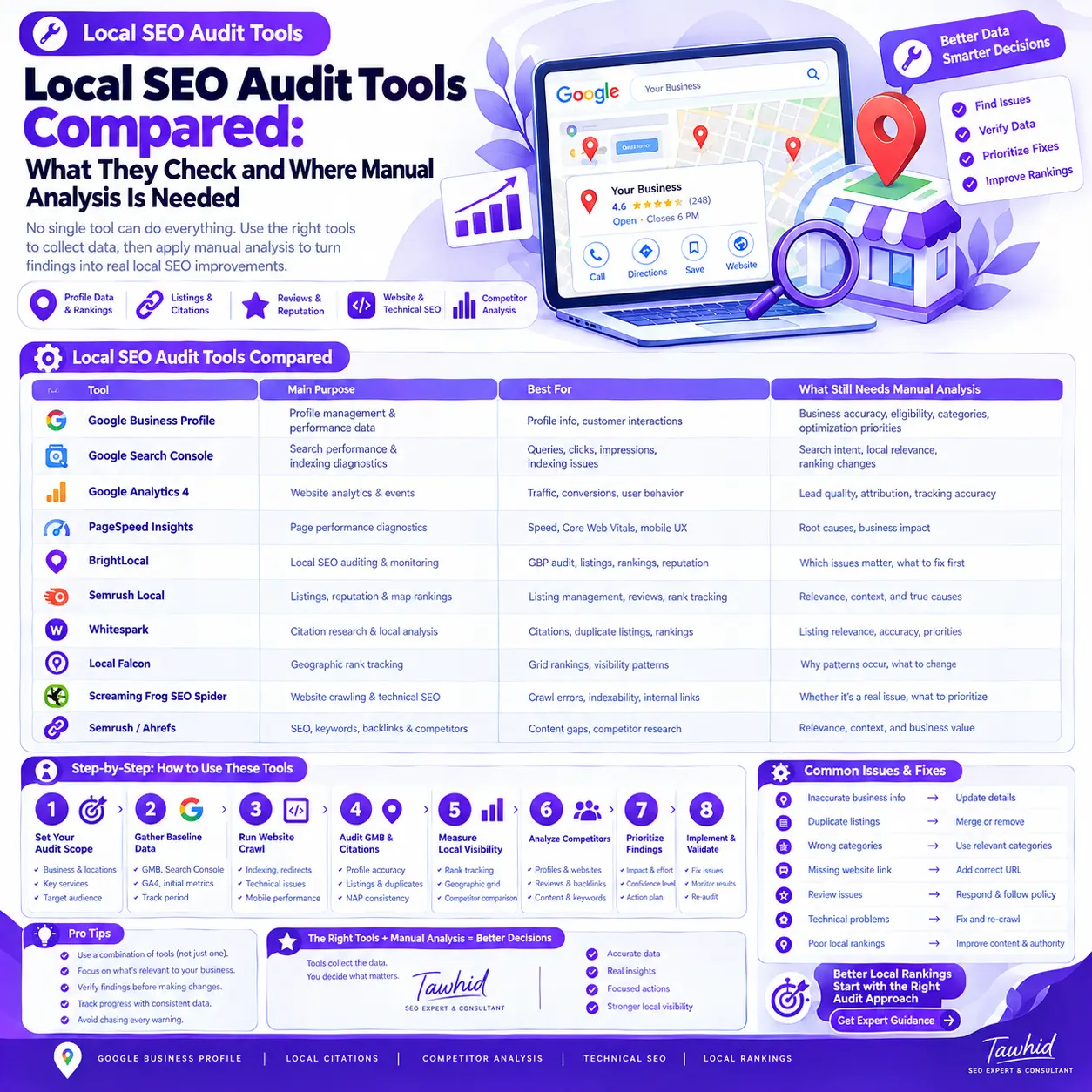
Local SEO audit tools help identify issues with Google Business Profile, local rankings, business listings, reviews, website health, backlinks, and on-page optimization. However, no single tool can reliably diagnose every local SEO problem. A useful audit combines automated reports with manual verification, competitor analysis, and business-focused prioritization.
The challenge is not finding software that produces an audit report. It is understanding what the report actually tells you, which findings deserve attention, and what needs further investigation before you make changes.
Some tools specialize in geographic ranking analysis. Others focus on citations, website crawling, business listings, or reputation monitoring. Google’s own tools provide essential performance and indexing data, while a manual review connects these separate findings to the business’s actual goals.
In this guide, we’ll compare popular local SEO audit tools, explain what each can and cannot establish, and show how to combine them into a practical audit workflow.
Local SEO Audit Tools Compared: Quick Overview
The best local SEO audit tool depends on the problem you need to investigate. A website crawler is useful for technical diagnostics, a geographic rank tracker helps examine Google Maps visibility, and a citation tool identifies business-listing opportunities. Google’s native tools provide important performance data, but manual analysis is still needed to interpret the results.
Tool | Main purpose | Best suited for | What still needs manual analysis |
Google Business Profile | Profile management and available performance data | Reviewing profile information and customer interactions | Business accuracy, eligibility, category suitability, and optimization priorities |
Google Search Console | Website search performance and indexing diagnostics | Finding search queries, page performance, and indexing issues | Search intent, local relevance, and the causes of ranking changes |
Google Analytics 4 (GA4) | Website analytics and configured key events | Understanding traffic and recorded lead-related activity | Lead quality, attribution limitations, and tracking accuracy |
PageSpeed Insights | Page-performance diagnostics | Reviewing performance metrics and Core Web Vitals data where available | The causes of performance problems and their practical importance |
BrightLocal | Dedicated local SEO auditing and monitoring | Local search audits, listings, rankings, and reputation workflows | Which findings matter most and which corrections are justified |
Semrush Local | Local listing, reputation, and map-ranking workflows | Managing local search activities across supported locations | Competitive context and the reasons behind visibility differences |
Whitespark | Local citation research and ranking analysis | Discovering citations and monitoring local rankings | Directory relevance, listing accuracy, and the value of each opportunity |
Local Falcon | Geographic Google Maps rank tracking | Investigating visibility patterns across geographic scan points | Why ranking patterns occur and which actions might improve them |
Screaming Frog SEO Spider | Technical website crawling | Identifying crawl, indexability, canonical, and internal-link issues | Whether a technical warning is genuinely a problem |
Semrush or Ahrefs SEO toolsets | Broader SEO, keyword, backlink, and competitor research | Investigating organic search and competitor gaps | The relevance of reported data to the specific local market |
These tools have different purposes and should not be treated as interchangeable. Their features, data coverage, and subscription limits can also vary.
The comparison below focuses on documented product capabilities and intended use cases. It is not a claim that every platform has been tested against every other tool under identical conditions.
What Can Local SEO Audit Tools Actually Check?
A local SEO audit examines several connected parts of a business’s online presence. Software can make many checks faster, but the depth and accuracy of those checks depend on the tool, the data available, and the audit’s configuration.
Google Business Profile information and performance
Google Business Profile is an important part of local search for eligible businesses. Audit tools can help inspect profile information and selected optimization signals, while Google’s own performance reporting provides information about how customers find and interact with a profile.
Depending on the available data and tool, an audit might examine:
- Business information and contact details.
- Primary and additional business categories.
- Business hours and other relevant profile details.
- Website links and the relationship between the profile and website.
- Reviews, ratings, and review activity.
- Available search, viewing, and customer-interaction metrics.
Google’s Business Profile performance documentation explains which metrics may be available to verified profiles. Availability varies by business and metric.
What automation cannot reliably decide: Whether every profile field accurately represents the business, whether a proposed category is appropriate, or which changes should take priority.
A profile completeness score is not proof that the profile is eligible for every local query or that it will achieve a particular ranking. Human review remains necessary, especially before making changes to important business details.
For implementation-related help, see my Google Business Profile Optimization service.
Local rankings and geographic visibility
Local rankings can vary according to the search query, the searcher’s location, competition, and other contextual factors. A ranking observed from one point does not necessarily represent visibility across an entire service area.
Local rank trackers help monitor a business for selected searches. Geographic grid tools go further by showing how visibility differs across selected scan points.
These tools can help identify:
- Queries for which a business has limited visibility.
- Geographic areas where visibility appears stronger or weaker.
- Competitors appearing above the business for selected searches.
- Changes in measured local visibility over time.
Google explains that local results are primarily based on relevance, distance, and prominence in its official local ranking guidance.
What automation cannot establish by itself: Why a business ranks differently across locations or whether a specific optimization will change that pattern.
For that, the audit needs a closer review of search intent, business relevance, the competitive environment, website content, profile accuracy, and other relevant signals.
Local citations and business-information consistency
Local citations are online references to a business and its details. They can appear in business directories, industry-specific websites, relevant platforms, and other online sources.
Citation tools can help discover listings, track existing citations, and identify possible inconsistencies in information such as the business name, address, phone number, and website.
A citation audit may reveal:
- Missing listings on relevant sources.
- Incorrect or outdated contact information.
- Potential duplicate listings.
- Differences between business records and online profiles.
- Additional directories worth evaluating.
However, not every directory is valuable, and not every data variation represents a serious SEO problem.
Manual analysis is essential to confirm whether a listing belongs to the correct business, whether the source is reputable and relevant, and whether the proposed correction reflects accurate information.
Adding a business to as many directories as possible is not a substitute for a sensible citation strategy. Focus on accuracy, relevance, and the quality of the sources.
If citation inconsistencies are a major concern, my Local Citation Building service covers the related business-listing and citation work.
Website and technical SEO issues
Website crawlers inspect technical and on-page elements across the URLs they can access. They can help identify patterns that would be difficult to investigate manually across a large site.
Depending on configuration, a crawler may identify:
- Broken internal links and HTTP status codes.
- Redirect chains and unexpected redirects.
- Missing or duplicate title tags and meta descriptions.
- Canonical-tag inconsistencies.
- Pages marked as non-indexable.
- Orphaned pages within the crawl’s discovery limits.
- Internal-link and crawl-depth problems.
- Selected structured-data issues.
For example, Screaming Frog SEO Spider provides crawl reports covering response codes, indexability, canonical information, internal links, and other technical data.
A crawler’s warning is a diagnostic signal, not an automatic instruction to make a change.
A page that points to a different canonical URL may be configured incorrectly, but it may also be using a legitimate canonicalization strategy. A redirect may be intentional. A page excluded from indexing may not be intended to appear in search results.
Check the affected URL, the page’s purpose, the intended indexation behavior, and the relevant technical evidence before making changes.
For local SEO, also inspect whether important service pages and genuine location pages have useful content, appropriate internal links, and a clear relationship to the services offered.
Reviews, backlinks, and competitor information
Some local SEO platforms consolidate reviews and reputation signals, while broader SEO tools help investigate backlinks, competitor websites, and organic keyword performance.
These reports can help answer questions such as:
- Where are competitors receiving relevant backlinks?
- How does the business’s review profile compare with other relevant businesses?
- Are there recurring themes in customer feedback?
- Which competitor pages appear for commercially important queries?
- Are there relevant sources or content gaps worth investigating?
Nevertheless, a correlation is not a complete explanation of ranking performance.
A competitor may have more reviews or referring domains, but this does not establish that one factor alone explains the difference in visibility. Competitors may also differ in relevance, location, reputation, website quality, demand, and other circumstances.
Use competitor reports to develop and test explanations, not to copy every visible competitor tactic.
Best Local SEO Audit Tools Compared by Use Case
The following tools cover different parts of a local SEO audit. Choosing between them is easier when you start with the question you need to answer rather than buying software based on the size of its feature list.
1. Google Business Profile, Search Console, and GA4: The Free Data Foundation
For many audits, Google’s own tools are the logical starting point because they provide information about the business profile, website search performance, indexing, and measured website activity.
Google Business Profile
Use the available performance reports to review how customers discover and interact with a verified profile.
Depending on eligibility and availability, reports may include searches, views, website clicks, calls, direction requests, and other interactions.
These metrics are helpful for understanding customer activity, but they are not a complete measurement of local rankings or business success.
For instance, a rise in website clicks does not automatically mean an increase in qualified enquiries. You need to examine what happens after people reach the website.
Google Search Console
Search Console helps you examine the website’s search performance and investigate technical search issues.
Useful areas include:
- Search queries, clicks, impressions, and click-through rates.
- Landing pages receiving search visibility.
- Indexing reports and individual URL Inspection.
- Search performance changes across selected date ranges.
The URL Inspection tool helps you examine what Google knows about a specific URL and test the live page against relevant requirements for appearing in Search.
Manual analysis is still needed to determine whether the page addresses the searcher’s intent, targets an appropriate topic, or deserves improvements based on the available evidence.
Google Analytics 4
GA4 helps connect website activity with configured events, including meaningful actions such as contact-form submissions when tracking has been correctly implemented.
Google now uses the term key events for events that are especially important to a business’s success. Its GA4 key events documentation explains how these actions are measured and reported.
Before relying on conversion-related data, test whether the relevant events trigger correctly. A website may receive enquiries that are not measured accurately, or an event may be recorded even when the intended business outcome has not occurred.
Review the tracking setup and actual lead quality before drawing conclusions.
PageSpeed Insights
PageSpeed Insights can provide performance diagnostics and field data where available. It is useful for examining page speed and Core Web Vitals, but it does not perform a complete local SEO audit.
Best use of the Google toolset: Establish a baseline, identify important questions, and investigate real search and website performance before purchasing additional tools.
2. BrightLocal: Broad Local Search Auditing
BrightLocal provides dedicated local SEO functions, including Local Search Audit, Google Business Profile Audit, citation-related tools, local ranking grids, and reputation features. Exact availability depends on the current product and subscription.
Its Local Search Audit can bring several categories of local SEO information into one report. This can be useful when reviewing a business’s overall local search presence, preparing audit reports, or monitoring selected issues over time.
Where BrightLocal can help
- Organizing multiple local SEO checks into a structured report.
- Reviewing selected business listings and citations.
- Monitoring local rankings and geographic visibility.
- Bringing together selected reputation and profile-related information.
- Helping agencies and businesses communicate findings.
Where manual analysis is still needed
First, inspect the underlying evidence rather than relying on the overall audit score. Different sections can use different data sources and scoring methodologies.
Second, verify the listings and profile information flagged by the platform. An inaccurate listing on an irrelevant website may deserve less attention than incorrect information on a source customers actually use.
Third, investigate why a finding matters. A report can identify a discrepancy, but the auditor must decide whether correcting it is necessary, strategically worthwhile, or urgent.
BrightLocal is a useful option when you need a relatively broad local SEO reporting workflow. It is not a guarantee of improved rankings.
3. Semrush Local: Listings, Reputation, and Map-Ranking Workflows
Semrush Local provides functions for business listing management, Google Business Profile workflows, reputation management, and geographic map-rank tracking. Broader Semrush products offer additional SEO research and website-audit capabilities.
These functions can be helpful when a business or agency wants to coordinate several local search activities from a central platform.
Where Semrush Local can help
- Managing supported business listings.
- Monitoring reviews and selected reputation signals.
- Tracking Google Maps visibility across geographic points.
- Comparing local ranking patterns over time.
- Coordinating local search management tasks.
Where manual analysis is still needed
Verify that the relevant product and plan support the directories, regions, locations, and workflows you actually need.
Review suggested listing changes before applying them. Check whether a reported competitor difference is relevant to the same services and queries you want to target. Investigate the website and profile context rather than assuming that one recommended change will fix a ranking problem.
Remember that Semrush Local and the broader Semrush SEO suite are not identical product scopes.
Best fit: Businesses and agencies that need to manage selected local listing, reputation, and ranking workflows, especially when recurring reporting is important.
4. Whitespark: Citation Research and Local Ranking Analysis
Whitespark offers specialist local SEO products, including Local Citation Finder, Local Rank Tracker, and Local Ranking Grids.
Its citation-focused tools can help discover relevant citation opportunities and monitor existing listings. Its ranking tools help businesses and marketers investigate local visibility.
Where Whitespark can help
- Discovering relevant directories and citation sources.
- Tracking existing citations.
- Monitoring local and organic rankings through supported products.
- Comparing geographic ranking patterns.
- Finding potential differences between a business and relevant competitors.
Where manual analysis is still needed
Evaluate each citation opportunity before pursuing it. Determine whether the directory is credible, relevant, and appropriate for the business.
Check possible duplicates at their original sources and confirm business information before correcting it. Avoid copying every directory link found in a competitor report; the quality and usefulness of a source matter more than generating a large list of submissions.
Best fit: Businesses, agencies, and consultants with specific citation-research requirements or a need for dedicated local ranking analysis.
5. Local Falcon: Geographic Google Maps Rank Tracking
Local Falcon specializes in local search visibility reporting, including geographic grid scans and reports comparing rankings at different points.
This is particularly useful when one ranking observation does not explain the business’s overall visibility.
A business may appear prominently for a relevant query in one part of its target area but less prominently in another. A geo-grid report makes those differences easier to inspect.
Local Falcon reports include metrics such as:
- Average Rank Position (ARP): A summary of the business’s ranking position across the relevant scan points, according to the report’s metric definition.
- Average Total Rank Position (ATRP): A related summary metric that should be interpreted using Local Falcon’s current documentation.
- Share of Local Voice (SoLV): A metric that summarizes the business’s visibility share within the scan and reporting methodology.
Review the tool’s report documentation for the exact definitions and reporting context.
Where Local Falcon can help
- Identifying geographic visibility patterns.
- Comparing selected search terms across scan points.
- Investigating local competitors.
- Monitoring changes through comparable scans.
Where manual analysis is still needed
A geo-grid report describes observed visibility; it does not automatically explain the cause.
Investigate search intent, location, competition, business relevance, website alignment, and other plausible factors before deciding what to change. Use consistent queries and scan settings when comparing results over time.
Avoid treating one scan as a permanent representation of rankings or as proof that a single optimization tactic will improve every point.
Best fit: Businesses and SEO professionals investigating geographic differences in Google Maps visibility.
6. Screaming Frog SEO Spider: Website and Technical Diagnostics
Screaming Frog SEO Spider is a website crawler designed to analyze URLs and technical SEO signals.
It is particularly useful when the audit needs to cover multiple pages and you want to inspect technical patterns rather than review each URL individually.
Where Screaming Frog can help
- Finding broken links and reviewing response codes.
- Inspecting redirects and indexability signals.
- Checking canonical tags.
- Identifying selected metadata and internal-link issues.
- Reviewing crawl depth and other site-structure patterns.
- Exporting findings for further investigation.
Where manual analysis is still needed
A technical report does not necessarily tell you whether a finding is an error.
For example, suppose the crawler identifies a page with a canonical pointing to another URL. Check which URL should be indexed, whether the canonical is intentional, and whether the target is the correct page.
Similarly, a page blocked from indexing may be an error if it is an important service page, but intentional if it is an administrative or duplicate page that should not appear in search results.
Review the website’s intended architecture before making changes.
Best fit: Auditing technical SEO, internal links, and important website pages—especially when the website contains many URLs.
7. Semrush or Ahrefs: Broader SEO and Competitor Research
Broader SEO platforms can support keyword research, backlink analysis, competitor research, and technical auditing. They are useful additions when the local SEO problem may involve more than profile management or citations.
For example, if a service page has limited organic visibility, you may need to investigate whether it targets relevant queries, whether competing pages satisfy the same search intent, and whether technical or content issues deserve attention.
Where these platforms can help
- Identifying keyword and content opportunities.
- Comparing selected organic search competitors.
- Reviewing referring domains and backlink patterns.
- Auditing broader website health.
- Investigating related search demand and page performance.
Where manual analysis is still needed
Estimated traffic and keyword metrics are not equivalent to verified business outcomes. Referring-domain counts do not establish the value of every link. Competitor reports also need to compare genuinely relevant businesses, pages, services, and search contexts.
Use the data to develop useful hypotheses and decide what to investigate next.
Best fit: SEO professionals and businesses that need broader website and competitor analysis alongside local-specific tools.
Automated Local SEO Audits vs. Manual Analysis: What Is the Difference?
Automated tools are efficient at collecting data, comparing selected information, and flagging potential issues. Manual analysis adds business context, checks the reliability of the findings, investigates possible causes, and determines what should happen next.
Neither approach is a complete substitute for the other.
Audit area | What tools can help identify | What requires human judgment |
Google Business Profile | Missing or inconsistent fields and selected profile signals | Business accuracy, eligibility, policy compliance, and category suitability |
Keyword targeting | Queries, keyword suggestions, and competing pages | Search intent, service relevance, and keyword-to-page mapping |
Google Maps visibility | Ranking patterns across selected scan points | Why geographic patterns differ and which changes are justified |
Citations | Listings, possible duplicates, and inconsistent details | Source quality, business ownership, relevance, and correct information |
Reviews | Review counts, ratings, new reviews, and response activity | Customer concerns, recurring themes, and appropriate responses |
Technical SEO | Crawl errors, metadata problems, and indexability signals | Whether an alert is a real problem and how important it is |
Backlinks | Referring domains and potential competitor link gaps | Relevance, context, quality, and appropriate action |
Business performance | Website analytics and configured events | Tracking reliability, lead quality, and commercial impact |
Why automated SEO scores can be misleading
Different platforms use different inputs, thresholds, and scoring methods. As a result, two tools can give the same business different scores without necessarily disagreeing about every underlying fact.
A high score does not prove that a business has strong local visibility. A low score does not establish that every warning must be fixed.
The useful question is not simply, “What is my audit score?”
It is:
- What specific issue has been identified?
- What evidence supports the finding?
- Does it affect an important part of the business’s search presence?
- What action, if any, is justified?
Treat tool scores as diagnostic summaries, not official Google ranking metrics.
Why manual competitor analysis matters
Competitor tools can show which businesses rank for selected searches, which pages receive visibility, and what backlinks or listing information may be available.
However, comparisons are useful only when the businesses and search contexts are genuinely relevant.
Review competing websites and profiles for their service relevance, business information, page structure, reputation, and other observable characteristics. Determine which differences suggest meaningful opportunities.
Do not assume that every difference explains the ranking gap. A competitor may benefit from its location relative to the searcher, a different level of relevance, a stronger reputation, or factors that a third-party tool cannot fully observe.
Google’s explanation of local ranking factors is a useful starting point for keeping these interpretations grounded.
When human judgment is essential
Manual investigation is especially important when:
- A profile change could affect business accuracy or policy compliance.
- Several listings may belong to the same business.
- Different tools provide conflicting information.
- A key service page has unexpected indexing or canonical signals.
- Competitors appear to outperform the business despite similar tool scores.
- A recommended change involves substantial cost or website restructuring.
- The data does not explain why leads or visibility have changed.
In these situations, further verification is more useful than immediately implementing every software recommendation.
How to Choose the Right Local SEO Audit Tool
Choose tools according to the audit requirements, the amount of data you need, and the work you plan to perform. The best toolset for a business with one location may be very different from the setup required by an agency managing many locations.
Best setup for a small business with one location
Start with the available Google Business Profile performance data, Google Search Console, GA4 where configured, and appropriate website diagnostics.
Add a specialist local SEO platform only when you have a clear need, such as citation research, recurring local ranking monitoring, or geographic grid analysis.
The goal is to cover the important questions without paying for overlapping features you do not use.
Best setup for Google Maps ranking problems
Choose a local rank tracker or geo-grid tool that allows you to examine the queries and geographic points that matter to your business.
Then investigate the reported patterns using competitor analysis, profile and website reviews, and Google’s local ranking guidance.
Do not buy a tracking tool expecting it to identify a guaranteed ranking fix. Tracking provides evidence; diagnosis and implementation require additional work.
Best setup for citation and listing problems
Consider a specialist citation platform when you need to identify listings at scale, compare business details, or monitor corrections.
For a smaller business with only a few important listings, direct manual checks may be enough to get started.
Prioritize accuracy and the relevance of each source rather than the total number of listings discovered.
Best setup for agencies and multi-location businesses
Agencies and multi-location organizations may need a more structured combination of tools.
Evaluate:
- The number of locations and projects supported.
- Geographic ranking coverage.
- Report exports and repeat reporting.
- User permissions and client access.
- Listing-management coverage.
- Data retention and historical comparisons.
- Subscription limits and additional costs.
A consolidated platform can save time, but it should not eliminate the need to validate findings or interpret the data for each business.
Are free local SEO audit tools enough?
Free tools can be enough to begin a local SEO audit. They can provide valuable search performance, profile activity, analytics, and technical diagnostic information.
Paid software becomes more useful when the audit requires broader citation discovery, geographic rank monitoring, repeated reporting, multiple locations, or more efficient workflows.
The right purchasing decision depends on the amount of work, the quality of data required, and the business value of the information.
Before subscribing, identify the precise task the tool needs to perform. Check the current vendor documentation and pricing, then determine whether an existing tool already covers that requirement.
How to Run a Local SEO Audit Using Multiple Tools
The following workflow combines automation with manual verification. It is designed to turn a collection of reports into a useful action plan.
Step 1: Define the audit scope
Start by documenting the business’s services, genuine locations or service areas, important search queries, target audience, competitors, and desired outcomes.
Confirm the website URLs and profiles to be reviewed, the available account permissions, and the reporting period.
This context helps prevent irrelevant checks from taking priority over the questions that actually matter.
Step 2: Establish a baseline with Google’s tools
Review available Google Business Profile performance, Search Console, and GA4 data.
Record the date range and distinguish between different metrics. Search impressions, organic clicks, profile interactions, website visits, and qualified leads are not interchangeable.
Check whether the relevant tracking is configured correctly and note any limitations that affect the analysis.
Step 3: Crawl the website
Use a crawler to inspect important URLs, response codes, indexability, canonical signals, internal links, metadata, and other relevant technical issues.
Investigate findings on the actual page before recommending changes. Determine whether affected pages are important to the website’s search visibility and whether their current configuration is intentional.
Do not prioritize every crawl warning equally.
Step 4: Audit the Google Business Profile and citations
Review profile information and compare important business details against accurate business records.
Use citation tools to identify potential listing inconsistencies and duplicates. Check the source and confirm the facts before updating any information.
If the audit identifies profile-related optimization opportunities, my Google Business Profile Optimization service explains the related work.
Step 5: Measure local visibility
Select commercially relevant queries and establish consistent geographic scan settings.
Use a local rank tracker to identify patterns, then compare results using equivalent queries and settings where possible.
Record the date and scope of each scan. This provides context for future comparisons and reduces the risk of overreacting to a single observation.
Step 6: Review competitors and investigate likely causes
Compare relevant competing businesses, their profiles and service pages, and other observable signals.
Investigate whether your pages address the right search intent and whether your business information is accurate. Consider several plausible explanations for ranking differences rather than assuming that one factor is responsible.
When keyword targeting or page relevance needs further investigation, use structured local keyword research to connect important queries with appropriate pages.
Step 7: Prioritize the findings
A good audit does not simply produce a long list of warnings. It identifies verified issues and assigns appropriate next steps.
Use the following illustrative prioritization framework.
Priority | Decision criteria | Example |
High | A verified issue with potentially material impact on an important page, business detail, or measurement process | A key service page is unintentionally blocked from indexing |
Medium | A confirmed issue or opportunity with a more limited or less immediate impact | Important business listings contain outdated contact information |
Low / monitor | A low-impact, uncertain, or context-dependent finding | A minor technical warning appears on a low-value page |
These categories are practical decision aids, not universal ranking weights.
For each finding, assess the evidence, likely business impact, urgency, confidence, and effort required to resolve it.
A confirmed indexing issue affecting an important page may deserve immediate attention. An uncertain warning on a low-value URL may need investigation before any change is made.
Step 8: Create an action plan and measure the outcome
Turn prioritized findings into concrete actions.
A useful audit record includes:
Field | What to record |
Finding | The issue or opportunity identified |
Evidence | The tool report, URL, profile, or other supporting observation |
Verification | Confirmed, rejected, or requiring further investigation |
Business impact | Why the finding matters |
Recommended action | The fix or additional investigation required |
Priority | High, medium, or low based on context |
Follow-up measure | The indicator to review after implementation |
After changes have been implemented, compare relevant performance data over a suitable period. Keep track of other changes, seasonal effects, and changes in measurement conditions where they may influence the results.
Report work completed separately from outcomes observed. An implemented fix is not automatically proof of improved rankings or business performance.
Common Mistakes When Using Local SEO Audit Tools
1. Treating the audit score as a Google ranking factor
A platform’s overall score is calculated using its own methodology. Google does not provide a universal third-party local SEO audit score that determines ranking.
Investigate the underlying findings rather than attempting to reach an arbitrary perfect score.
2. Relying on one Google Maps ranking check
A single ranking observation does not represent visibility across all relevant queries and geographic points.
Use consistent scans and interpret the results in the appropriate geographic and competitive context.
3. Fixing every warning without checking its significance
Some warnings may be intentional, harmless, or irrelevant to the business’s goals.
Verify whether the issue exists, understand its consequences, and prioritize the actions that matter.
4. Assuming more citations always mean better rankings
A larger number of listings does not automatically establish a stronger local search presence.
Focus on accurate business information, relevant sources, legitimate listings, and the actual needs of the business.
5. Assuming more reviews automatically solve ranking problems
Reviews can influence customer trust and form part of the broader local search environment. However, review counts and ratings do not explain every ranking difference.
Respond appropriately to genuine customer feedback and investigate the complete local SEO situation rather than focusing on review numbers alone.
6. Buying multiple tools that perform overlapping tasks
Before subscribing to another product, determine which audit requirement is not being met by your current toolset.
A focused selection of complementary tools is often more useful than maintaining multiple subscriptions that produce similar reports.
7. Making changes before collecting a baseline
Without an initial record, it becomes harder to evaluate what changed after implementation.
Document relevant performance indicators, dates, and the changes made. Before-and-after comparisons can reveal useful patterns, although they do not always establish that a particular change caused the outcome.
How Often Should You Run a Local SEO Audit?
There is no universal audit schedule that applies to every business. The appropriate frequency depends on website size, the number of locations, the pace of business changes, competitive conditions, and previous findings.
Consider separating ongoing monitoring from comprehensive audits.
Ongoing monitoring involves reviewing relevant ranking, website performance, profile activity, and other indicators often enough to detect meaningful changes.
Periodic audits involve a broader review of technical health, business information, citations, reviews, local visibility, and the relationship between the website and the business profile.
An additional audit may be appropriate following a website migration, business relocation, new location launch, major visibility decline, significant profile change, or substantial website restructuring.
The objective is to identify important changes early without repeating a comprehensive audit when it is unlikely to provide additional value.
What Should a Useful Local SEO Audit Report Include?
A useful audit report should help a business understand what is happening, why it matters, and what to do next.
Verified findings and supporting evidence
Document the specific issue, the affected website page or business profile, and the evidence supporting the finding.
Clearly distinguish confirmed problems from hypotheses and recommendations that require further investigation.
Business impact and recommended actions
Explain how a finding relates to search visibility, the customer experience, accurate business information, or another meaningful business objective.
Then recommend an appropriate action. A report should not simply show a warning without explaining its practical significance.
Priorities, responsibilities, and measurement
Record the intended action, its priority, who is responsible, and how the outcome will be reviewed.
This helps the business separate urgent issues from longer-term opportunities and track the progress of implementation.
The quality of an audit depends on the usefulness of its conclusions, not the number of charts, warnings, or software scores it contains.
Frequently Asked Questions About Local SEO Audit Tools
Are free local SEO audit tools enough to audit a local business?
Free tools can provide a useful starting point for auditing a local business. Google Search Console, Google Business Profile performance data, GA4, and selected website diagnostic tools can reveal important issues. However, identifying citation problems, geographic ranking patterns, or extensive competitor gaps may require specialist tools and additional manual investigation.
Can one tool perform a complete local SEO audit?
One platform can cover several local SEO audit functions, but coverage varies by product, subscription, and available data. A comprehensive audit may also require Google Search Console, website crawling, geographic rank tracking, and manual competitor analysis. Choose tools according to the audit’s scope instead of assuming one dashboard can verify every important issue.
Why do local SEO tools report different Google Maps rankings?
Local ranking reports may differ because tools use different search locations, geographic grid points, scan settings, queries, or data-collection methods. Rankings also vary across geographic contexts. Compare reports only after checking the search term, measurement location, date, and settings, and use repeated observations rather than relying on one ranking snapshot.
Do automated local SEO audit scores directly affect Google rankings?
No. A third-party audit score is a summary generated using that tool’s own methodology; it is not an official Google ranking score. Some underlying issues flagged by a tool may deserve attention, but the score itself does not demonstrate a ranking cause. Validate the underlying evidence and prioritize changes based on their relevance and impact.
How often should you run a local SEO audit?
There is no universal audit schedule that applies to every local business. Monitor important performance indicators regularly and conduct broader reviews according to site complexity, business changes, competitive conditions, and previous findings. A website migration, new location, major visibility decline, or significant profile change may justify an additional audit.
Conclusion: Combine Reliable Data With Manual Local SEO Analysis
The best local SEO audit tools depend on the questions you need to answer. Google’s native tools provide essential performance and indexing information. Dedicated local SEO platforms can help with citations, listings, reputation workflows, and geographic ranking analysis. Website crawlers reveal technical issues that deserve closer inspection.
However, no tool can automatically turn every warning into the right business decision.
The most useful process combines accurate data collection, manual verification, relevant competitor analysis, and sensible prioritization. Verify important findings before implementing changes, establish a baseline, and measure the outcomes that matter to the business.
If your audit reports reveal several issues but you are unsure which ones deserve priority, a more structured evaluation may help.
Need help understanding your local SEO audit findings?
I’m Tawhid, an SEO Expert & Consultant behind Freelancer Tawhid. My Local SEO Audit service is designed to help businesses identify meaningful technical, on-page, Google Business Profile, citation, keyword, competitor, and local visibility issues.
The aim is to understand what may be limiting your search presence, determine which opportunities deserve attention, and develop practical next steps based on your business and website.
Explore the service to review the audit scope, or discuss your requirements through an SEO consultation before deciding on implementation.