
Google Business Profile Suspensions: How to Diagnose the Cause and Prepare a Reinstatement Appeal

Freelancer Tawhid
SEO Expert and Consultant
- October 12, 2026
- No Comments
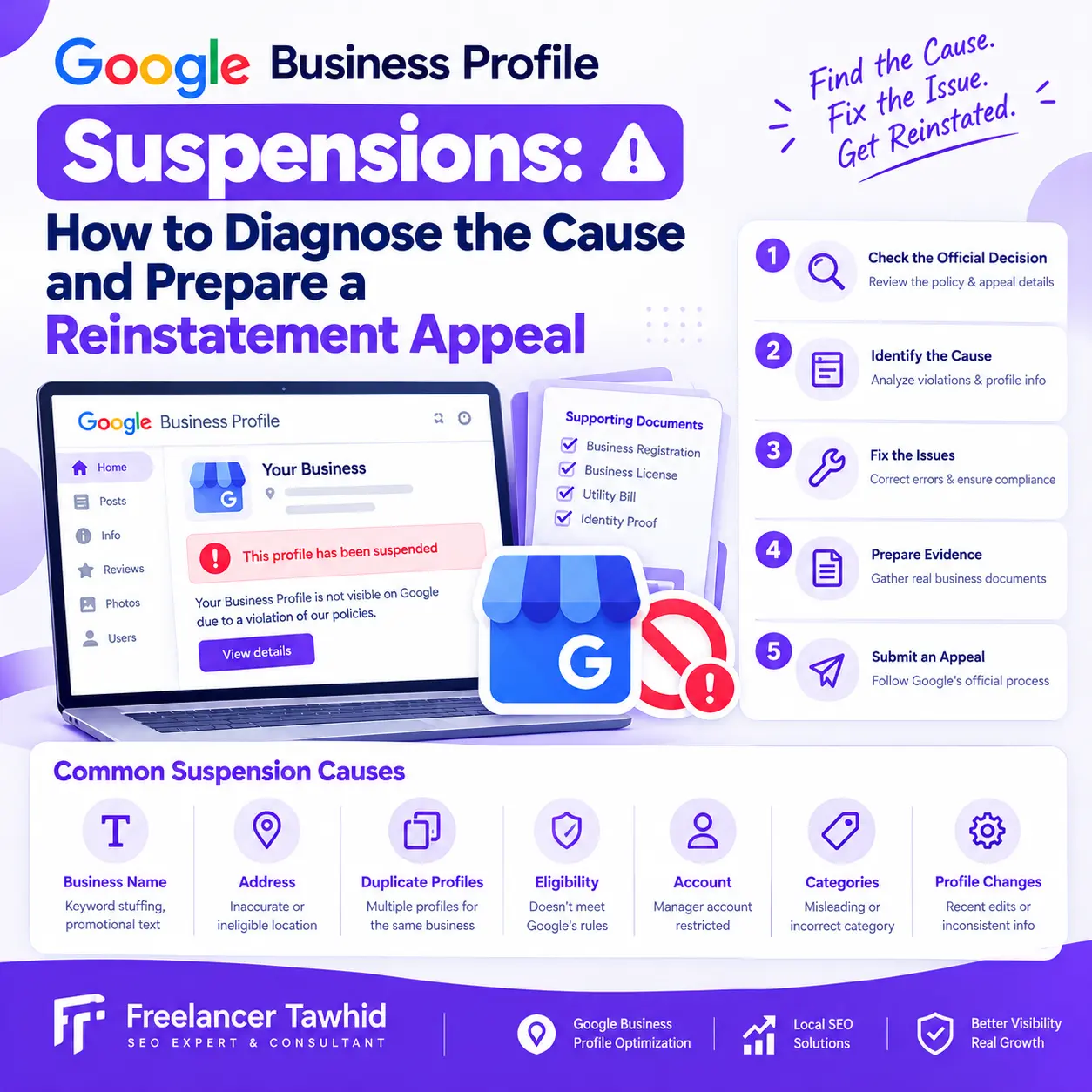
What Should You Do When Your Google Business Profile Is Suspended?
If your Google Business Profile is suspended, first review the decision in Google’s official appeals tool and identify the relevant policy. Check that your business is eligible, investigate potential violations, correct confirmed problems, and prepare genuine supporting documents before submitting an appeal. Follow Google’s instructions carefully, because reinstatement is not guaranteed.
A suspended Google Business Profile can disrupt your business’s visibility on Google Search and Google Maps, making it harder for potential customers to discover your business information.
However, the right solution depends on what actually happened. A profile suspension, a restricted Google Account, a rejected edit, and a decline in Google Maps visibility are different problems that require different responses.
The most effective approach is to diagnose the underlying issue before attempting reinstatement.
In this guide, you’ll learn how to identify possible suspension causes, investigate policy violations, prepare supporting evidence, submit an appeal, and respond appropriately if Google declines your request.
What Does a Google Business Profile Suspension Mean?
A Google Business Profile suspension occurs when Google restricts a profile because of a suspected or identified policy violation. A suspended or disabled profile may no longer be publicly accessible, and its owner or managers may lose the ability to manage it until Google resolves the restriction.
Google’s official guidance for fixing suspended or disabled profiles explains how eligible businesses can request reinstatement.
Before taking action, determine which type of restriction affects your business.
Suspended or disabled profile versus restricted Google Account
A profile-level suspension affects an individual Business Profile. An account-level restriction affects the Google Account associated with managing profiles and can have broader consequences.
For example, if an account restriction affects a profile manager or owner, the consequences may extend beyond a single listing. Google explains that profiles managed by a restricted account can be suspended, while restoring a manager’s account may restore that manager’s access to the affected locations.
If your Google Account is restricted, resolve that restriction through Google’s account-level process first. Once the restriction is lifted, you may still need to submit a separate appeal for the suspended Business Profile.
See Google’s official suspended-profile guidance for the applicable steps.
Suspension versus rejected edits or restricted content
A rejected business-information edit is not necessarily a profile suspension.
Google may reject an attempted change to your business name, category, address, phone number, or website. It can also restrict individual pieces of profile content, such as posts, photos, or videos.
These moderation decisions have their own appeal procedures, which may vary depending on the type of decision and the business’s jurisdiction.
Before following a reinstatement guide, confirm whether Google has actually suspended the profile or has restricted a particular edit or piece of content.
Does a decline in Google Maps visibility mean your profile is suspended?
Not necessarily.
Your business may receive fewer impressions, appear less frequently for relevant searches, or rank below competitors without having a suspended profile.
Check the profile’s actual status before assuming it has been suspended. If the profile remains active, the problem may involve search relevance, competition, inaccurate business information, or other local search factors.
My Google Maps SEO service focuses on broader local search visibility issues, which are different from a confirmed suspension.
Why Does Google Suspend Business Profiles?
Google may suspend or disable Business Profiles that violate its guidelines. The precise reason must be investigated for the individual business; a suspected trigger should not be treated as a confirmed cause.
The following policy areas are worth checking when diagnosing a suspension.
1. Business name violations
Google requires a Business Profile name to reflect the business’s real-world name.
Adding keywords, promotional phrases, locations, or unnecessary descriptions to the name can violate its guidelines if those additions are not part of the business’s genuine name.
For example, a business operating under the real-world name “Greenwood Plumbing” should not automatically change its profile name to “Greenwood Plumbing Best Emergency Plumber” simply to target additional searches.
The appropriate name should reflect how the business is consistently represented in the real world, including its legitimate branding and business materials.
Review Google’s guidelines for representing your business before changing the name.
2. Inaccurate business addresses or service-area information
Address and eligibility problems are important areas to investigate.
Potential issues include:
- Listing an address where the business does not genuinely operate.
- Using a virtual office that does not meet Google’s eligibility requirements.
- Listing a mailbox or remote mailing address as the business location.
- Displaying a customer-facing address when the business operates as a service-area business and should hide that address.
- Operating from shared premises without meeting Google’s requirements for signage, staffing, and receiving customers.
- Providing inaccurate or misleading service-area information.
A storefront business generally needs an eligible physical location where customers can visit. A service-area business that travels to customers may be eligible for a profile without displaying its residential or other business address publicly.
A virtual office is not automatically eligible simply because it has a business mailing address. Google states that businesses using coworking spaces must satisfy specific conditions, including appropriate signage, staffing, and receiving customers during business hours.
Read the official business representation guidelines to evaluate the requirements for your particular operating model.
3. Duplicate Business Profiles
Google generally does not allow multiple profiles for the same business location, although specific exceptions exist.
Duplicate listings can arise when a business owner creates a replacement profile, multiple people create listings independently, or an existing profile is claimed without understanding the current ownership structure.
Do not immediately create another profile when the original one is suspended. First investigate the existing listing, ownership, duplicates, and applicable guidelines.
Creating an additional profile does not correct an underlying compliance problem.
4. Business eligibility problems
Not every business model qualifies for a Google Business Profile.
A business must meet Google’s eligibility requirements, which generally concern businesses with a physical location customers can visit or businesses that travel to customers.
If a business operates exclusively online and does not meet Google’s eligibility criteria, changing profile fields or writing a more persuasive appeal will not make the business eligible.
Before appealing, establish whether the underlying business legitimately qualifies for a Business Profile.
5. Inaccurate categories or other business information
Your business category, contact information, address, and other profile details should accurately describe the business.
Potential issues include misleading business categories, incorrect phone numbers, inaccurate addresses, and information that conflicts with the actual business.
A discrepancy is not automatically proof of a policy violation. Investigate the relevant field against Google’s guidelines and the business’s real circumstances.
6. Google Account restrictions
Sometimes the issue affects the account managing the profile rather than just the listing.
If several profiles become suspended or inaccessible around the same time, investigate whether the managing account has been restricted. This pattern is a reason to check the account status, not conclusive evidence of the cause.
Google’s suspension and account-restriction guidance explains the separate resolution processes.
7. Recent profile changes
A suspension that occurs after a profile edit does not prove that the edit caused it.
Review the timing of recent changes, but give greater weight to the actual moderation decision, the linked policy, and verified problems with the business information.
Avoid repeatedly changing names, addresses, categories, or other fields simply to see whether Google responds differently. Unnecessary changes can make it more difficult to identify the genuine issue.
How to Diagnose the Actual Cause of a Google Business Profile Suspension
Before writing your appeal, work through the following diagnostic process.
Step 1: Confirm the affected profile and Google Account
Sign in to the Google Account associated with the Business Profile.
Confirm which profile is affected and whether you are dealing with a suspension, a disabled profile, or an account restriction.
If you manage multiple locations, record the affected profile IDs and distinguish them from profiles that remain active.
This prevents you from investigating the wrong listing or overlooking an account-level issue.
Step 2: Review the decision in Google’s appeals tool
Open the Google Business Profile appeals tool.
Sign in to the relevant account and select the affected profile. Review the decision information available in the tool.
Depending on the case, Google may show:
- The affected Business Profile.
- The date of the moderation decision.
- The reason for the action.
- A link to the relevant policy.
- Whether the decision can be appealed.
- The current appeal status.
The linked policy is an essential starting point. Read it carefully rather than relying exclusively on a short notification or a third-party explanation.
If the tool indicates that the decision cannot be appealed, or no relevant decision appears, follow Google’s instructions for contacting support where applicable.
Step 3: Audit the Business Profile against Google’s guidelines
Review the profile systematically instead of looking only at the field you most recently edited.
Check:
- Business name and real-world branding.
- Primary and additional business categories.
- Address and service-area configuration.
- Storefront or service-area eligibility.
- Phone number and website.
- Duplicate listings.
- Ownership and management access.
- Whether the information accurately describes the real business.
For each potential issue, record what you found and which policy applies.
Your aim is to distinguish a confirmed violation from a suspected problem that needs further investigation.
Step 4: Verify the underlying business’s eligibility
An accurate profile does not automatically mean that a business is eligible.
Examine how the business actually operates. Does it receive customers at a legitimate business location, or does it travel to customers? Does the listed address represent a real operating location? Does the business meet the relevant requirements for its business model?
These questions matter because the correct profile configuration depends on the business’s actual circumstances.
Step 5: Review recent changes and account activity
Make a simple timeline of relevant events, such as recent profile edits, changes in business ownership, address changes, account-access problems, or other notifications.
Use this timeline as supporting context, not as proof that a particular event caused the suspension.
If the cause remains unclear, identify the unanswered questions rather than making speculative claims in your appeal.
Google Business Profile suspension diagnostic table
Finding | What it may indicate | Recommended next action |
Business name contains unsupported promotional wording | Potential business-name violation | Compare the name with real-world branding and correct any confirmed discrepancy |
Address does not reflect an eligible business location | Possible address or eligibility issue | Verify the actual operating model and configure the profile appropriately |
Multiple listings represent the same location | Possible duplicate-profile problem | Review ownership and remove or resolve duplication through the appropriate process |
Several profiles are affected through one managing account | Possible account-level restriction | Check the account status and resolve restrictions before appealing affected profiles |
The profile appears eligible and compliant, but the decision is disputed | Potentially appealable moderation decision | Prepare an evidence-supported appeal through the official tool |
No clear violation has been identified | The cause remains uncertain | Recheck the decision, relevant policy, profile details, and available support options |
These findings are diagnostic clues, not automatic proof of why Google acted.
For broader issues involving your website, profile information, and local search setup, a Local SEO audit may help identify related problems. A general audit, however, does not replace Google’s formal reinstatement process.
What Should You Fix Before Appealing?
Once you have identified a confirmed issue, correct it before asking Google to reconsider the profile.
Correct genuine policy violations
Make targeted changes that bring the profile into compliance.
For example, remove unsupported wording from the business name, correct inaccurate information, or adjust a service-area configuration that does not reflect how the business operates.
Avoid making unrelated changes simply because the profile is suspended.
Resolve duplicate-profile issues
Investigate which profile represents the legitimate business location and determine how to address any duplicates in accordance with Google’s policies.
Do not create a replacement profile as a workaround for the suspension.
Resolve account-level restrictions first
If Google’s account-restriction process applies, follow it before appealing the individual profile.
Google explains that a restricted account may need to be reinstated before a separate profile appeal can proceed.
Make sure the profile reflects the real business
Do not make the profile appear compliant by presenting a business model, address, or identity that does not match reality.
A legitimate business should be able to explain how its actual operations satisfy the applicable eligibility requirements.
Complete this pre-appeal checklist
Before submitting your appeal, confirm the following:
- I have identified the affected Business Profile and managing account.
- I have reviewed the decision and its linked policy.
- I have checked whether the underlying business is eligible.
- I have investigated the business name, address, categories, and duplicate listings.
- I have corrected confirmed compliance issues.
- I have gathered authentic documents that support the relevant facts.
- I have checked the consistency of names and addresses in those documents.
- I have prepared a clear explanation based on verified information.
- I understand the current appeal and evidence-submission instructions.
You do not need to invent an explanation for every possible trigger. Focus on the actual facts and the policy that applies.
What Evidence Should You Prepare for a Reinstatement Appeal?
Supporting documents help Google evaluate whether the business meets the requirements for a Business Profile.
Google’s official reinstatement guidance identifies several types of potentially useful documents. The appropriate evidence depends on the business and the circumstances of the suspension.
Official business documents
Google identifies the following as examples of evidence that may strengthen an appeal:
- Official business registration.
- Business licence.
- Tax certificates.
- Business utility bills, such as electricity, phone, water, or internet bills.
See Google’s official suspension evidence requirements.
Choose documents that genuinely support your business identity, location, or eligibility. Do not submit every document you possess if it does not help establish the relevant facts.
Additional supporting evidence for specific situations
Depending on the issue, supplementary evidence may help explain the business’s actual operating model.
For example, photographs of a genuine storefront and its permanent signage may be relevant when establishing that an eligible business operates at the listed location.
A service-area business may need to demonstrate that its operations match Google’s requirements for businesses that travel to customers.
These examples are not a guarantee that Google will accept every type of supplementary material. Follow the evidence instructions shown in the appeal process.
Check the consistency of your documents
Before submitting, check whether your documents identify the business clearly and support the information on the suspended profile.
Pay particular attention to:
Business name: Does it match the real-world business identity and official records?
Address: Does it support the location claimed on the profile, where an address is relevant?
Business identity: Is it clear that the documents relate to the business whose profile is being appealed?
Evidence quality: Are the files legible, authentic, relevant, and consistent with the explanation?
If a genuine discrepancy exists, determine whether it can be explained accurately. Do not alter documents or invent facts to make them match.
Prepare an evidence inventory
A simple table can help organize your submission.
Document | What it supports | Ready to submit? |
Business registration or licence | Business identity and legal registration | Confirm relevance and consistency |
Tax certificate | Business identity and applicable registration details | Check the details against the profile |
Utility bill | Relevant business-location information | Confirm the name and address |
Genuine storefront photographs, where relevant | Physical location and signage | Ensure they accurately represent the business |
Other relevant records | A specific eligibility or compliance question | Include only when useful and permitted |
Submit documents through the appropriate official Google process. Handle sensitive information carefully and do not disclose private records to unverified third parties.
How to Submit a Google Business Profile Suspension Appeal
Once the underlying issue has been investigated and the evidence is ready, use Google’s official appeals tool.
Step 1: Open the official appeals tool
Visit the Google Business Profile appeals tool and sign in to the Google Account associated with the suspended profile.
Confirm that you are working with the correct account and business.
Step 2: Select the affected Business Profile and decision
Select the profile you want to appeal and review the available decision details.
Check the relevant policy, appeal eligibility, and status before proceeding.
If the managing Google Account is restricted, resolve that restriction first.
Step 3: Prepare your explanation and supporting evidence
Explain the issue clearly and provide relevant facts about the business and its compliance with Google’s guidelines.
Where the process allows supporting information or documentation, use it to substantiate your explanation.
Google’s current workflow may present an evidence form after the initial appeal submission. If the tool opens this linked form, Google requires the supporting evidence to be submitted within 60 minutes for it to be attached to the appeal. Prepare your files in advance rather than waiting until the form is open.
Always follow the instructions displayed in the current tool.
Step 4: Submit the appeal carefully
Review the information you have supplied before submitting.
Google’s published instructions state that appeals can only be submitted once for the relevant decision through that process. Do not treat the submission as an opportunity to test speculative explanations.
After submission, Google will review the appeal and communicate its decision.
Step 5: Check the appeal status
Return to the official appeals tool to review the status of your submission.
Google’s tool may display statuses such as:
- Submitted.
- Approved.
- Not approved.
- Can’t be appealed.
- Eligible for appeal.
The precise action available depends on the case and the status shown.
Do not submit repeated appeals for the same issue while a decision is pending. Google’s appeal instructions explicitly advise waiting for a decision before submitting another appeal for the same issue.
How to Write a Clear Google Business Profile Suspension Appeal
Your appeal should explain why the profile should be reinstated based on the actual business, the applicable policy, and supporting evidence.
It should not be an emotional complaint, a generic request for reinstatement, or an unsupported assertion that Google made a mistake.
A useful structure is:
- Identify the business: State the real business name and identify the affected profile.
- Explain the issue: Refer to the moderation decision or relevant policy where appropriate.
- Describe corrective actions: Explain what you changed or verified to bring the profile into compliance.
- Identify the evidence: Briefly describe the documents that support your business identity, location, or eligibility.
- Request reconsideration: Ask Google to review the profile based on the facts and supporting material.
Example appeal explanation
Use the following as a structure, not as a claim that these facts apply to your business.
Subject: Request for Google Business Profile Reinstatement
Hello Google Business Profile Support,
I am requesting a review of the suspended Business Profile for [actual business name].
I reviewed the applicable Business Profile guidelines and investigated the issues relevant to my business. I have [describe the actual corrective actions completed] and checked that the profile reflects the business’s real-world identity and operating circumstances.
I have prepared [list the relevant supporting documents] to substantiate the business information and eligibility described in this appeal.
Please review the profile and supporting evidence to determine whether it meets the applicable requirements for reinstatement.
Thank you for reviewing my request.
[Name and role, where appropriate]
Replace every bracketed item with accurate information. If you have not corrected a confirmed violation, do not claim that you have. If the cause is uncertain, do not invent one.
The objective is a clear, consistent, evidence-supported request—not a lengthy argument or a promise that the profile must be reinstated.
What If Google Denies Your Reinstatement Appeal?
A denied appeal does not automatically mean that no further review is possible. However, your next action should depend on the decision and the options made available through Google’s official process.
Review the decision and your original evidence
Start by identifying what remains unresolved.
Revisit the applicable policy, confirm that the business is eligible, and check whether the evidence actually supports the claims in your appeal.
Look for missing documents, inconsistencies, incomplete corrections, or facts that were not adequately explained.
Do not assume that submitting the same material again will lead to a different outcome.
Request an additional review when eligible
Google provides an additional-review process for eligible requests that have been denied.
According to its official suspension guidance, you may be able to provide additional evidence that was not included with the original appeal.
Use this opportunity to address a substantive evidence gap or clarify an unresolved eligibility issue. Follow the instructions shown for your specific case.
Consider other official options where applicable
Google notes that certain businesses in the European Economic Area may have additional redress options. Availability depends on the applicable circumstances and current rules.
Consult Google’s official appeal and regional redress guidance rather than assuming that a particular process is available to every business.
Recognize when reinstatement may not be possible
If the underlying business is not eligible for a Google Business Profile, repeated appeals cannot replace the eligibility requirements.
In that situation, focus on accurately understanding the policy and determining whether the business genuinely qualifies under its actual operating model.
Google Business Profile Suspension Mistakes to Avoid
Some recovery attempts can complicate an already difficult situation. Avoid these common mistakes.
Creating a replacement profile
Google explicitly advises businesses not to create a new Business Profile for the same business while an appeal is under review.
A replacement listing is not a legitimate shortcut around the suspension. Resolve the existing issue through the appropriate process.
Appealing without fixing confirmed violations
An appeal should address the relevant policy and the business’s actual compliance.
If you know that the profile contains inaccurate or ineligible information, investigate and correct the issue before requesting reinstatement.
Submitting weak or inconsistent evidence
Documents that do not relate to the affected business, contain unexplained discrepancies, or fail to support the explanation may be less useful.
Choose authentic, relevant records and make sure your statements match the facts.
Repeatedly submitting appeals or making random edits
Avoid submitting duplicate appeals before receiving a decision or repeatedly editing the profile in the hope of triggering a different outcome.
Each action should have a clear purpose supported by the relevant policy and your diagnostic findings.
Trusting guaranteed-reinstatement promises
No SEO consultant, agency, or third-party provider can legitimately guarantee Google’s reinstatement decision.
Be cautious of anyone who promises certain reinstatement, recommends fabricating evidence, or requires inappropriate access to your account.
A qualified professional can help interpret policies, assess eligibility, identify evidence gaps, and prepare a structured appeal. The final decision remains Google’s.
What If You Manage Multiple Suspended Business Profiles?
Businesses and agencies that manage several locations may need a more structured approach.
Start by establishing whether the affected profiles share an account-level restriction, a common compliance issue, or separate profile-specific problems. Do not assume that every location has the same cause.
Google provides a bulk reinstatement process through its appeals tool for qualifying groups of suspended profiles. The process can require a spreadsheet containing the Business Profile ID for each affected location and relevant supporting documentation.
Consult Google’s current bulk reinstatement instructions for the applicable threshold and submission requirements.
For internal tracking, maintain a record of each profile’s ID, business identity, relevant eligibility evidence, diagnosed issue, corrective action, and appeal status.
Remember that the status displayed for the selected profile may not update the status of every other location included in a bulk submission. Follow Google’s instructions for tracking the affected profiles.
When Should You Seek Professional Google Business Profile Suspension Assistance?
Some businesses can investigate and appeal a straightforward suspension independently. Others face unclear policy decisions, complex eligibility questions, inconsistent documents, account restrictions, multiple affected locations, or a denied appeal.
Professional help may be useful when you need a structured review of the facts and a practical plan for resolving the issue.
When DIY troubleshooting may be sufficient
You may be able to manage the process independently when:
- The applicable policy issue is clear.
- The business’s eligibility is straightforward.
- The relevant information can be corrected accurately.
- You have appropriate supporting documents.
- The official appeals tool provides a clear route forward.
Google’s official documentation should remain your primary source of instructions.
What a qualified GBP specialist can help with
A specialist can review the business information, interpret the relevant guidelines, investigate potential compliance issues, identify evidence gaps, and organize the corrective actions and appeal explanation.
For businesses with more complicated Local SEO needs, this assessment may also uncover broader issues affecting their local search presence.
Professional support should be transparent about its scope and limitations. It should not involve fabricating evidence or claiming privileged access to Google’s internal decision-making.
How to choose a reliable provider
Before engaging a specialist, ask how they will assess the issue, what information they need, and what work is included.
Look for an evidence-led process based on current Google policies. Be cautious of guaranteed outcomes, unrealistic promises, or requests to surrender account ownership unnecessarily.
The goal should be an accurate diagnosis and a defensible appeal—not merely a quick submission.
Frequently Asked Questions About Google Business Profile Suspensions
How long does Google Business Profile reinstatement take?
There is no single guaranteed timeframe for every reinstatement case. Google’s current guidance on Business Profile content and profile restrictions states that certain appeal reviews and decisions can take up to five business days, but this should not be treated as a universal deadline for every suspension. Monitor the official appeals tool and your email for updates.
Can I create a new Google Business Profile while my original profile is suspended?
No. Google advises against creating a new profile for the same business while an appeal is under review. A replacement listing does not resolve the underlying suspension and may introduce duplicate-profile complications. Investigate the existing profile, correct confirmed compliance issues, and follow the official reinstatement process instead.
What documents should I submit for a Google Business Profile suspension appeal?
Google identifies official business registration, business licences, tax certificates, and utility bills as potentially useful evidence. Choose authentic documents relevant to your business and the issue under review. Check that business names and addresses match the relevant profile information, and follow the specific evidence requirements shown by Google.
Will editing my Google Business Profile automatically cause a suspension?
No. A suspension occurring after an edit does not prove that the edit caused it. Review Google’s moderation decision, the linked policy, and the changed information. Investigate other relevant eligibility or account issues before deciding on the cause. Avoid making random edits or assuming that reverting a change will automatically reinstate the profile.
What should I do if Google rejects my reinstatement appeal?
Review the decision and identify whether a policy issue remains unresolved or the original submission lacked supporting evidence. Google provides an additional-review process for eligible denied reinstatement requests, where you may be able to supply additional evidence. Follow the instructions shown for your case, and do not repeatedly submit the same appeal without addressing the underlying issue.
Conclusion: Diagnose the Problem Before You Appeal
A Google Business Profile suspension requires a careful, evidence-based response. The most important step is to determine what Google has restricted and why, rather than immediately creating another listing or submitting a generic appeal.
Start by reviewing the official decision and linked policy. Check the business’s eligibility, investigate the profile and account, correct confirmed compliance issues, and prepare authentic documents that support your explanation. Then follow Google’s current appeal instructions and monitor the outcome through the official tool.
Remember that reinstatement is not guaranteed, and the appropriate next step depends on the business’s actual circumstances.
If you need help reviewing your profile setup, identifying potential compliance issues, or understanding how your Google Business Profile fits into your wider Local SEO strategy, explore my Google Business Profile Optimization service.
I’m Tawhid, an SEO Expert & Consultant at Freelancer Tawhid. I take a practical, research-led approach to SEO, with a focus on understanding the underlying issue before recommending a strategy.
Need professional guidance? Visit the Google Business Profile Optimization page to learn more about the service and request a consultation.