
How to Choose the Right Google Business Profile Categories

Freelancer Tawhid
SEO Expert and Consultant
- October 12, 2026
- No Comments
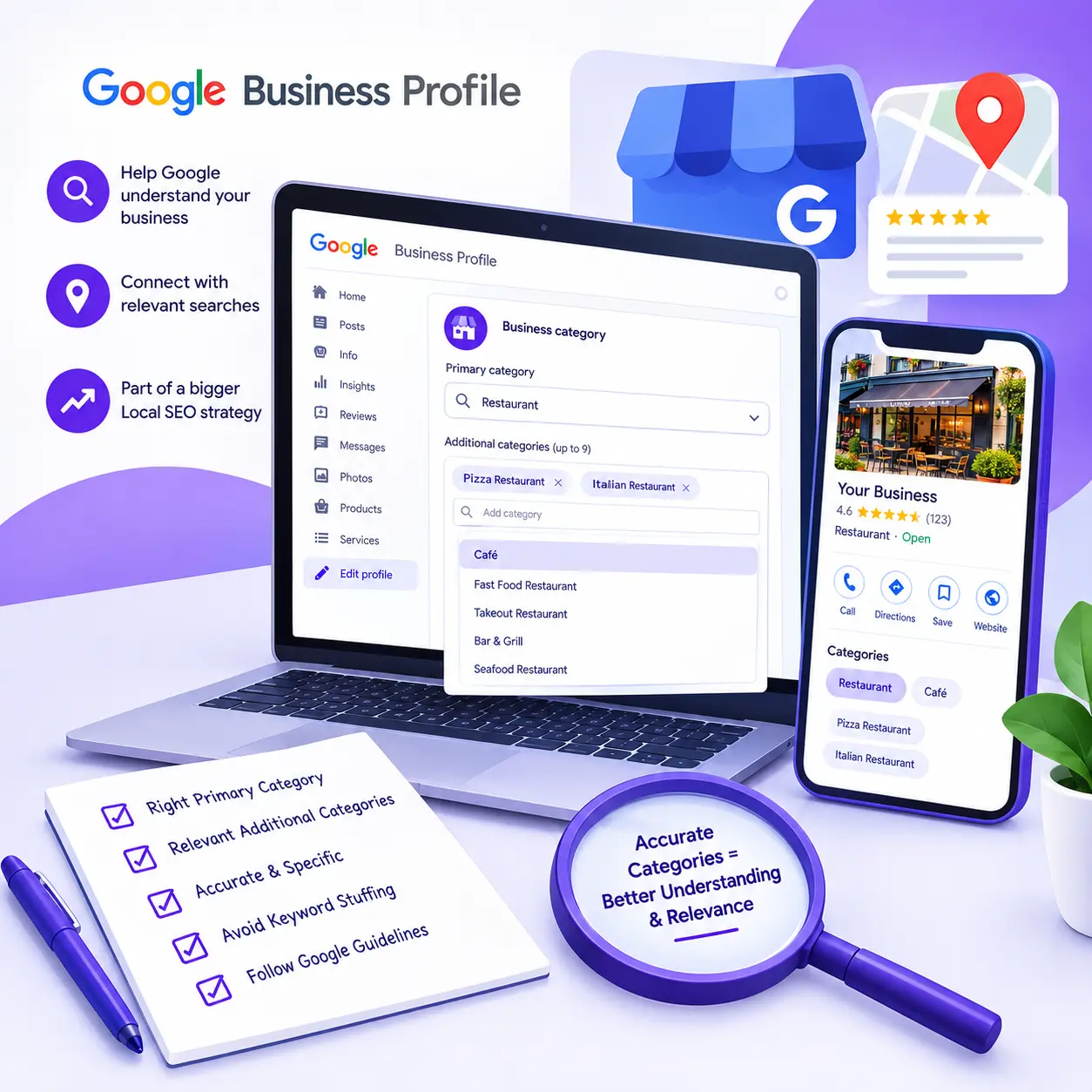
Choosing the right Google Business Profile categories starts with identifying what your business actually is, selecting the most specific accurate primary category, and adding only the additional categories that genuinely represent your business. The right choices help Google understand your business and match it with relevant searches, but categories alone cannot guarantee higher Google Maps rankings.
Whether you manage a single-location business, a service-area business, a retail store, or multiple business locations, category selection deserves careful consideration. Choosing categories simply because competitors use them or because they appear relevant to popular keywords can lead to an inaccurate business profile.
In this guide, you will learn how to choose your primary category, decide which additional categories are appropriate, handle situations where your exact category is unavailable, and evaluate your choices as part of a broader Local SEO strategy.
What Are Google Business Profile Categories, and Why Do They Matter?
Google Business Profile categories describe the type of business you operate. They help Google understand your business and connect your profile with people searching for relevant products or services.
For example, a pizza restaurant may be relevant to searches for pizza, restaurants, or Italian restaurants, depending on its selected category and other information available to Google.
According to Google’s official category guidance, the categories you select affect local ranking. However, categories are only one part of the overall picture. Google identifies relevance, distance, and prominence as the main factors influencing local search results.
Your category selection should therefore accurately represent your business rather than attempt to manipulate rankings.
Primary Category vs. Additional Categories
Your Google Business Profile has one primary category and can have up to nine additional categories.
The primary category represents the main type of business you operate. It is the first category to consider when deciding how Google should understand your business.
Additional categories describe other relevant business types that form a genuine part of the same business.
For example, a grocery store that operates its own bakery and deli may select “Grocery store” as its primary category, with “Bakery” and “Deli” as additional categories if those options accurately represent its operations. Google uses this type of scenario in its own category guidance.
You do not need to fill every available category slot. One accurate primary category may be sufficient for some businesses, while others may have legitimate reasons to use additional categories.
Google Business Profile Categories vs. Services and Keywords
Categories, services, and keywords have different purposes. Understanding the distinction helps prevent unnecessary or inaccurate category selections.
Profile element | Purpose | Example |
Business category | Describes what the business is | Grocery store |
Services or offerings | Explains what the business provides | Delivery, catering, or other actual services |
Search keywords | Describe how people search for a business or offering | Grocery delivery, fresh produce, or food store |
A business should not create a new category for every service it offers.
Instead, choose categories that accurately describe the business itself. Use the Services section, where available, to provide more detail about individual offerings.
Google’s business representation guidelines explain this principle through a simple distinction: describe what your business is, rather than everything it has.
This distinction is the foundation of good category selection.
How to Choose the Right Google Business Profile Categories Step by Step
The following process helps you make an informed decision before editing your profile.
Step 1: Define What Your Business Actually Is
Before comparing category options, write a simple description of your business.
Ask yourself:
- What is the main type of business I operate?
- What do customers primarily come to my business for?
- Which services define the core offering?
- Does the business operate multiple genuine business types?
- Am I describing the business itself or merely listing its products, services, and amenities?
Consider a plumbing company that also installs heating systems. Its primary category should reflect the most accurate available description of the actual business, while an additional category may be appropriate if another supported category genuinely describes a distinct aspect of its operations.
Now consider a grocery store that has an ATM on its premises. The presence of the ATM does not automatically make the grocery store an ATM business.
The distinction matters because Google wants categories to describe the business holistically, not every feature customers might find inside it.
Practical tip: Complete this sentence before choosing a category: “This business is a…”
If your answer describes a product, a single task, or a feature rather than the business itself, reconsider whether it belongs in the category field.
Step 2: Find the Closest Accurate Category in Google’s Category Picker
After defining your business, look for a category that accurately represents it.
To add or edit your categories:
- Open the Google Business Profile you manage.
- Select Edit profile.
- Find the Business category section.
- Enter a term describing your business in the category field.
- Review the supported suggestions.
- Select the closest accurate category.
- Add any genuinely appropriate additional categories, then save your changes.
The exact interface may vary, so follow the current controls displayed in your profile.
Google does not allow businesses to create their own category labels. If your preferred category is unavailable, select a more general category that accurately describes the business. Google also provides a feedback option for requesting new categories.
Do not rely exclusively on an old online category list. The options available in your own Business Profile editor are the practical starting point for making your selection.
You can review the current instructions in Google’s Manage your business category documentation.
Step 3: Compare Relevant Search Intent and Comparable Businesses
Competitor research can provide useful context, but it should support your decision rather than determine it.
Review a small group of genuinely comparable businesses appearing for searches relevant to your core offering.
Consider the following questions:
- Do these businesses provide the same main type of service or product?
- Are their business models genuinely comparable to yours?
- Do the search results suggest that Google understands the query as a particular business type?
- Is there a more specific supported category that describes your own business?
- Are differences between competitors explained by their actual operations rather than simply their category choices?
For example, a business that mainly repairs appliances should not automatically copy the category selection of a retailer that sells appliances and also provides repairs. Their main business identities may be different even though their services overlap.
Also, you may not be able to confirm every additional category through the public profile interface. Do not assume that a category used by a competitor is known or that it caused the competitor to rank prominently.
Competitor research should help you understand the market and customer intent. Your final selection must remain accurate for your own business.
Step 4: Choose One Specific and Accurate Primary Category
Google recommends choosing the most specific available category that accurately represents your main business.
Use these criteria when comparing your options:
Decision factor | What to check |
Business identity | Does the category describe what your business actually is? |
Specificity | Is a more specific, accurate option available? |
Core offering | Does it represent the main business rather than an incidental activity? |
Customer relevance | Does it align with the types of customers and searches relevant to the business? |
Accuracy | Would the category create a truthful impression of what the business does? |
Suppose a business specializes in a specific type of repair and Google offers an accurate category for that specialty. The specialist category may be a better fit than a broad repair category.
However, specificity should never come at the expense of accuracy. A business should not choose a narrow category for a service it does not genuinely provide.
The best primary category is not necessarily the one that sounds most attractive or appears most frequently in competitor profiles. It is the closest accurate representation of the business within Google’s available options.
Step 5: Add Only the Additional Categories That Truly Fit
Additional categories help describe other genuine business types, but they should not become a collection of service keywords.
Use this process:
- Start with the primary category.
- Identify other meaningful business activities that are not adequately represented by it.
- Check whether Google provides a category that accurately describes each activity.
- Remove unrelated, redundant, or weakly relevant choices.
- Keep only the additional categories that you can justify based on the real business.
Google allows up to nine additional categories, but it recommends using as few categories as necessary to describe the core business.
It also notes that selecting a specific category can implicitly cover broader categories, making some additional selections redundant.
For example, a business should not automatically add a general category if its existing, more specific category already adequately describes that business type.
The number of categories is less important than whether the selection accurately represents the business.
Step 6: Check Your Categories Against the Whole Business Profile
Your selected categories should make sense alongside the rest of the information about your business.
Review whether the categories align with:
- Your actual business operations.
- The services or products you genuinely provide.
- The information presented on your website.
- Other relevant Business Profile details.
- The intent behind the searches you want to serve.
Google can use information from different sources, including your website and information available elsewhere on the web, to understand a business.
That does not mean a specific sentence on your website will automatically determine your category. Rather, your online information should present an accurate and coherent picture of the business.
If you select a category that conflicts with your real operations or the way your business is represented, revisit the decision.
Final rule: Do not select a category simply because you hope it will attract more searches. Select it because it accurately describes your business.
How to Choose Categories for Different Business Situations
Not every business fits the same category-selection pattern. Consider the following situations before finalizing your profile.
A Business That Offers Several Services
A business can provide numerous services without needing a separate category for every one of them.
Imagine a home-services business that handles plumbing, heating-system maintenance, and related repairs.
The correct primary category depends on the business’s actual identity and main focus. An additional category may be appropriate if another supported category genuinely represents a distinct business type.
Individual services can be described elsewhere in the profile where suitable.
The important distinction is between a business that genuinely operates across different business types and a business that simply offers several related services.
A Store or Business With a Distinct Department
Some businesses operate multiple departments under one overall business.
Google’s grocery-store example illustrates this: a grocery store with a bakery and deli may use the grocery category as its primary category and add bakery and deli categories where appropriate.
However, a separate department may need its own Business Profile if it qualifies under Google’s rules for departments that are independently owned and operated and publicly face customers.
Do not add another business’s categories to the parent profile merely because the business operates inside the same premises.
Check Google’s guidelines for representing businesses, departments, and chains before making decisions about separate profiles.
Multi-Location Businesses and Chains
Businesses with several locations should consider consistency as well as accuracy.
Google’s guidance states that locations of the same business providing the same service should share the appropriate category. Different types of locations, sub-brands, departments, or operations may require separate treatment under its rules.
Before applying category changes across multiple profiles:
- Identify which locations provide the same core service.
- Establish the most accurate category for that business type.
- Check whether genuine operational differences justify a different selection.
- Follow Google’s guidance for chains, departments, and distinct business operations.
Do not assign different categories to equivalent locations solely to target additional search terms.
Practitioner, Agency, and Other Complex Business Structures
Some professional arrangements are more complicated than choosing a primary category for a single business.
For example, an individual practitioner and the organization they work for may need separate consideration under Google’s profile eligibility rules.
However, separate profiles are not automatically appropriate for every professional or specialization.
Check the actual business arrangement, public-facing identity, eligibility requirements, and applicable representation guidelines before creating or changing profiles.
If the problem concerns eligibility or the structure of the business rather than the category itself, resolve that question first.
When the Exact Category Is Unavailable or the Business Changes
Sometimes the exact category you want does not appear in the available options.
In that situation, choose the closest accurate, more general category. Do not select an unrelated category to approximate a service you provide.
You can also use Google’s feedback process to suggest a missing category.
Similarly, if your business genuinely changes its main focus, review whether the existing primary category remains accurate. Seasonal changes or the introduction of a new service do not automatically require a category change.
Make adjustments when there is a clear business reason, not simply because you want to experiment with different category labels.
Practical Examples of Good and Poor Category Decisions
These examples illustrate how to apply the selection principles. They are hypothetical except for the grocery-store scenario described in Google’s own documentation.
Business situation | Better approach | Mistake to avoid |
Grocery store with its own bakery and deli | Use the grocery category as the primary category and add relevant bakery and deli categories when appropriate | Adding unrelated categories for every product sold |
Plumbing and heating business | Select the most accurate category for the core business and add another only if it genuinely fits | Adding a category for every individual service keyword |
Specialist business with no exact category available | Choose a suitable, more general supported category | Inventing a category or choosing an unrelated label |
Chain with equivalent locations | Maintain consistent categories across locations providing the same service | Using different categories at similar locations merely to broaden keyword coverage |
The key lesson is that category selection requires judgment, not just a list of available options.
A category that suits one business may not suit another business offering similar products or services. The correct decision depends on the actual business type, the available options, and the relevant Google guidelines.
Common Google Business Profile Category Selection Mistakes
Even when the available category options appear straightforward, several mistakes can undermine the accuracy of a Business Profile.
1. Choosing a Broad Category When a More Specific One Fits
A broad category may be acceptable when no appropriate specific option exists. However, if Google offers a more specific category that accurately describes the business, evaluate that option before settling on the broader label.
Specificity is useful only when the category remains truthful.
2. Adding Every Available Category
The maximum category limit is not a target.
Adding categories that only loosely relate to the business can make the profile less accurate and may violate Google’s guidance to use the fewest categories needed to describe the core business.
Keep categories that reflect genuine business types and remove those that are redundant or irrelevant.
3. Treating Categories as Extra Keyword Fields
Categories are not intended to hold every keyword associated with your services.
Do not add categories simply because a keyword has commercial intent, appears frequently in search suggestions, or is used by competitors.
Use appropriate profile fields and relevant website content to explain individual services instead.
4. Copying Competitors Without Checking Business Fit
Competitors may operate differently, target different customer needs, or qualify for different categories.
Their visibility does not prove that every category they use is appropriate for your business or that their primary category alone explains their rankings.
Use competitor research as supporting evidence, not as a substitute for Google’s guidelines and your own business information.
5. Expecting Category Changes to Solve Every Ranking Problem
A correct category can help Google understand a business, but it cannot compensate for every problem affecting local visibility.
Other factors may include the searcher’s location, business prominence, competition, incomplete profile information, or a website that does not adequately support relevant customer needs.
When visibility remains weak, investigate the wider situation rather than repeatedly changing category settings.
6. Changing Categories Without a Clear Reason
Repeatedly changing categories without a clear business rationale makes it harder to understand what is happening.
A category change may also trigger a request for business reverification.
Before editing an established profile, confirm the intended category and make sure you can complete any verification steps that Google requires.
Correct inaccurate information when necessary, but avoid making changes solely to test ranking theories.
Do Google Business Profile Categories Affect Local SEO Rankings?
Yes. Google explicitly states that Business Profile categories affect local ranking because they help describe a business and connect it with relevant searches.
However, the right category does not guarantee higher rankings or a particular position in Google Maps or the local pack.
How Categories Relate to Relevance
Relevance describes how well a Business Profile matches what someone is searching for.
An accurate category helps communicate the type of business represented by the profile. This gives Google useful information when determining whether the business may match a relevant query.
Category accuracy is therefore an important part of profile optimization, but it is not a standalone ranking strategy.
Why Categories Are Not the Whole Ranking Strategy
Google identifies three main factors in local ranking:
- Relevance: How well a profile matches a search.
- Distance: How far the business is from the searcher or relevant location.
- Prominence: How well-known the business is, based on information Google has about it.
A business may have the correct primary category and still struggle to appear prominently because of competition, location, prominence, or other issues.
You cannot control every factor affecting local search results, and Google’s exact ranking systems are not fully disclosed.
The sensible approach is to make your profile as accurate and useful as possible while working on the other relevant aspects of your local presence.
For a broader explanation of improving visibility in Maps and local results, see my Google Maps SEO service.
What If the Category Is Correct but Visibility Is Still Weak?
If your categories accurately describe the business but local visibility remains disappointing, avoid changing them without a clear reason.
Instead, examine the broader picture:
- Is the profile complete and accurate?
- Does the website clearly explain the business and its services?
- Is the website relevant to the searches the business wants to attract?
- Are competitors better established or more prominent?
- Are there other profile, website, or local-search issues that need attention?
These questions help separate category-selection problems from wider Local SEO challenges.
A broader Local SEO audit may be appropriate when you need to investigate several potential causes rather than focus on one profile field.
How to Review and Evaluate Your Category Choice
Choosing the right category is the first step. You should also ensure that the change is saved correctly and evaluate your broader local-search performance responsibly.
Save the Change and Check the Live Profile
After changing categories, confirm that the edit has been saved and review the live profile when the updated information becomes available.
Follow any review or reverification prompts shown by Google. If Google requests further verification, complete the process using its instructions.
Do not assume that a category change will produce an immediate ranking improvement.
Establish a Baseline Before Evaluating Performance
Before changing a category, record the existing profile configuration and relevant performance information where available.
Depending on your business and the reports available, useful indicators may include profile interactions, calls, website clicks, direction requests, and other meaningful outcomes.
If you monitor local rankings separately, be consistent about the searches, locations, devices, and measurement methods you use.
This makes it easier to identify changes in visibility without treating every movement as evidence that the category was responsible.
Decide Whether Further Investigation Is Necessary
If performance changes after an edit, consider what else may have happened during the same period.
Competition, demand, website changes, reviews, location, seasonality, and other factors may affect local search results. A change occurring after a category edit does not necessarily mean the edit caused it.
There is no universal waiting period or guaranteed result for every business. Evaluation depends on the available data, the competitive environment, and the specific circumstances.
If the category is already accurate, continue investigating the wider Local SEO picture instead of making repeated experimental changes.
Google Business Profile Category Selection Checklist
Use this checklist before finalizing your profile:
- I have clearly defined what my business actually is.
- I have reviewed the available category options in Google Business Profile.
- I have chosen the most specific accurate primary category.
- I have added additional categories only where they describe genuine business types.
- I have not selected categories solely to target keywords.
- I have checked whether department, practitioner, chain, or multi-location guidelines apply.
- My categories align with the actual business and its other profile information.
- I understand that categories can influence local ranking but cannot guarantee a particular position.
- I have recorded the current setup and will evaluate any changes responsibly.
If your profile meets these criteria, you have a defensible starting point for category selection. Further improvements should be based on the business’s actual needs rather than a desire to add more categories.
Frequently Asked Questions About Google Business Profile Categories
How many Google Business Profile categories should I choose?
Google allows one primary category and up to nine additional categories. This is a maximum, not a target. Select the primary category that best describes your business, then add only additional categories that accurately represent other relevant business types. Some businesses need only one category.
What should I do if my exact business category isn’t available?
Search Google’s current category picker for the closest accurate option. If your preferred category is unavailable, choose a more general category that still describes the business. You cannot create your own category, but Google provides a feedback process for requesting a new one.
Should I add a category for every service my business offers?
No. Categories should describe what the business is, not provide a separate label for every service. Choose the relevant business categories, then use the Services section, where available, to describe individual offerings. Avoid adding categories simply because they match keywords or appear on competitor profiles.
Can changing my Google Business Profile category trigger reverification?
Yes. Google warns that adding or editing a category may result in a request to verify your business again. Before saving a change, ensure that you can access the account managing the profile and follow any verification prompts. Avoid making inaccurate changes simply to test ranking theories.
Will choosing the right Google Business Profile category guarantee higher rankings?
No. Google confirms that categories affect local ranking, but local results also depend on relevance, distance, and prominence. An accurate category helps Google understand your business, but it cannot guarantee a particular position in Google Maps or the local pack.
Conclusion: Choose Categories That Accurately Represent Your Business
Choosing the right Google Business Profile categories requires more than finding popular keywords or copying competitors. The objective is to describe your real business as accurately as possible.
Start with the most specific available primary category that genuinely fits your business. Add only relevant additional categories, keep your profile information consistent with your actual operations, and avoid changing categories without a clear reason.
Most importantly, remember that category selection is one part of Local SEO. Your visibility may also depend on the relevance of your website, business prominence, competition, location, profile accuracy, and other factors.
Need help selecting the right categories or identifying issues affecting your Google Business Profile? Explore my Google Business Profile Optimization service for support with profile optimization and related Local SEO opportunities.
You can also explore my broader Local SEO services if your challenges extend beyond category selection.